How I Built an AI-Powered Automation Workflow That Saves Me 3 Hours Every Day
How I Built an AI-Powered Automation Workflow That Saves Me 3 Hours Every Day
Last year, I was spending an embarrassing amount of time on repetitive tasks — checking emails, summarizing meeting notes, triaging GitHub issues, and drafting routine responses. Not hard work, just tedious. The kind of work that drains energy without producing much value.
Then I started building automation workflows around AI APIs. What began as a weekend experiment turned into a system that now handles a significant chunk of my daily operational overhead. Here’s how I built it, what broke along the way, and what actually works.
The Problem With “Just Use ChatGPT”
The first instinct most developers have is to open a chat interface and paste things in manually. I did this for months. It works fine for one-offs, but it doesn’t scale — you’re still doing the repetitive work, just with a smarter tool.
The shift happens when you stop thinking about AI as a chat partner and start treating it as a programmable component in a pipeline.
Architecture Overview
My automation stack has three layers:
- Triggers — events that start a workflow (incoming email, new GitHub issue, scheduled cron, webhook)
- AI Processing — Claude API calls that understand context and generate structured output
- Actions — what happens with the output (send a message, update a database, create a task)
I use a combination of Python scripts, GitHub Actions, and a Telegram bot (via OpenClaw) as the glue between these layers.
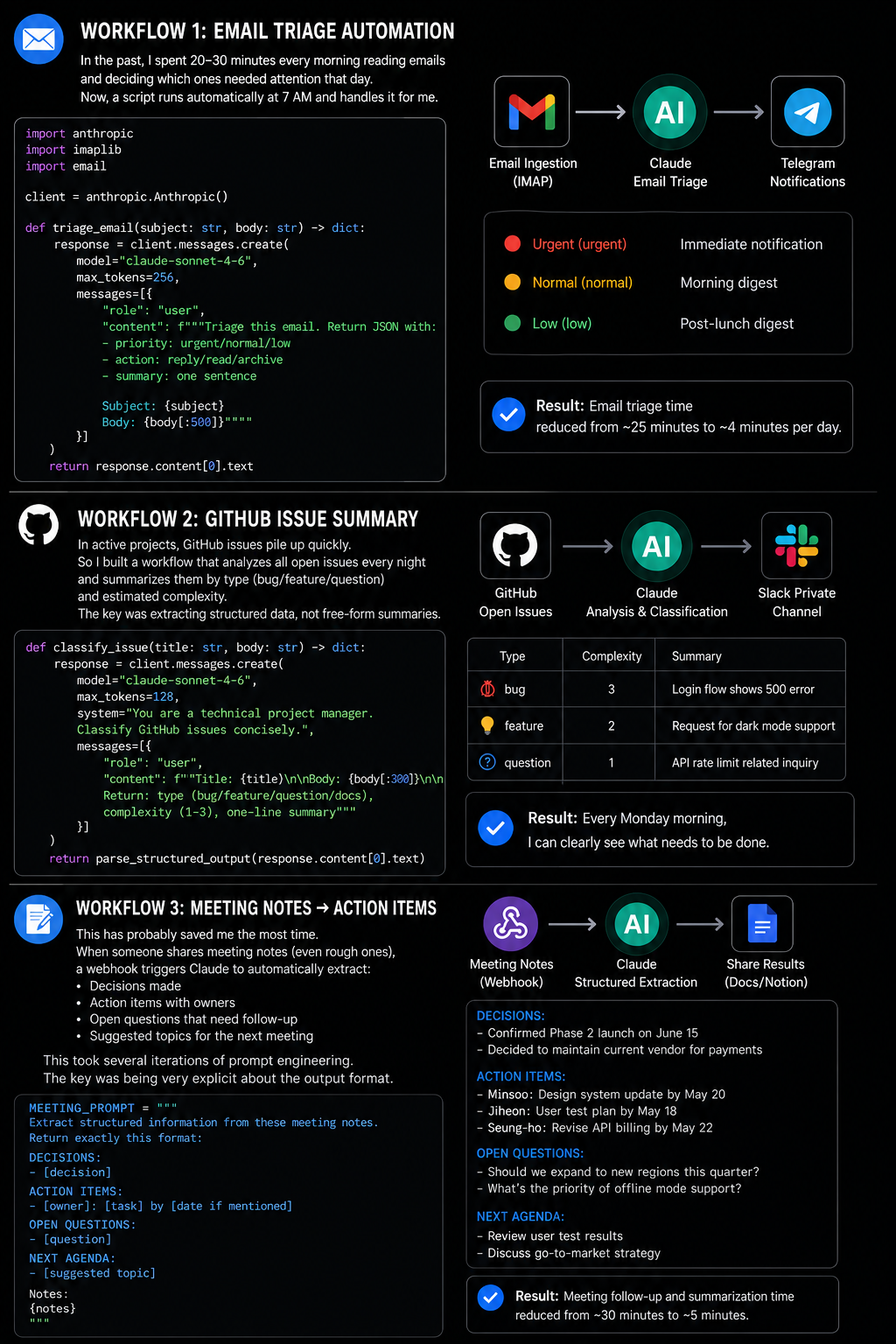
Workflow 1: Automated Email Triage
Every morning I used to spend 20-30 minutes reading emails to figure out which ones needed same-day responses versus which could wait. Now a script runs at 7am and does this for me.
import anthropic
import imaplib
import email

client = anthropic.Anthropic()

def triage_email(subject: str, body: str) -> dict:
    response = client.messages.create(
        model="claude-sonnet-4-6",
        max_tokens=256,
        messages=[{
            "role": "user",
            "content": f"""Triage this email. Return JSON with:
- priority: urgent/normal/low
- action: reply/read/archive
- summary: one sentence

Subject: {subject}
Body: {body[:500]}"""
        }]
    )
    return response.content[0].text
The output feeds into a Telegram notification with color-coded priority. Urgent emails ping me immediately. Everything else lands in a digest I review once in the morning and once after lunch.
Result: Email triage time went from 25 minutes to about 4 minutes of reviewing the digest.
Workflow 2: GitHub Issue Summarization
On active projects, GitHub issues pile up fast. I built a workflow that runs every night and produces a structured summary of all open issues, grouped by type (bug, feature request, question) and estimated complexity.
The key insight was using Claude to extract structured data rather than free-form summaries:
def classify_issue(title: str, body: str) -> dict:
    response = client.messages.create(
        model="claude-sonnet-4-6",
        max_tokens=128,
        system="You are a technical project manager. Classify GitHub issues concisely.",
        messages=[{
            "role": "user",
            "content": f"Title: {title}\n\nBody: {body[:300]}\n\nReturn: type (bug/feature/question/docs), complexity (1-3), one-line summary"
        }]
    )
    return parse_structured_output(response.content[0].text)
This runs as a nightly GitHub Action and posts results to a private Slack channel. Monday mornings now start with a clear picture of what needs attention.
Workflow 3: Meeting Notes → Action Items
This one has probably saved the most time. After any meeting where someone shares notes (even rough ones), a webhook triggers a Claude call that extracts:
- Decisions made
- Action items with owners
- Open questions that need follow-up
- Suggested next meeting agenda
The prompt engineering here took some iteration. The key was being explicit about output format:
MEETING_PROMPT = """
Extract structured information from these meeting notes.
Return exactly this format:

DECISIONS:
- [decision]

ACTION ITEMS:
- [owner]: [task] by [date if mentioned]

OPEN QUESTIONS:
- [question]

NEXT AGENDA:
- [suggested topic]

Notes:
{notes}
"""
Structured output matters because the results get parsed and pushed into Notion automatically.
What Broke (And How I Fixed It)
Rate limits hit me hard early on. When I was batch-processing a backlog of 200 emails, I slammed into API rate limits. Fix: add exponential backoff with jitter, and use Claude’s batch API for non-urgent bulk processing.
Prompt drift across updates. As Claude models updated, some prompts that worked well started producing slightly different formats, breaking my parsers. Fix: explicit format specifications in every prompt, and a weekly sanity check that runs prompts against known test inputs.
Cost crept up unexpectedly. Processing full email bodies was expensive. Fix: truncate inputs aggressively (most triage decisions can be made from subject + first 200 words), and use smaller models for classification tasks.
Results After Six Months
- Email triage: 25 min → 4 min/day
- Issue review: 40 min → 8 min/week
- Meeting follow-up: 30 min → 5 min/meeting
- Total saved: ~3 hours/week
The development time was maybe 20 hours spread across a month of weekends. The ROI crossed break-even around week six.
What’s Next
I’m currently building a workflow that monitors my project dependencies for security advisories and drafts PR descriptions for routine dependency updates. The goal is to get routine maintenance work down to a weekly 15-minute review.
If you’re a developer who’s been treating AI as a chat tool, I’d encourage you to try thinking about it as an API component. The jump from “paste things in manually” to “trigger → process → act” is smaller than it looks, and the leverage is substantial.
The scripts in this post are simplified for clarity. Full implementations are in my GitHub repository.
Related Guides on Private Labs
- Automate Your Daily Workflow with Python Scripts
- How I Automated My Content Workflow with AI Agents
- The System Prompt That Turns Claude into a Senior Code Reviewer
More in Automation.