What I Got Wrong Pricing My First Digital Product
What I Got Wrong Pricing My First Digital Product
My first digital product launched at $19. I picked that number in about four minutes, based on absolutely nothing. It felt “accessible.” It felt “fair.” It felt like the kind of price that wouldn’t scare anyone off.
It scared off zero people. It also generated $47 in revenue the first week, which is not enough to feel like a business and not little enough to quit on. I spent the next two months wondering why sales felt so stuck, then raised the price to $39 on a Tuesday afternoon without announcing it.
Revenue nearly tripled the following month.
This is the post I wish I’d read before I launched.
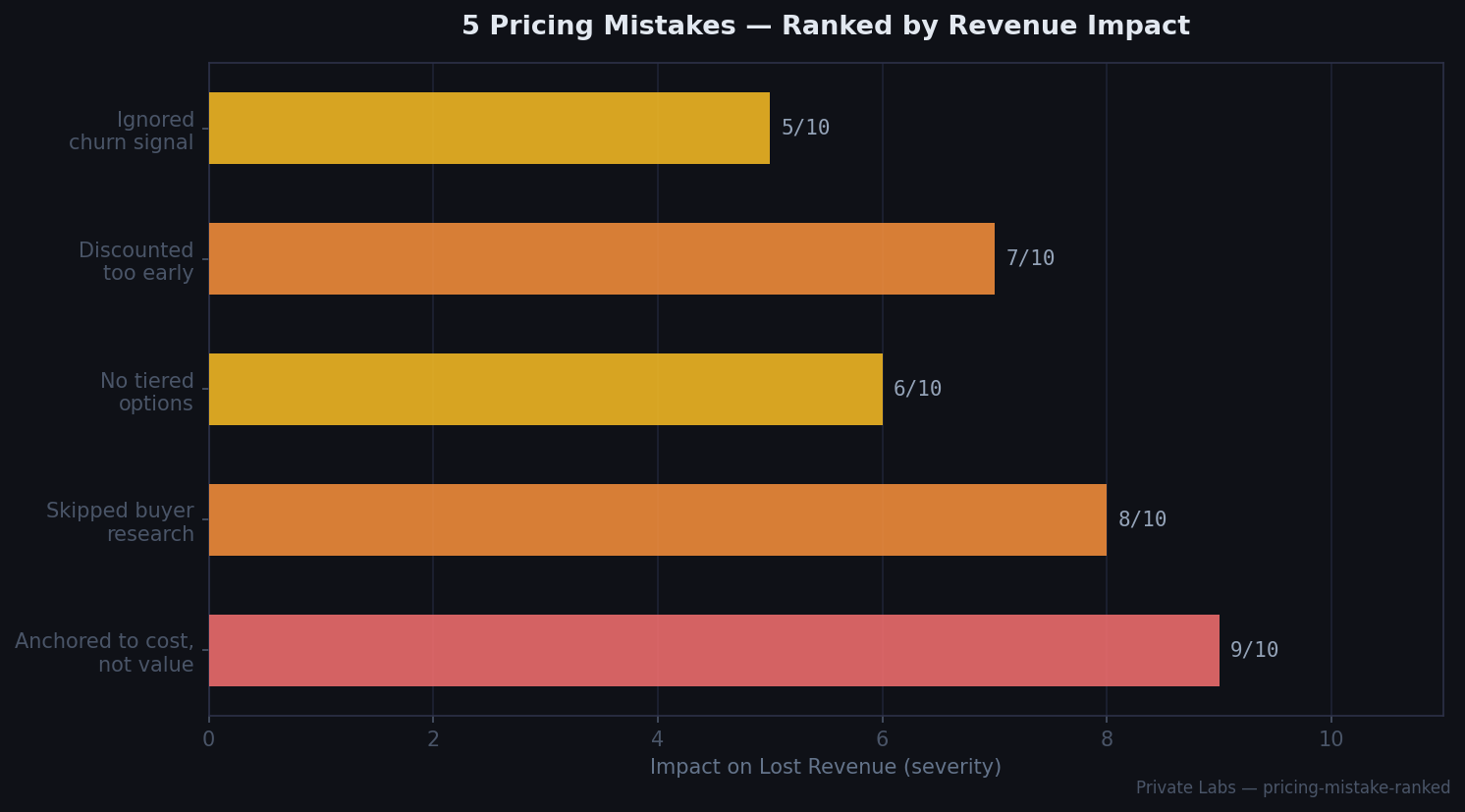
Mistake 1: I Anchored to Cost, Not Value
When I set $19, my internal logic was something like: “I spent about 40 hours building this. If I sell 50 copies, that’s $950, which is around $24/hour.” That’s cost-based pricing. It’s the wrong framework for digital products.
Cost-based pricing makes sense when your cost scales with output — when making 1,000 units costs 10x more than making 100. Digital products don’t work that way. Once the product exists, the marginal cost of the next sale is essentially zero. Your pricing ceiling isn’t set by your cost; it’s set by the value the buyer receives.
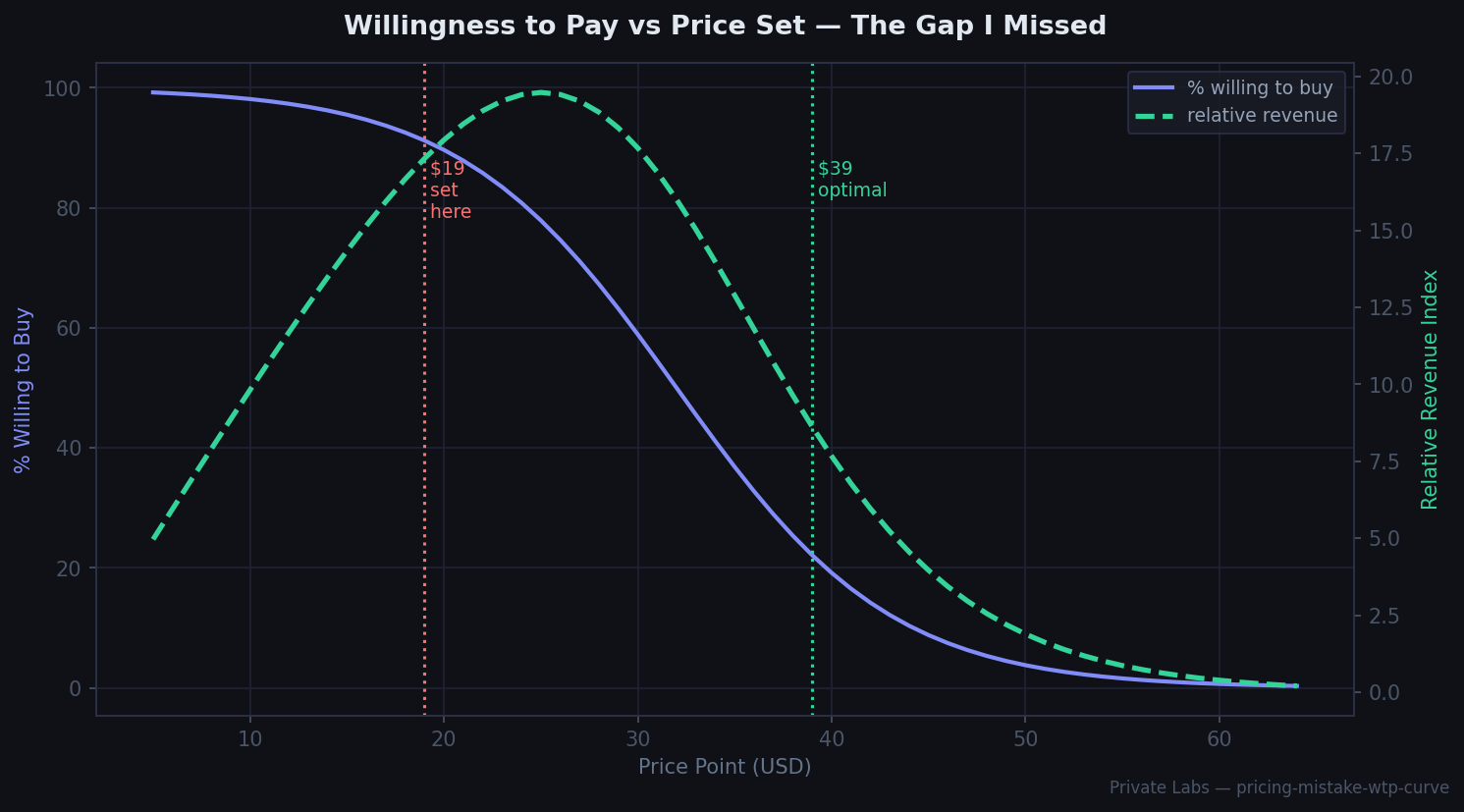
The question I should have asked: what is this worth to the person buying it, in terms of time saved, problem solved, or money earned? My product was a set of templates and scripts that saved a developer roughly 3–5 hours of setup work. At $50/hour, that’s $150–$250 in saved time. Charging $19 for $200 of value isn’t “accessible” — it’s just leaving money on the table and, perversely, making the product look low-quality.
Mistake 2: I Skipped Buyer Research
I had no idea what my buyers would actually pay. I made up $19 based on vibes and comparison-shopped other products in a vague, non-systematic way. I looked at a few Gumroad listings in adjacent categories, saw prices ranging from $9 to $49, and picked something in the lower third because I was nervous.
The right approach, which I learned after the fact: talk to 10 potential buyers before you set a price. Not “would you buy this at $X?” — that question is useless because people systematically understate willingness to pay when asked directly. Instead: “What have you paid for tools that solved similar problems?” and “What would make this feel expensive to you?”
The Van Westendorp Price Sensitivity Meter is the more formal version: ask people the price at which the product feels cheap (signals low quality), too cheap (they’d be suspicious), expensive (but still worth it), and too expensive (they’d walk away). Plot the four curves. The acceptable price range sits between where “too cheap” crosses “expensive” and where “cheap” crosses “too expensive.”
I ran this exercise retroactively with 12 people. The sweet spot was $35–$45. I’d priced $16 below the floor of the acceptable range.
Mistake 3: No Tiered Options
I launched with one price: $19. One product, one tier, take it or leave it.
This left two groups of buyers underserved. The first group was happy to pay more for additional access — extended templates, a private community, a one-time consulting call. By not offering a higher tier, I got $19 from buyers who would have paid $79 for a bundle. The second group was price-sensitive but interested — students, early-career developers — who might have bought a stripped-down version at $9.
A three-tier structure would have looked something like:
| Tier | Price | Contents |
|---|---|---|
| Starter | $9 | Core templates only |
| Full | $39 | Templates + scripts + updates |
| Pro | $89 | Everything + 1hr async Q&A |
The “Full” tier anchors the value. “Starter” captures price-sensitive buyers who wouldn’t have bought at $39. “Pro” captures high-intent buyers willing to pay for access. This isn’t manipulation — it’s matching the product to different buyer needs.
I added tiers in month four. The $89 Pro tier alone accounted for 28% of that month’s revenue despite representing only 11% of units sold.
Mistake 4: I Discounted Too Early
About three weeks after launch, sales slowed down. My response was to run a 30% discount. Sales picked up slightly, then slowed down again.
What I had just done: trained my early buyers to wait for sales, signaled that I didn’t believe my own price was correct, and permanently damaged my ability to sell at full price to people who’d seen the discount.
Discounts work in specific contexts: clearing inventory (not applicable to digital products), time-boxed launches (where the discount has a hard end date and a clear reason), and bundles with other creators. Random discounts when sales slow down do none of these things. They just erode price integrity.
The right move when sales slow: investigate why. Are people visiting and not buying? (Messaging problem, not price problem.) Are they not visiting at all? (Distribution problem.) Are they visiting, adding to cart, and abandoning? (Price might be part of it, but so might checkout friction, missing social proof, unclear guarantee.)
I had a messaging problem. My product page described what the templates contained, not what problem they solved. Fixing the copy lifted conversions without touching the price.
Mistake 5: I Ignored the Churn Signal
After month two, I noticed something: I had a small number of buyers asking for refunds. Not many — maybe 8% — but higher than I expected. I interpreted this as “some people just weren’t the right fit” and moved on.
Refund rate is a pricing signal. If people buy and then want their money back, one of three things is usually true: the product didn’t deliver what the sales page promised (expectation mismatch), the product was lower quality than the price suggested (overpriced for quality), or they bought impulsively and price-regretted it (often happens with products that are priced oddly — either too cheap to feel substantial or too expensive relative to perceived value).
My refund cluster was mostly in the first week. Buyers were reading “templates and scripts for faster project setup” and expecting something more comprehensive than what they got. The fix was expectation management on the sales page, not a price change — but I only figured that out when I started actually reading the refund request messages.
The rule I’ve since applied: treat every refund as a user interview. What did they expect that they didn’t get? What would have made them keep it? Two follow-up questions to refund requests taught me more about my product’s positioning gaps than six months of analytics.
What the Revenue Actually Looked Like
Here’s the month-by-month breakdown across the first six months, with the pricing changes marked:
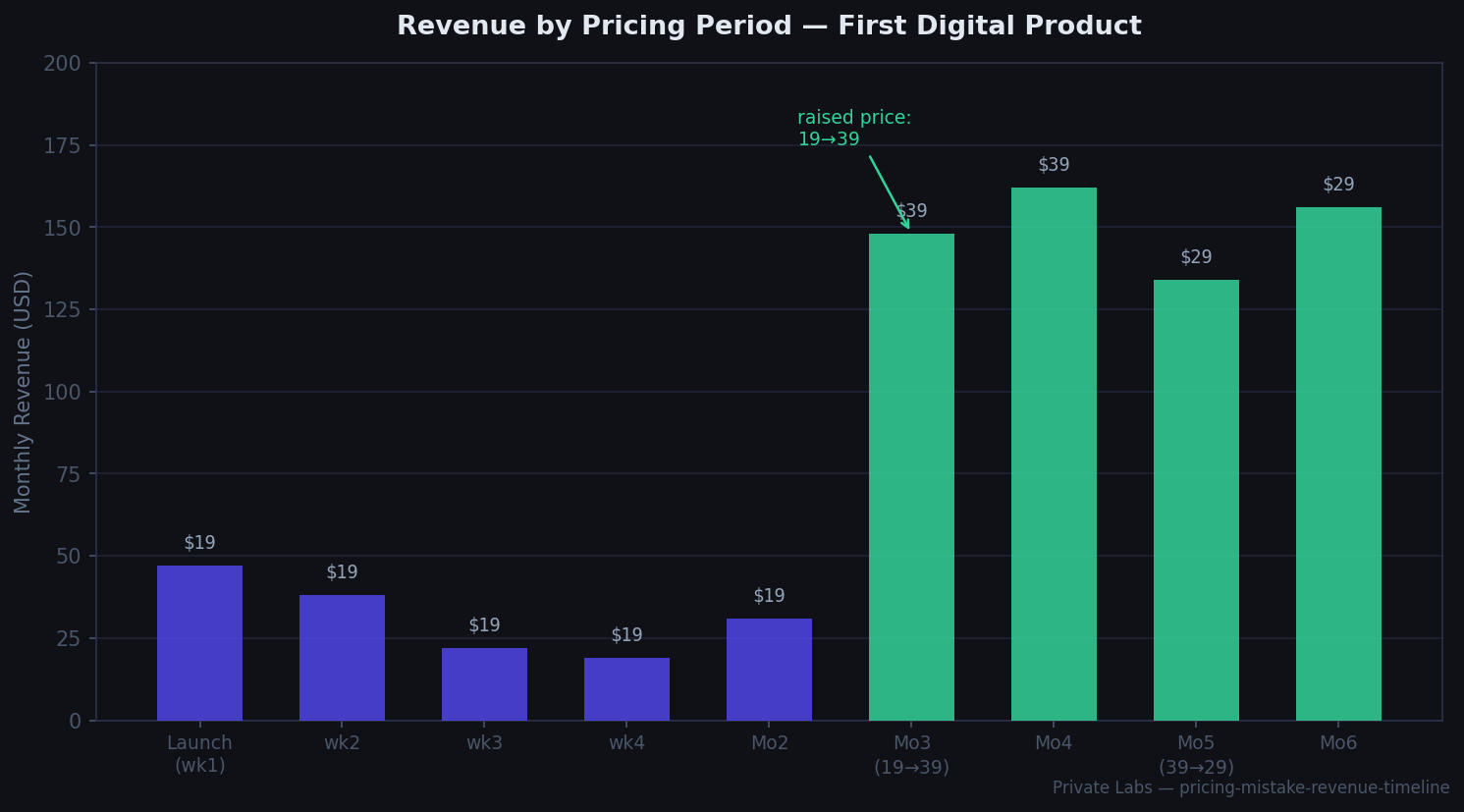
The pattern is clear in hindsight and invisible when you’re in it. The $19 period produced declining revenue as the initial launch burst faded. The jump to $39 produced a step-change up — not because I suddenly had more buyers, but because each buyer was paying more, and the higher price actually improved conversion slightly by signaling more credibility. The $29 “test” in month five was a mistake in retrospect; I got nervous when month four was strong and wanted to “make it more accessible again.” Revenue dropped. I went back to $39.
The Framework I’d Use Now
If I were launching again, in order:
1. Define the value delivered, not the features included. What does the buyer have after using this that they didn’t have before? Quantify it if possible — time saved, money earned, problem eliminated.
2. Research willingness to pay before setting price. Five to ten conversations with potential buyers. Ask what they’ve paid for similar things, not what they’d pay for this.
3. Set price at the high end of the acceptable range. You can always run a launch discount to your own audience. You cannot easily raise prices on existing buyers. Start high, earn trust, then selectively discount for defined reasons.
4. Build in tiers from day one. At minimum: a core tier and a higher tier with access or extras. It takes 20 minutes to set up in Gumroad and captures significantly more revenue per buyer.
5. Read every refund request. They’re the most honest feedback you’ll get.
The $19 launch wasn’t a disaster — it validated demand, generated early reviews, and gave me something to iterate on. But I left a significant amount of revenue on the table for two months because I was afraid to charge what the product was actually worth. That’s the mistake I see most often in first digital products, and it’s also the easiest one to fix.
Built a product and now trying to get traffic without an existing audience? The Gumroad post in this section covers distribution — which turned out to be the second problem I had to solve, once I got the pricing right.