I Built an MCP Server in an Afternoon — Now Claude Talks Directly to My Tools
I Built an MCP Server in an Afternoon — Now Claude Talks Directly to My Tools
I’ve been running a local automation stack for a while — SQLite databases, a handful of REST APIs, some cron jobs — and every time I wanted Claude to interact with any of it, I’d spend half an hour copy-pasting outputs back and forth. Last month I decided to stop tolerating that friction. I built an MCP server in a single afternoon, and now Claude reaches directly into my tools without me acting as the middleman.
This isn’t a survey post. I’m going to show you the actual Python code I wrote, the config that wires it to Claude Desktop and Cursor, and the three automation examples that now save me an embarrassing amount of manual work every week. By the end, you’ll have a working server you can adapt.
What MCP Actually Is (and What It Isn’t)
Think of MCP as USB-C for AI. Before USB-C, every device had its own connector: micro-USB here, Lightning there, proprietary everywhere. The Model Context Protocol does the same consolidation for AI tool integrations.
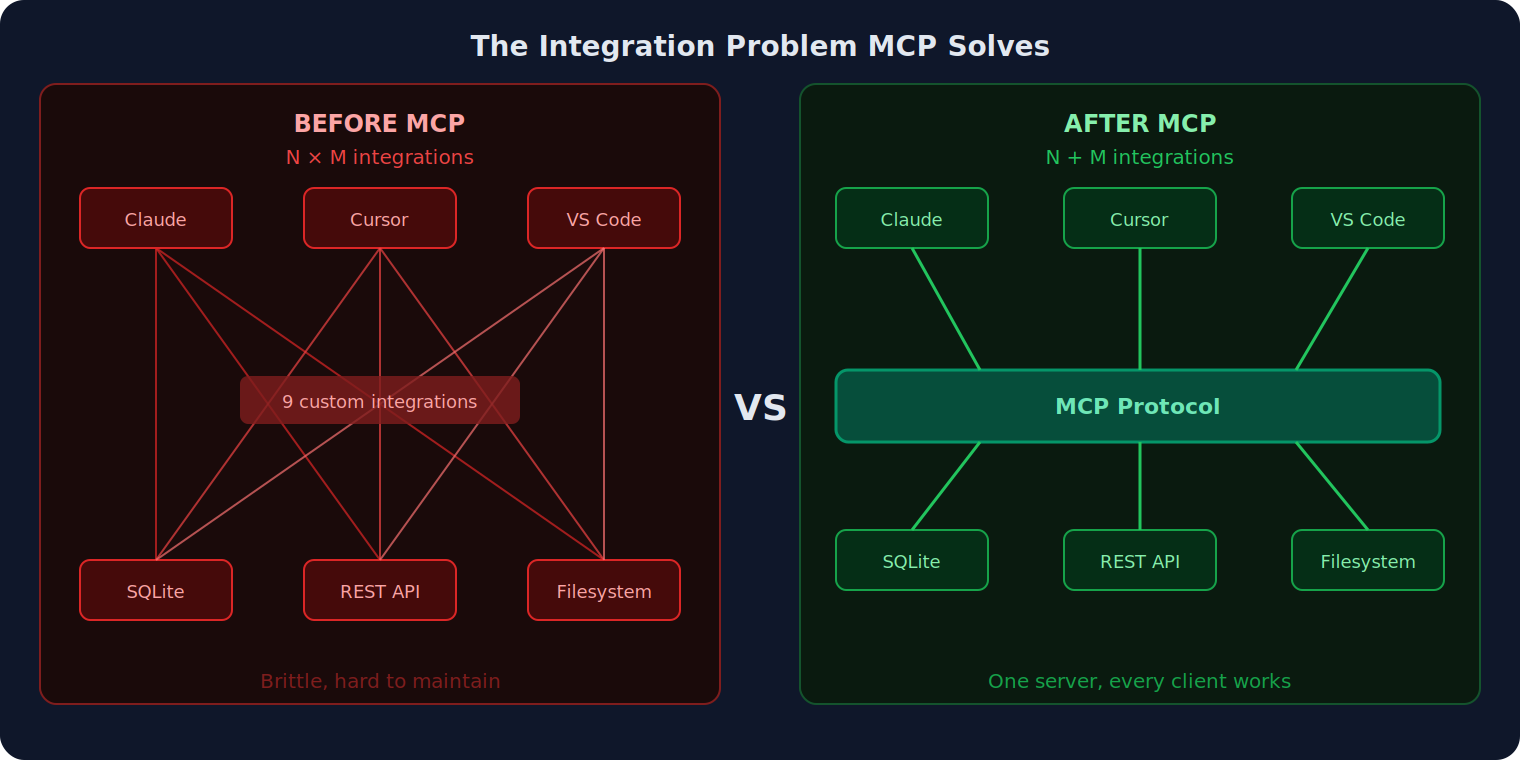
Before MCP existed, connecting an LLM to a tool meant one of two things: either you crammed instructions into a system prompt and hoped the model would call a webhook correctly, or you wrote a custom API wrapper per tool per client. Three tools, three clients? Nine integration paths to maintain.
MCP collapses that N×M problem into N+M. Each tool exposes itself as an MCP server once. Every compatible client — Claude, Cursor, VS Code, ChatGPT, GitHub Copilot — connects to it through the same protocol. You build the server once and it works everywhere.
What MCP is not: it’s not a plugin marketplace, it’s not an agent framework, and it’s not magic that makes any AI smarter. It’s a well-defined communication protocol. The intelligence is still in the model; MCP just gives it a reliable, standardized way to reach outside itself.
The Architecture: Clients, Servers, and Transports
MCP defines three capability types that a server can expose:
- Tools — functions the LLM can call to take action (query a DB, send a request, run a script)
- Resources — read-only data the LLM can pull into context (files, database records, API responses)
- Prompts — reusable prompt templates with arguments, stored server-side
A server can expose any combination of these. Mine exposes mostly Tools and a few Resources.
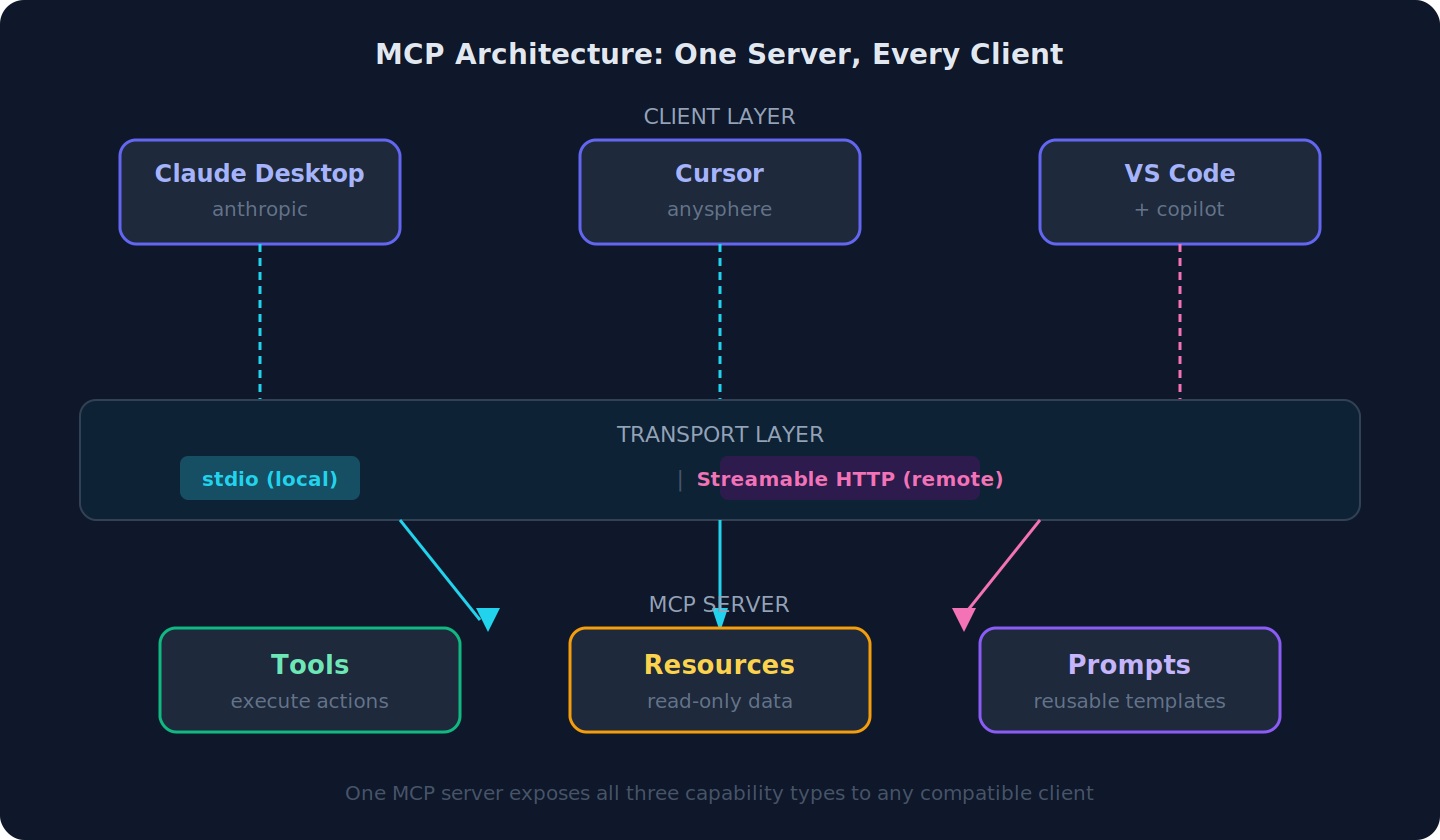
For transport, you have two choices. stdio runs the server as a local subprocess — fastest, zero network overhead, perfect for personal tools. Streamable HTTP exposes the server over the network, enabling team-shared servers and production deployments. The 2025 spec revision added proper OAuth 2.0 resource server support to the Streamable HTTP transport, which makes auth manageable at scale.
I use stdio for everything on my machine. If you’re building something a team will share, Streamable HTTP is the path forward.
Build Your First MCP Server in Python
The official Python SDK makes the boilerplate nearly invisible. Install it:
pip install mcp[cli]
Here’s the server I actually built. Two tools: one for SQLite, one for a REST API.
# my_tools_server.py
from mcp.server.fastmcp import FastMCP
import sqlite3, httpx, json

mcp = FastMCP("my-local-tools")

@mcp.tool()
def query_sqlite(query: str, db_path: str = "data/tasks.db") -> str:
    """Run a read-only SELECT query against a local SQLite database."""
    if not query.strip().upper().startswith("SELECT"):
        return "Error: only SELECT queries are permitted"
    try:
        conn = sqlite3.connect(db_path)
        conn.row_factory = sqlite3.Row
        cursor = conn.execute(query)
        rows = [dict(row) for row in cursor.fetchall()]
        conn.close()
        return json.dumps(rows, indent=2, default=str)
    except Exception as e:
        return f"Query error: {e}"

@mcp.tool()
def fetch_api(url: str, method: str = "GET", payload: dict | None = None) -> str:
    """Call an external REST API endpoint and return the response body."""
    try:
        with httpx.Client(timeout=15) as client:
            if method.upper() == "POST":
                resp = client.post(url, json=payload or {})
            else:
                resp = client.get(url)
        return resp.text
    except Exception as e:
        return f"Request failed: {e}"

if __name__ == "__main__":
    mcp.run()
A few things worth noting about this structure:
The @mcp.tool() decorator is doing a lot of work. It reads the function signature and the docstring to generate the JSON schema the LLM receives. The docstring is what Claude reads to decide whether to call the tool — write it as if you’re explaining the tool to a developer who’s never seen your code.
Type annotations aren’t cosmetic here. The SDK converts them directly into the JSON Schema type fields. Use them, or the schema will be too vague for the model to use reliably.
The error handling matters more than you’d think. When a tool returns an error string, Claude receives it as the tool result and can reason about what went wrong and try a different approach. If you let exceptions propagate uncaught, the entire tool call fails hard.
Connect It to Claude / Cursor / VS Code
Wire the server to Claude Desktop by editing ~/Library/Application Support/Claude/claude_desktop_config.json (macOS) or %APPDATA%\Claude\claude_desktop_config.json (Windows):
{
  "mcpServers": {
    "my-local-tools": {
      "command": "python",
      "args": ["/absolute/path/to/my_tools_server.py"],
      "env": {
        "DB_PATH": "/absolute/path/to/data/tasks.db"
      }
    }
  }
}
For Cursor, the same structure lives in ~/.cursor/mcp.json. VS Code with the GitHub Copilot extension reads from .vscode/mcp.json in your workspace. The JSON keys differ slightly per client but the concept is identical: point to the command that starts the server.
Here’s what that looks like in practice — this is the full lifecycle of a single tool call:
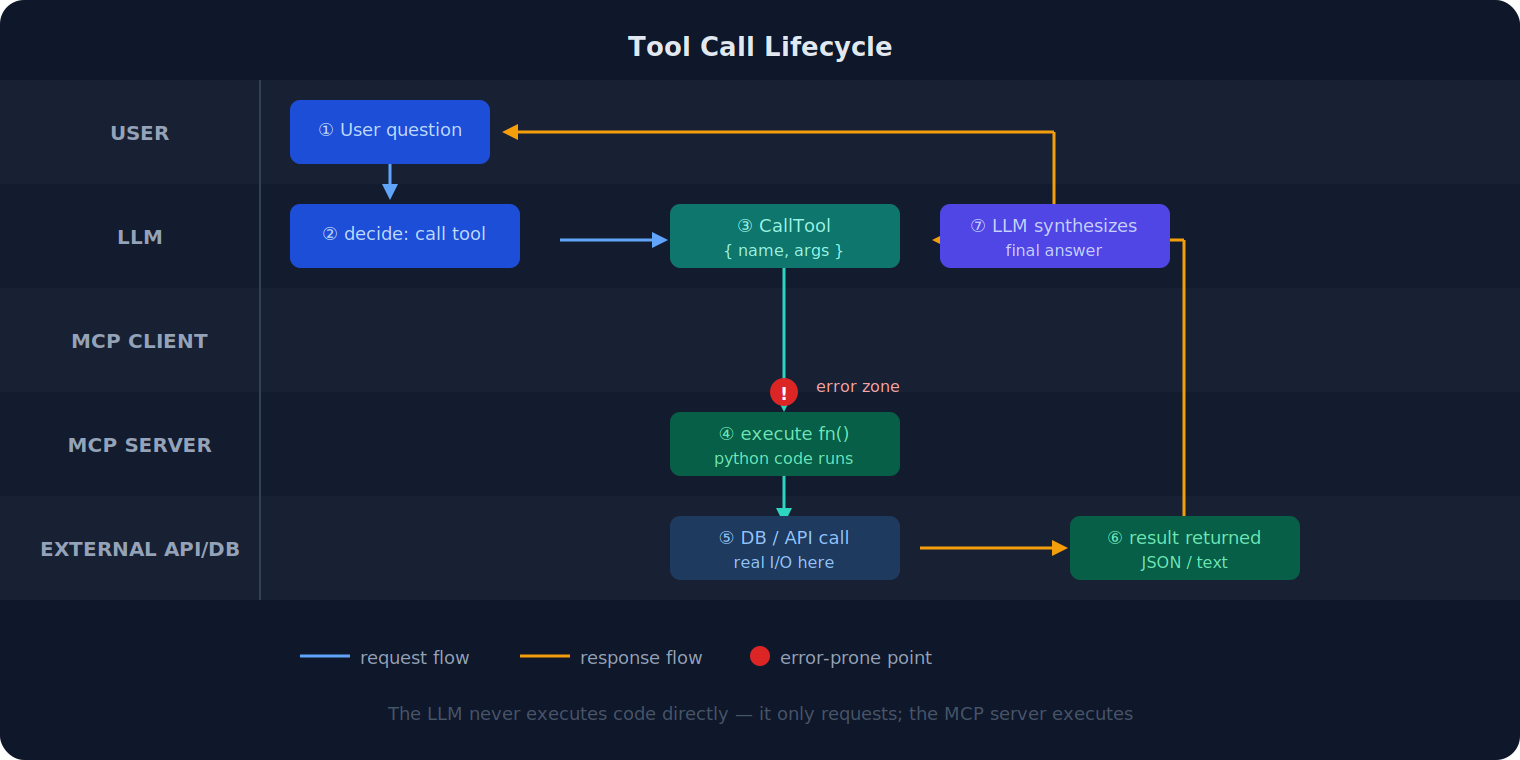
The key insight here is that Claude never executes your code. It makes a structured request — “call query_sqlite with this argument” — and receives back a string. What your Python function does with that request is entirely up to you. The model has no visibility into your implementation, only the result you return.
One practical implication: you control the security boundary. The LLM can only do what your tool functions allow. If query_sqlite rejects non-SELECT statements, the model cannot run a DELETE query no matter how cleverly it phrases the request.
stdio vs Streamable HTTP: Which Transport to Choose
The choice is mostly about who’s using the server and from where.
stdio is the right choice when: – The server runs on the same machine as the client – You’re the only user – Low latency matters (subprocess communication is fast) – You don’t want to manage a running process
Streamable HTTP is the right choice when: – You want to share a server across a team – The server needs to run on a remote machine or in a container – You need multiple clients connecting simultaneously – You’re building something for production use
Streamable HTTP can deliver long-running tool results incrementally to the client rather than buffering the full response before sending.
For auth on HTTP servers, the 2025 MCP spec added an OAuth 2.0 resource server pattern. Your server issues an authorization URL, the client opens it for the user, and subsequent requests carry a bearer token. The SDK has scaffolding for this — it’s not trivial to implement, but the path is clear.
My recommendation for personal automation: start with stdio. You’ll have a working server in minutes. If you later need to share it, the code changes are minimal — only the transport layer changes, your tool functions stay identical.
Three Real Automation Examples
These are the three MCP tools that actually changed how I work day to day.
Example A: Path-Constrained Filesystem Server
The official MCP filesystem reference server is useful but unrestricted by default — Claude can access any path the process has permission to read. I replaced it with a constrained version:
import os
from pathlib import Path

ALLOWED_ROOTS = [
    Path("/Users/me/projects").resolve(),
    Path("/Users/me/notes").resolve(),
]

@mcp.tool()
def read_file(path: str) -> str:
    """Read a file. Only paths under ~/projects and ~/notes are permitted."""
    target = Path(path).resolve()
    if not any(target.is_relative_to(root) for root in ALLOWED_ROOTS):
        return f"Access denied: {path} is outside allowed directories"
    if not target.exists():
        return f"File not found: {path}"
    return target.read_text(encoding="utf-8", errors="replace")
This eliminates the possibility of Claude accidentally reading SSH keys, .env files, or anything else sensitive. The path jail is enforced server-side, not by prompt instruction.
Example B: Cron Job Manager
I manage a dozen cron jobs and I kept forgetting which ones existed. Now I ask Claude:
import subprocess, json

@mcp.tool()
def list_cron_jobs() -> str:
    """List all current user crontab entries with their schedules."""
    result = subprocess.run(["crontab", "-l"], capture_output=True, text=True)
    if result.returncode != 0:
        return "No crontab found or error reading it"
    lines = [l for l in result.stdout.splitlines() if l.strip() and not l.startswith("#")]
    return json.dumps({"jobs": lines, "count": len(lines)}, indent=2)

@mcp.tool()
def describe_cron_schedule(cron_expr: str) -> str:
    """Return a human-readable description of a cron schedule expression."""
    # crondescriptor package: pip install cron-descriptor
    from cron_descriptor import get_description
    try:
        return get_description(cron_expr)
    except Exception as e:
        return f"Could not parse: {e}"
Asking “which of my cron jobs runs most frequently?” now takes three seconds instead of ten minutes of crontab -l archaeology.
Example C: WordPress REST API Query Server
This one feeds directly into managing this blog. The WordPress REST API is well-documented and auth is straightforward with application passwords:
import httpx, os

WP_BASE = os.environ["WP_BASE_URL"]  # e.g. https://private-labs.com/wp-json/wp/v2
WP_AUTH = (os.environ["WP_USER"], os.environ["WP_APP_PASSWORD"])

@mcp.tool()
def get_recent_posts(count: int = 10) -> str:
    """Fetch the most recent published posts from the WordPress blog."""
    with httpx.Client(auth=WP_AUTH, timeout=15) as client:
        resp = client.get(f"{WP_BASE}/posts", params={
            "per_page": min(count, 50),
            "status": "publish",
            "_fields": "id,slug,title,date,categories,link"
        })
    posts = resp.json()
    return json.dumps([{
        "id": p["id"],
        "title": p["title"]["rendered"],
        "slug": p["slug"],
        "date": p["date"],
        "link": p["link"]
    } for p in posts], indent=2)
Now I can ask Claude “do any of my recent posts overlap with this topic?” and it queries the actual blog rather than relying on whatever I remember having published.
Production Gotchas
If you move beyond personal tools into something used at scale, these are the failure modes I’ve run into or read about from teams who have.
Tool schemas consume context window budget. Every tool definition — its name, description, parameter schema — gets injected into the model’s context on each request. If you expose 40 tools, you’re burning a meaningful chunk of the context window before the user says a word. Be selective. If you have a large tool library, consider splitting it into multiple focused servers and configuring clients to connect only to what’s relevant for a given task.
Shell access is a significant security surface. Any tool that calls subprocess.run is a potential shell injection vector if you’re not careful about input. Never pass user-provided strings directly to shell commands. Use argument lists, not shell strings, and validate inputs against a whitelist where possible.
Tool call rate limits will surprise you in production. If the model is autonomously chaining many tool calls — for example, paginating through API results — you’ll hit rate limits on both the LLM side and the external API side faster than expected. Build retry logic with exponential backoff into your tools from the start.
Credentials need real separation. Don’t hardcode secrets. Pass them as environment variables through the MCP config’s env block. For production HTTP servers, use a secrets manager. Application passwords (for things like WordPress) are better than account passwords because they can be scoped and revoked independently.
Sources
- MCP Adoption Statistics 2026 — Digital Applied
- MCP Hits 97M Downloads — Digital Applied
- How MCP will supercharge AI automation in 2026 — Hallam Agency
- MCP’s biggest growing pains for production use — The New Stack
- Everything your team needs to know about MCP in 2026 — WorkOS
- Top 13 Agentic AI Trends to Watch in 2026 — Firecrawl
- AI Workflow Automation Trends in 2026 — Cflow
- MCP 2026 Complete Developer’s Guide — Essa Mamdani
- Best MCP Servers 2026 — Totalum Blog
- Build an MCP Server — Official MCP Docs
- 11 Best AI Browser Agents in 2026 — Firecrawl
- Zapier vs Make vs n8n 2026 — Digital Applied
- n8n vs Zapier 2026 Comparison — StartupOwl
- Claude Code Hooks Guide 2026 — DEV Community
- Stagehand vs Browser Use vs Playwright 2026 — NxCode
Word count: ~2,200 · is_public: false · Category: Tools & Reviews