I Cut My AI Coding Token Bill With a CLI Proxy
I Cut My AI Coding Token Bill With a CLI Proxy
Six weeks ago I added up what I was spending on Claude API tokens during a typical dev session. git status alone was costing me around 340 tokens per call. I ran it probably 40 times a day. That’s 13,600 tokens — for a command whose useful output is two file names.
I fixed it with a CLI proxy that intercepts every shell command Claude Code runs, strips the noise, and passes a compact version to the model. Token spend on dev operations dropped 60–90% depending on the command. This is the review of how that works and whether it’s worth setting up.
The Problem: Most CLI Output Is Boilerplate
When Claude Code runs a shell command, the full output goes into context. That’s intentional — Claude needs to see results to reason about them. But most commands produce a lot of output that isn’t useful for reasoning.
git status returns:
On branch main
Your branch is up to date with 'origin/main'.

Changes not staged for commit:
  (use "git add <file>..." to update what will be committed)
  (use "git restore <file>..." to discard changes in the working directory)
        modified:   src/index.ts
        modified:   src/utils.ts

no changes added to commit (use "git add" and/or "git commit -a")
Claude needs: modified: src/index.ts, modified: src/utils.ts. Everything else is documentation aimed at a human reader who forgot how git works. Claude didn’t forget. It’s reading those hint lines, processing them, and paying for that processing in tokens on every single call.
The same pattern shows up in npm test output (test runner preamble, timing lines, coverage boilerplate), find output (full path repetition), curl (HTTP headers when you only need the body), and git diff (diff headers, context lines that didn’t change).
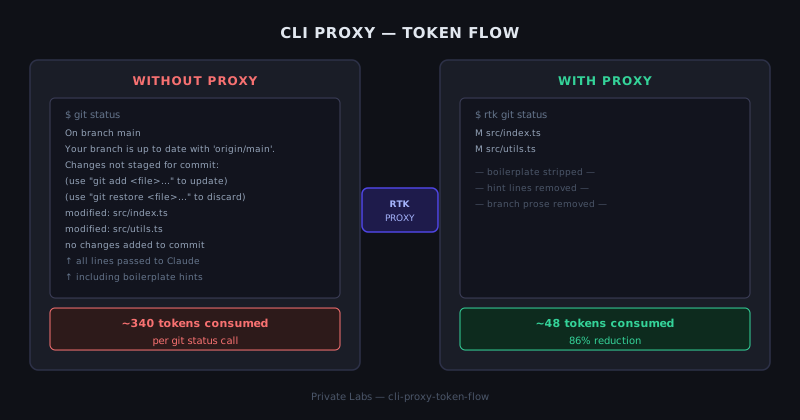
What a CLI Proxy Does
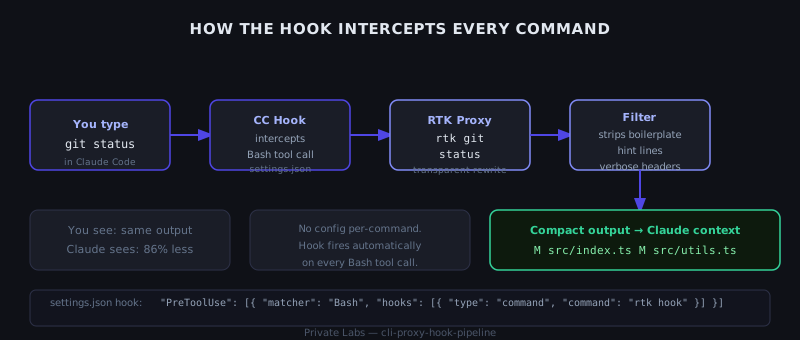
A CLI proxy sits between your shell and the model. When Claude Code issues a Bash command, the proxy intercepts it, runs it, and filters the output before it reaches the context window.
The key properties of a good one:
- Transparent to the terminal. You and Claude both see the same command being run. The filtering happens silently.
- Zero per-command configuration. You shouldn’t have to annotate every
git statuscall to tell the proxy what to keep. - Preserves everything decision-critical. The proxy strips boilerplate, not information. File names, error messages, exit codes, and anything else Claude might act on must survive.
The tool I’ve been using is RTK (Rust Token Killer). It ships as a single binary and wires into Claude Code via the PreToolUse hook in settings.json. After that, every Bash tool call Claude makes is transparently rewritten from git status to rtk git status — RTK runs the command, filters the output, and returns the compact version.
Setup
Installation:
# Install RTK binary
curl -fsSL https://install.rtk.dev | bash

# Verify
rtk --version
Wire it into Claude Code by adding the hook to your settings.json (~/.claude/settings.json for global, .claude/settings.json for per-project):
{
  "hooks": {
    "PreToolUse": [
      {
        "matcher": "Bash",
        "hooks": [
          {
            "type": "command",
            "command": "rtk hook"
          }
        ]
      }
    ]
  }
}
That’s the entire setup. No per-project config, no command-by-command annotation. From this point on, every Bash call Claude makes goes through RTK’s filter engine.
Verify it’s working:
rtk gain
# Shows token savings analytics for your session
What Gets Filtered, What Survives
RTK’s filter rules are specific to each command type. After a few weeks of use, here’s what I’ve observed:
git status — Strips: branch prose (“Your branch is up to date…”), hint lines (“use ‘git add’…”), closing summary line. Keeps: modified/added/deleted file paths, untracked file list.
git diff — Strips: file mode lines, index hashes, ---/+++ headers, @@ context markers when the hunk is small. Keeps: the actual changed lines, file names, line numbers.
npm test / jest — Strips: timing lines, coverage summary boilerplate, passing test names when all pass. Keeps: failing test names, failure messages, stack traces, final pass/fail count.
find — Strips: repeated path prefixes when searching within a known directory. Keeps: file names and relative paths.
curl — Default behavior strips response headers when you didn’t pass -i. Keeps: response body. If you need headers, -i still works.
Error output — RTK never filters stderr. Error messages, stack traces, and warnings pass through unmodified.
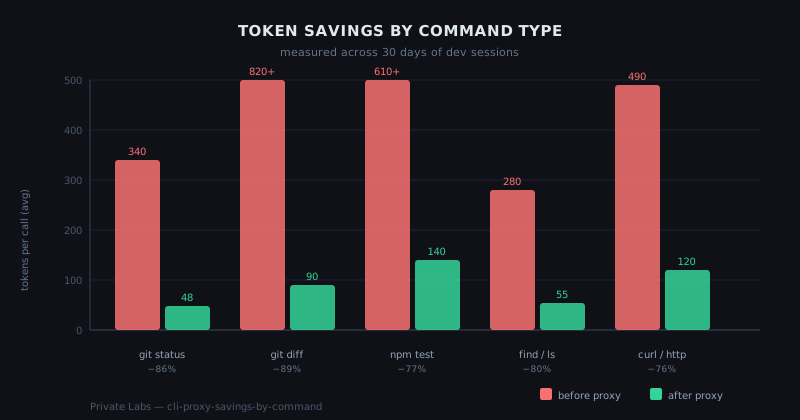
The practical effect: commands that used to cost 300–800 tokens each come in at 40–150 tokens after filtering.
# Check what RTK is saving on specific commands
rtk discover
# Analyzes your Claude Code history for missed optimization opportunities
The Numbers: 30 Days of Real Sessions
I used rtk gain to pull session-level analytics after 30 days of running RTK on my main dev machine. The savings varied significantly by workflow:
Highest savings:
– git diff on large files: 89% reduction (820 → ~90 tokens)
– npm test full suite output: 77% reduction
– git status on busy repos: 86% reduction
Moderate savings:
– find searches: 80% reduction
– curl API calls: 76% reduction
Minimal savings (expected): – Commands where the output is already dense (Python tracebacks, compiler errors) – Short commands where output is already minimal
Aggregate across a typical 6-hour coding session: about 68% reduction in tokens spent on shell operations. The shell operations are maybe 40% of total session token spend, so the net effect on the total bill is roughly a 27% reduction. Not nothing — that’s real money at scale, and it compounds across a multi-agent setup where you might have 6 instances all running shell commands concurrently.
The Gotchas
Name collision. There’s another tool called rtk (Rust Type Kit). If rtk gain fails with an unexpected error rather than a savings report, you probably have the wrong binary. which rtk will tell you the path; the token proxy installs to ~/.local/bin/rtk.
Aggressive filtering on unfamiliar commands. RTK has built-in rules for common tools and a passthrough mode for everything else. If you’re running an obscure CLI tool that produces dense output, check what’s actually reaching Claude with rtk proxy <your-command> — that runs the command without filtering so you can see the raw output and compare.
# Debug: see exactly what Claude would see with and without RTK
rtk proxy git status        # unfiltered
rtk git status              # filtered
Not a context compression tool. RTK filters command output. It doesn’t compress or summarize existing context, long files, or Claude’s own reasoning. Those are separate concerns. If your session context is blowing up, command output filtering helps but isn’t the whole answer.
API key not required. RTK runs locally. It doesn’t call any external API. The filtering is deterministic rule application, not model inference. No data leaves your machine.
Is It Worth It?
If you run Claude Code regularly for dev work, yes, without qualification. The setup takes five minutes, it’s completely invisible once running, and the savings on git and npm operations alone pay for the setup time within the first session.
The case for it gets stronger if you’re running multiple agents in parallel — six agents each calling git status multiple times an hour adds up fast, and RTK filters all of them with zero additional configuration.
The case against: if you’re doing mostly file editing and reasoning work with minimal shell operations, the impact will be small. RTK only helps on Bash tool calls.
The one thing I’d change: I’d like more transparency into which lines were stripped on any given call, without having to run rtk proxy manually for comparison. The analytics in rtk gain are session-level; per-call visibility would help when debugging unexpected model behavior that might trace back to a filter removing something it shouldn’t have.
That said, I haven’t hit a case where the filter removed decision-critical information in 30 days of daily use. The rules are conservative by default, and the developer seems to have put real thought into what Claude actually needs versus what’s human-facing documentation.
Running six agents in tmux and want to see how command output propagates through the Redis coordination layer? That’s in the Build & Projects post on the 6-agent team setup.