Building a Self-Healing Daemon (Watchdog + the Duplicate-Process Bug)
Building a Self-Healing Daemon (Watchdog + the Duplicate-Process Bug)
I have a content pipeline that runs on a VPS. For a while, my morning routine was: wake up, SSH in, check if the pipeline was still alive, restart it if it wasn’t. It died maybe twice a week — sometimes from an unhandled exception, sometimes from the VPS running out of memory, once for a reason I never identified.
I got tired of being the watchdog. So I built one.
This is the build log for that watchdog, including the duplicate-process bug that took me two days to find and felt genuinely embarrassing once I understood it.
What a Watchdog Actually Does
A watchdog is a process that watches another process. If the target process stops running, the watchdog restarts it. That’s the core loop — everything else is refinements.
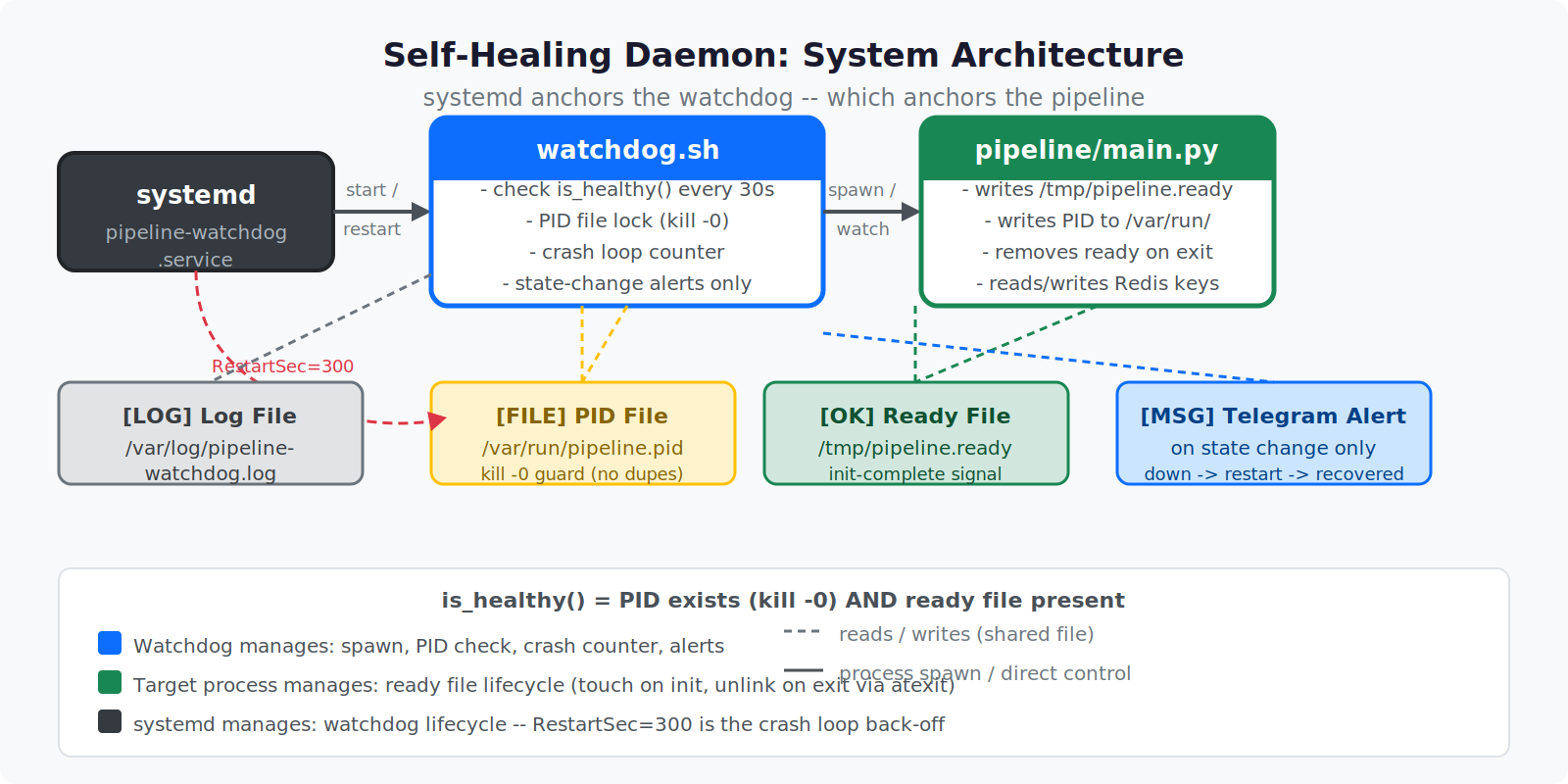
The minimal version looks like this:
#!/usr/bin/env bash
TARGET_CMD="python3 /home/allen/pipeline/main.py"
PIDFILE="/tmp/pipeline.pid"
LOGFILE="/var/log/pipeline-watchdog.log"

while true; do
  if ! pgrep -f "pipeline/main.py" > /dev/null; then
    echo "[$(date '+%Y-%m-%d %H:%M:%S')] Process not found — restarting" >> "$LOGFILE"
    $TARGET_CMD &
    echo $! > "$PIDFILE"
  fi
  sleep 30
done
Every 30 seconds, check if the process is running. If not, start it and record the PID. Simple enough to fit in a napkin.
The production version is less simple. Here’s what I learned building toward it.
The First Problem: Detecting “Actually Dead” vs. “Starting Up”
pgrep checks for a process name match. If your process takes 10 seconds to initialize (connecting to a database, loading a model, warming up caches), there’s a window where it’s running but pgrep finds it — then the watchdog thinks it’s alive, but the process exits during init, and the next check 30 seconds later finds it dead again.
This caused spurious restart loops early on. A crash during startup would get the process restarted, which would crash during startup again, and so on — 60 restarts in an hour before I noticed.
The fix: a readiness signal. The target process writes a file (a “ready file”) once it finishes initializing. The watchdog checks for both the process existence and the ready file:
READY_FILE="/tmp/pipeline.ready"

is_healthy() {
  pgrep -f "pipeline/main.py" > /dev/null && [[ -f "$READY_FILE" ]]
}
The target process:
# At the end of initialization in main.py
Path("/tmp/pipeline.ready").touch()
And the target process deletes the ready file on exit (via atexit or a trap), so the next watchdog check correctly sees “process gone, ready file gone → restart.”
import atexit
from pathlib import Path

READY_FILE = Path("/tmp/pipeline.ready")

def cleanup():
    READY_FILE.unlink(missing_ok=True)

atexit.register(cleanup)
This solved the spurious restart loop. The watchdog now waits until the process actually signals readiness before considering it healthy.
The Duplicate-Process Bug
Here’s the embarrassing one.
After running for a few weeks, I started noticing the pipeline running slower on some days. CPU was higher than expected. Output was duplicating — articles being scraped twice, summaries generated twice. I assumed it was a logic bug in the pipeline itself and spent a day and a half reviewing the Python code.
It wasn’t the Python code.
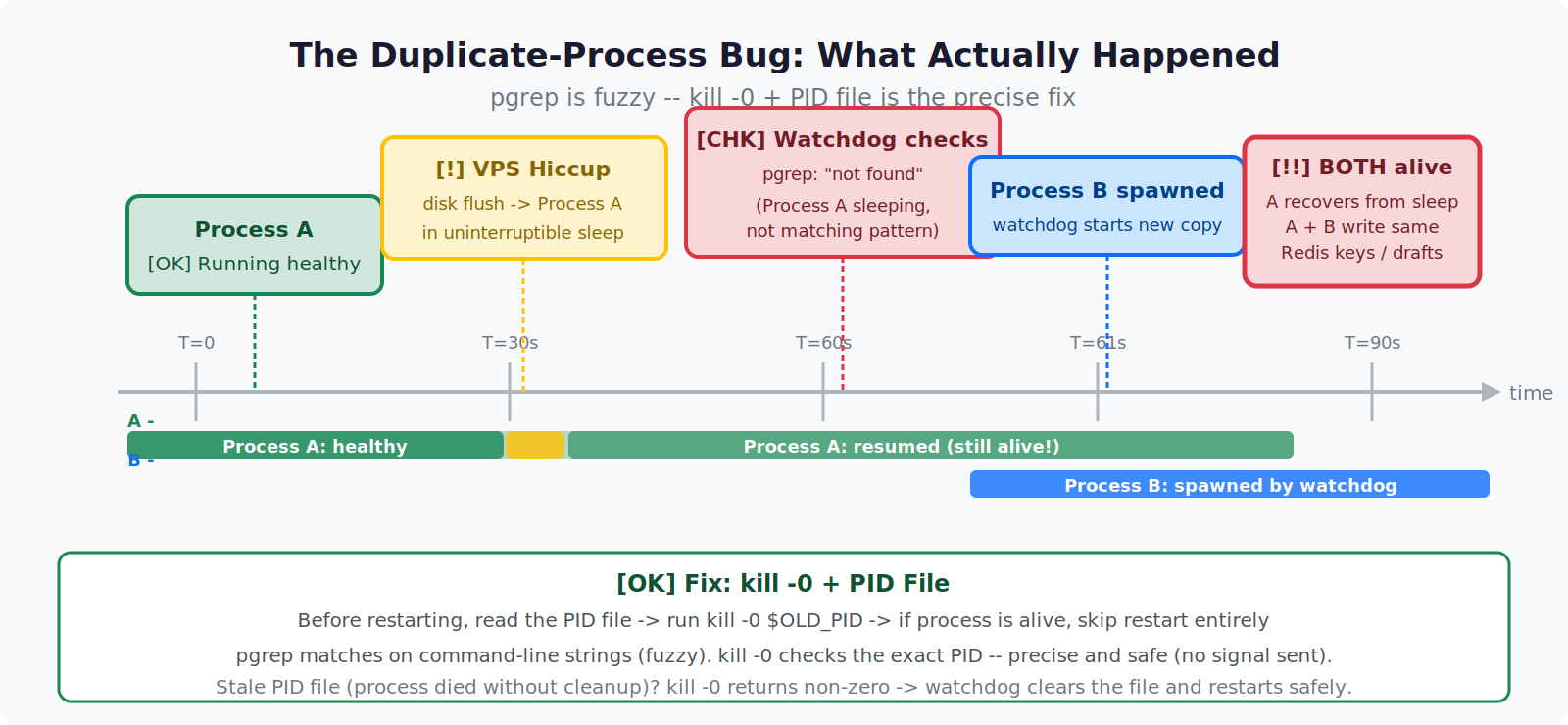
ps aux | grep pipeline
Two processes. Both running main.py. Both healthy. Both writing to the same Redis keys, the same output queues, the same WordPress drafts.
What happened: the watchdog had restarted the pipeline after a brief VPS hiccup. But the original process hadn’t actually died — it had just been temporarily unresponsive. So pgrep reported “not found” (because the process was in an uninterruptible sleep state for a few seconds during a disk flush), the watchdog started a new one, and then both processes resumed.
I had two pipelines running in parallel, racing each other, doubling my API spend, and writing conflicting state to Redis.
The fix is a PID file with a lock check:
PIDFILE="/var/run/pipeline.pid"

acquire_lock() {
  if [[ -f "$PIDFILE" ]]; then
    OLD_PID=$(cat "$PIDFILE")
    if kill -0 "$OLD_PID" 2>/dev/null; then
      # Process with that PID is still alive
      echo "[$(date)] Process $OLD_PID is still running — skipping restart" >> "$LOGFILE"
      return 1
    else
      # Stale PID file — process died without cleanup
      echo "[$(date)] Stale PID file (PID $OLD_PID gone) — clearing" >> "$LOGFILE"
      rm -f "$PIDFILE"
    fi
  fi
  return 0
}

start_target() {
  if acquire_lock; then
    $TARGET_CMD &
    echo $! > "$PIDFILE"
    echo "[$(date)] Started PID $(cat $PIDFILE)" >> "$LOGFILE"
  fi
}
kill -0 PID doesn’t actually send a signal — it just checks whether the process with that PID exists and is reachable. If it returns 0, the process is alive. This is the right primitive for “is this PID still running?” rather than pgrep, which can match on command-line string patterns and is slightly fuzzier.
With this in place: if a stale check causes the watchdog to try a restart, it reads the PID file, finds the old process still alive with kill -0, and skips the restart. No duplicate.
Crash Loop Detection
The next refinement was crash loop protection. If the process is genuinely broken (bad deploy, corrupted config, dependency missing), I don’t want the watchdog to restart it 500 times while I’m asleep. I want it to restart it a few times, then back off and alert me.
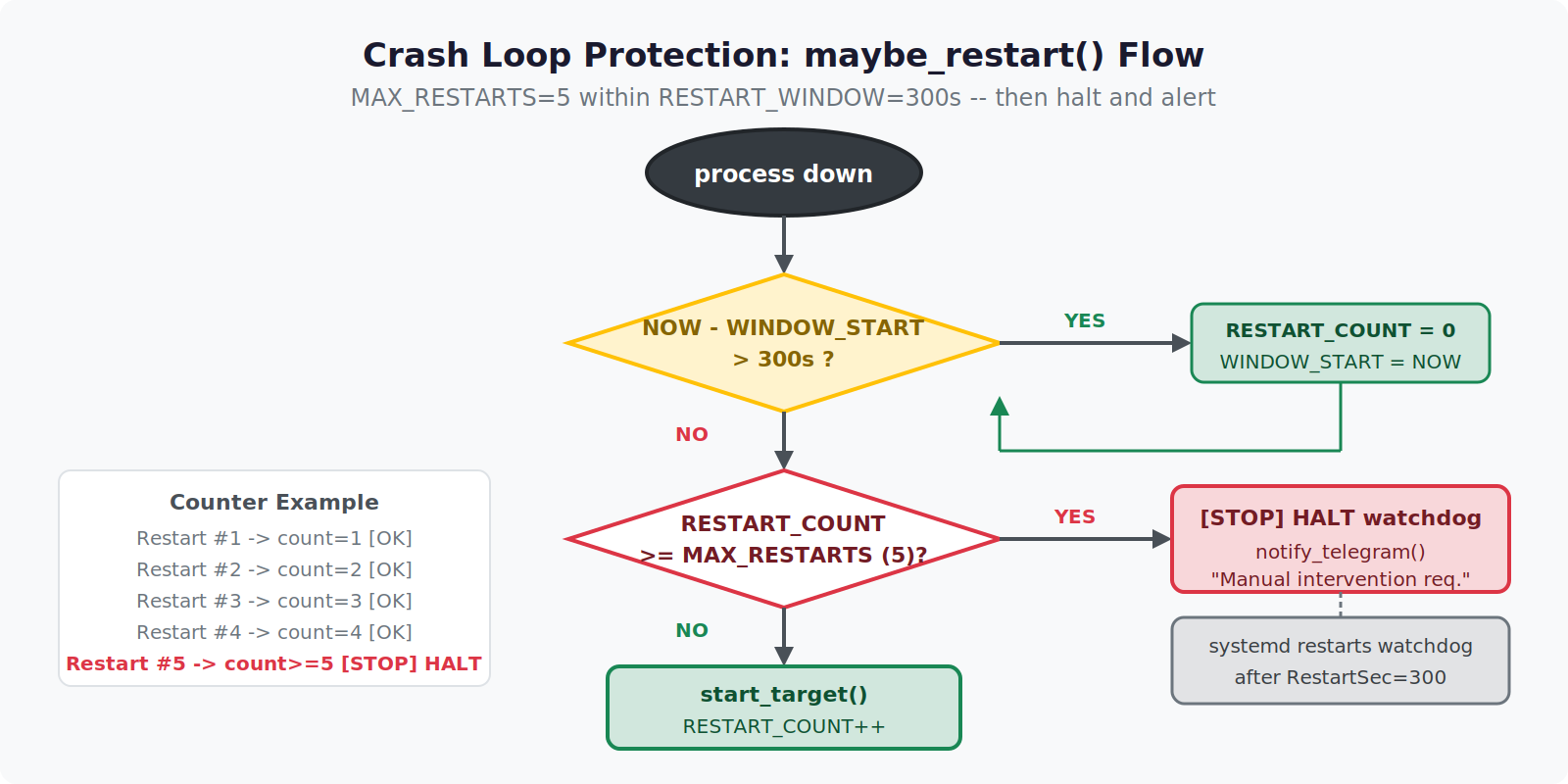
MAX_RESTARTS=5
RESTART_WINDOW=300  # 5 minutes
RESTART_COUNT=0
WINDOW_START=$(date +%s)

maybe_restart() {
  local NOW
  NOW=$(date +%s)

  # Reset counter if the window has passed
  if (( NOW - WINDOW_START > RESTART_WINDOW )); then
    RESTART_COUNT=0
    WINDOW_START=$NOW
  fi

  if (( RESTART_COUNT >= MAX_RESTARTS )); then
    echo "[$(date)] Crash loop detected — $MAX_RESTARTS restarts in ${RESTART_WINDOW}s. Halting." >> "$LOGFILE"
    notify_telegram "Pipeline crash loop — intervention required"
    exit 1  # Watchdog itself exits; systemd will restart it after a delay
  fi

  start_target
  (( RESTART_COUNT++ ))
}
The watchdog exits on crash loop detection — it doesn’t loop forever trying. Since the watchdog itself is managed by systemd with a RestartSec=300 policy, a crash loop pauses restarts for 5 minutes automatically. Clean behavior without the watchdog needing to manage its own sleep logic.
Wiring It Into systemd
Running the watchdog as a bare shell script means it dies when the SSH session ends, or doesn’t survive a reboot. systemd is the right place to anchor it.
/etc/systemd/system/pipeline-watchdog.service:
[Unit]
Description=Pipeline Watchdog
After=network.target redis.service
Wants=redis.service

[Service]
Type=simple
User=allen
ExecStart=/home/allen/scripts/watchdog.sh
Restart=on-failure
RestartSec=300
StandardOutput=append:/var/log/pipeline-watchdog.log
StandardError=append:/var/log/pipeline-watchdog.log

[Install]
WantedBy=multi-user.target
sudo systemctl daemon-reload
sudo systemctl enable pipeline-watchdog
sudo systemctl start pipeline-watchdog
The After=redis.service line matters. My pipeline writes heartbeat keys to Redis. If the watchdog starts before Redis is up, the first health check reads nothing from Redis and triggers an immediate (unnecessary) restart of a pipeline that hasn’t even had time to connect yet.
Dependency ordering in systemd unit files is one of those things that seems optional until it burns you.
Telegram Alerts
A watchdog that restarts things silently is fine. A watchdog that tells you what it restarted and why is better.
notify_telegram() {
  local MESSAGE="$1"
  curl -s -X POST "https://api.telegram.org/bot${TELEGRAM_TOKEN}/sendMessage" \
    -d chat_id="${TELEGRAM_CHAT_ID}" \
    -d text="[Private Labs Watchdog] ${MESSAGE}" \
    > /dev/null
}
I get a Telegram message on every restart, every crash loop halt, and every time the process goes missing for more than two consecutive checks. This means I wake up knowing what happened overnight rather than discovering it during my morning SSH ritual.
The alert cadence matters. If I sent a message on every watchdog loop iteration, I’d mute it within a day. The rule I settled on: alert on state change, not on check. A process going from healthy to missing gets one alert. Repeated missing checks in the same outage don’t pile up.
WAS_HEALTHY=true

while true; do
  if is_healthy; then
    if [[ "$WAS_HEALTHY" == "false" ]]; then
      notify_telegram "Pipeline recovered (PID $(cat $PIDFILE))"
    fi
    WAS_HEALTHY=true
  else
    if [[ "$WAS_HEALTHY" == "true" ]]; then
      notify_telegram "Pipeline not responding — attempting restart"
    fi
    WAS_HEALTHY=false
    maybe_restart
  fi
  sleep 30
done
One alert when it goes down. One alert when it comes back. Nothing in between.
The Full Script
#!/usr/bin/env bash
set -euo pipefail

TARGET_CMD="python3 /home/allen/pipeline/main.py"
PIDFILE="/var/run/pipeline.pid"
READY_FILE="/tmp/pipeline.ready"
LOGFILE="/var/log/pipeline-watchdog.log"
MAX_RESTARTS=5
RESTART_WINDOW=300

RESTART_COUNT=0
WINDOW_START=$(date +%s)
WAS_HEALTHY=true

log() { echo "[$(date '+%Y-%m-%d %H:%M:%S')] $*" >> "$LOGFILE"; }

notify_telegram() {
  curl -s -X POST "https://api.telegram.org/bot${TELEGRAM_TOKEN}/sendMessage" \
    -d chat_id="${TELEGRAM_CHAT_ID}" \
    -d text="[Watchdog] $1" > /dev/null
}

is_healthy() {
  [[ -f "$PIDFILE" ]] || return 1
  local PID
  PID=$(cat "$PIDFILE")
  kill -0 "$PID" 2>/dev/null && [[ -f "$READY_FILE" ]]
}

acquire_lock() {
  if [[ -f "$PIDFILE" ]]; then
    local OLD_PID
    OLD_PID=$(cat "$PIDFILE")
    if kill -0 "$OLD_PID" 2>/dev/null; then
      log "PID $OLD_PID still alive — skipping restart"
      return 1
    fi
    log "Stale PID file ($OLD_PID) — clearing"
    rm -f "$PIDFILE" "$READY_FILE"
  fi
  return 0
}

start_target() {
  acquire_lock || return
  rm -f "$READY_FILE"
  $TARGET_CMD &
  echo $! > "$PIDFILE"
  log "Started PID $(cat $PIDFILE)"
}

maybe_restart() {
  local NOW
  NOW=$(date +%s)
  if (( NOW - WINDOW_START > RESTART_WINDOW )); then
    RESTART_COUNT=0
    WINDOW_START=$NOW
  fi
  if (( RESTART_COUNT >= MAX_RESTARTS )); then
    log "Crash loop — halting watchdog"
    notify_telegram "Crash loop detected. Halting. Manual intervention required."
    exit 1
  fi
  start_target
  (( RESTART_COUNT++ ))
}

log "Watchdog started"

while true; do
  if is_healthy; then
    [[ "$WAS_HEALTHY" == "false" ]] && notify_telegram "Pipeline recovered (PID $(cat $PIDFILE))"
    WAS_HEALTHY=true
  else
    if [[ "$WAS_HEALTHY" == "true" ]]; then
      log "Pipeline not healthy — restarting"
      notify_telegram "Pipeline down — restarting"
    fi
    WAS_HEALTHY=false
    maybe_restart
  fi
  sleep 30
done
What I’d Do Differently
Use a proper process supervisor first. Before writing a watchdog from scratch, check if supervisord or s6-overlay meets your needs. They handle PID files, crash loops, log rotation, and startup ordering out of the box. I built mine partly because I had specific Redis health check requirements that supervisord couldn’t express easily, and partly because I wanted to understand what I was relying on. Both are valid reasons. “I want to avoid learning systemd” is not.
Write the crash loop protection before you need it. I added it after the third time I woke up to a dead server. It should have been in v1.
The duplicate-process bug will happen to you. pgrep is fuzzy. kill -0 with a PID file is precise. Use the precise tool.
Six months after building this, the pipeline runs unattended roughly 95% of the time. The remaining 5% is edge cases that genuinely need human judgment — a source site changing its HTML structure, a Redis key schema migration, a decision about what counts as publishable content. The watchdog handles the mechanical failures. I handle the judgment calls. That division of labor is what I actually wanted from the start.