I Built a Telegram Bot That Notifies Me of Price Drops — Here’s How
I Built a Telegram Bot That Notifies Me of Price Drops — Here’s How
I Built a Telegram Bot That Notifies Me of Price Drops — Here’s How
I got tired of manually checking prices. Specifically, I was watching a mechanical keyboard on a few different sites for about three weeks, refreshing the page every day like some kind of discount-obsessed robot. Eventually I thought: I’m a programmer. I should be building the robot, not being one.
So I spent a weekend building a Telegram bot that watches product URLs, checks prices on a schedule, and pings me when something drops below a threshold I set. It’s been running for about four months now. It’s caught me several real deals, it’s broken in interesting ways, and I’ve learned a few things worth writing down.
What I Built and Why
The core idea is simple: give the bot a URL and a target price, and it messages you on Telegram when the current price falls at or below that target. You can track multiple products, set different thresholds per product, and get a clean notification with the product name, current price, and a direct link.
I chose Telegram over email or SMS for a few reasons. Telegram’s Bot API is genuinely good — straightforward, well-documented, and free. Push notifications on my phone work reliably. And I was already using Telegram daily, so there’s no friction to receiving alerts.
The whole thing runs on a cheap VPS I already had sitting around. No serverless, no managed queues — just a Python script with a scheduler, a SQLite database, and a systemd service keeping it alive.
Tech Stack
- Python 3.11 — comfortable with it, good library support for scraping
- python-telegram-bot (v20, async) — official-ish wrapper for the Bot API
- APScheduler — for running the price-check job every 30 minutes
- Requests + BeautifulSoup4 — for scraping product pages
- Playwright — eventually added this for JavaScript-rendered pages (more on that later)
- SQLite via SQLAlchemy — for storing tracked products and price history
- systemd — for keeping the process running on my Ubuntu VPS
I explicitly avoided heavy frameworks. No FastAPI, no Celery, no Redis. The feature scope didn’t justify the operational overhead. A single Python process is easy to debug and easy to restart.
Architecture Decisions
The bot runs in two parallel tracks: a command handler loop that listens for Telegram commands, and a scheduler that runs price checks independently.
User → Telegram → Bot API → Command Handler → SQLite
                                                 ↑
Scheduler (every 30 min) → Price Checker ────────┘
                                ↓
                         Alert Sender → Telegram → User
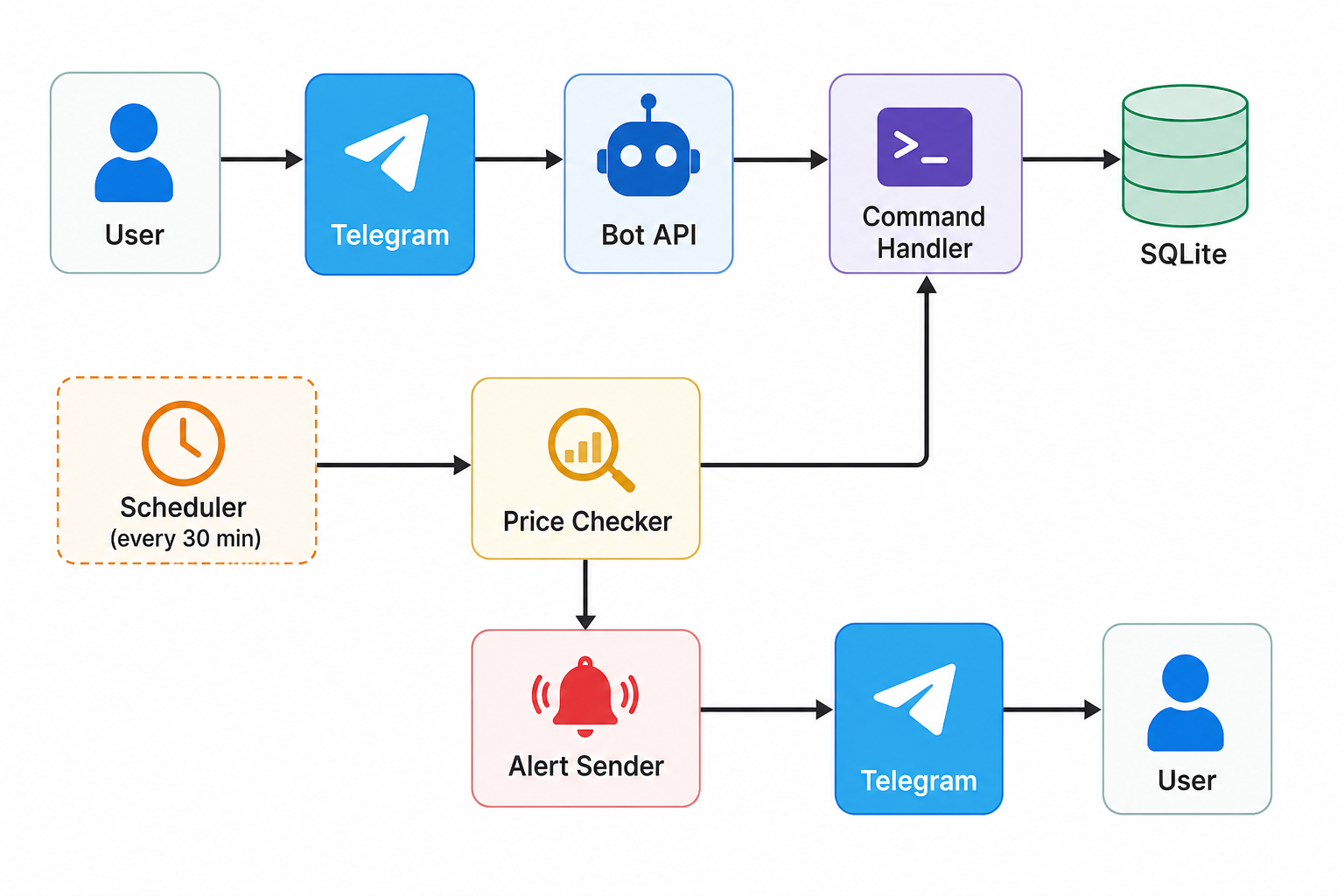 Commands I implemented:
/track <url> <target_price>— add a product to the watchlist/list— show all tracked products with current prices/remove <id>— stop tracking something/history <id>— show price history for a product
The price checker fetches each tracked URL, parses the price from the HTML, compares it to the stored threshold, and sends a notification if the condition is met. It also logs every price check to a history table so I can see trends over time.
One decision I’m glad I made early: I stored the last notified price separately from the last seen price. This prevents the bot from spamming you if the price stays below your threshold across multiple check cycles. It only notifies you when the price crosses the threshold downward, or if it drops further than the last notification.
Key Implementation Details
Parsing prices is messier than you’d think. Different sites format prices differently — some use commas as decimal separators, some have currency symbols embedded in weird places, some wrap the price in three layers of nested spans. I wrote a price extraction function that tries a few common CSS selectors, then falls back to a regex that looks for patterns like $XX.XX or £XX,XX. It’s not perfect, but it handles maybe 80% of cases without custom logic.
def extract_price(html: str, url: str) -> float | None:
    soup = BeautifulSoup(html, "html.parser")

    selectors = [
        "[itemprop='price']",
        ".product-price",
        "#priceblock_ourprice",
        ".a-price-whole",  # Amazon
    ]

    for selector in selectors:
        el = soup.select_one(selector)
        if el:
            raw = el.get("content") or el.get_text()
            price = parse_price_string(raw)
            if price:
                return price

    # Regex fallback
    match = re.search(r'[\$£€]?\s*(\d{1,6}[.,]\d{2})', html)
    if match:
        return parse_price_string(match.group(1))

    return None
Rate limiting and politeness. I’m scraping sites I don’t own, so I added random delays between requests (5-15 seconds), rotate a User-Agent string, and don’t hammer the same domain more than once per check cycle. I’m not trying to scrape at scale — just checking a handful of personal items — but I didn’t want to be immediately blocked or cause problems.
SQLAlchemy with SQLite. I kept the schema simple — two tables, products and price_history. SQLAlchemy felt like slight overkill for SQLite, but I wanted the option to swap to PostgreSQL later without rewriting queries. In practice I’ve never needed to swap, but the habit of using an ORM for anything that touches a database is one I don’t regret.
Problems I Ran Into
JavaScript-rendered pages broke everything.
This was the first real wall. Some sites — particularly a few electronics retailers I was watching — render their prices entirely through JavaScript. BeautifulSoup parses static HTML, so it gets a skeleton page with no price data at all. My extractor returns None, the check silently fails, and I think the product is never discounted when really the bot just can’t see the price.
I fixed this by adding Playwright as a fallback. When the primary scraper returns None, a secondary function spins up a headless Chromium instance, loads the page, waits for a price element to appear, and extracts the HTML from the rendered DOM. It works, but it’s slow (3-8 seconds per page) and heavyweight. I only trigger Playwright for known problematic domains now, which I maintain as a list in the config.
Running Playwright in the same process as the async Telegram bot was annoying. Playwright has its own async API, but mixing it with python-telegram-bot’s event loop required some care. I ended up running Playwright calls in a thread pool executor to keep the event loop clean.
APScheduler and the async event loop.
python-telegram-bot v20 is fully async, and APScheduler needs some configuration to play nicely with async jobs. I burned about two hours on RuntimeError messages about event loops before I found the right combination: using AsyncIOScheduler and making sure the scheduler starts inside the same running loop as the bot. The documentation for both libraries assumes you’re not combining them, which you often are in practice.
Price alerts firing repeatedly.
Before I implemented the “last notified price” logic, the bot would send me the same alert every 30 minutes as long as the price stayed low. I woke up to 14 identical notifications one morning for a graphics card that was on sale. Fixed by adding the last_notified_at and last_notified_price columns and adding the condition: only alert if current_price < last_notified_price or last_notified_price is None.
Sites blocking me.
Two sites started returning 403 responses after a few days of checks. One came back after I switched the User-Agent to something more browser-like. The other never recovered and I removed it from my tracked list. I could go down the route of rotating proxies and full browser fingerprinting, but that’s a different project with different ethics involved, and these are personal items — not worth the effort.
systemd service and environment variables.
I store API tokens and other config in a .env file. My systemd service unit needed EnvironmentFile= pointing at that file to pick them up correctly. I forgot this the first time and spent a while wondering why the bot worked in my terminal session but not as a service. Classic, embarrassing, documented here so I remember.
What I’d Do Differently
Build site-specific parsers for the sites I actually use. The generic scraper approach works maybe 80% of the time. The other 20% is where I spend debugging time. If I were starting over, I’d write a thin
Related Guides on Private Labs
- Build Log: I Made a Real App Using Only Claude Code
- Automate Your Daily Workflow with Python Scripts
- 5 Ways to Make Real Money with AI Tools
More in Build & Projects.