How I Automated My Content Workflow With AI Agents
How I Automated My Content Workflow With AI Agents
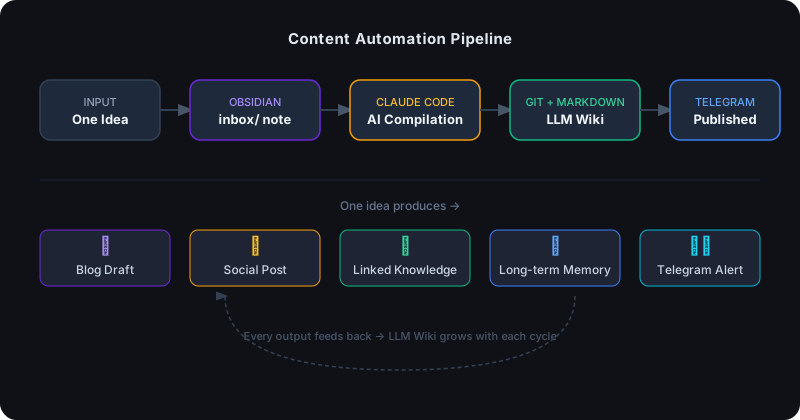
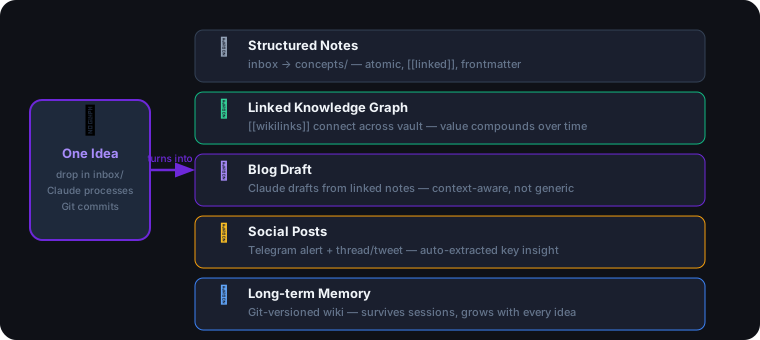
One-line verdict: One idea, dropped into a folder, automatically becomes structured notes, linked knowledge, a blog draft, social posts, and a permanent memory entry — without me touching any of it until it’s ready to publish.
The Problem I Was Actually Trying to Solve
I had no shortage of ideas. The problem was the gap between having an idea and doing anything useful with it.
The typical workflow looked like this:
- Think of something interesting
- Open a notes app and type something half-formed
- Never look at it again
- Repeat
The AI version wasn’t much better:
- Think of something interesting
- Open ChatGPT, have a great conversation
- Session ends, context disappears
- Start from zero next time
What I actually wanted was a system where an idea, once captured, would propagate automatically — into notes, into a linked knowledge base, into content drafts, into posts — and then stay there as part of a growing memory I could build on.
That system now exists. Here’s the stack and how it works.
The Stack
Obsidian       — knowledge container (local .md vault)
Claude Code    — AI agent that reads, writes, links, compiles
Telegram       — delivery channel (alerts, drafts, notifications)
Markdown       — universal storage format
Git            — versioned memory backbone
LLM Wiki       — the persistent knowledge structure all of it builds toward
None of these tools are exotic. What’s new is how they connect.
The Pipeline
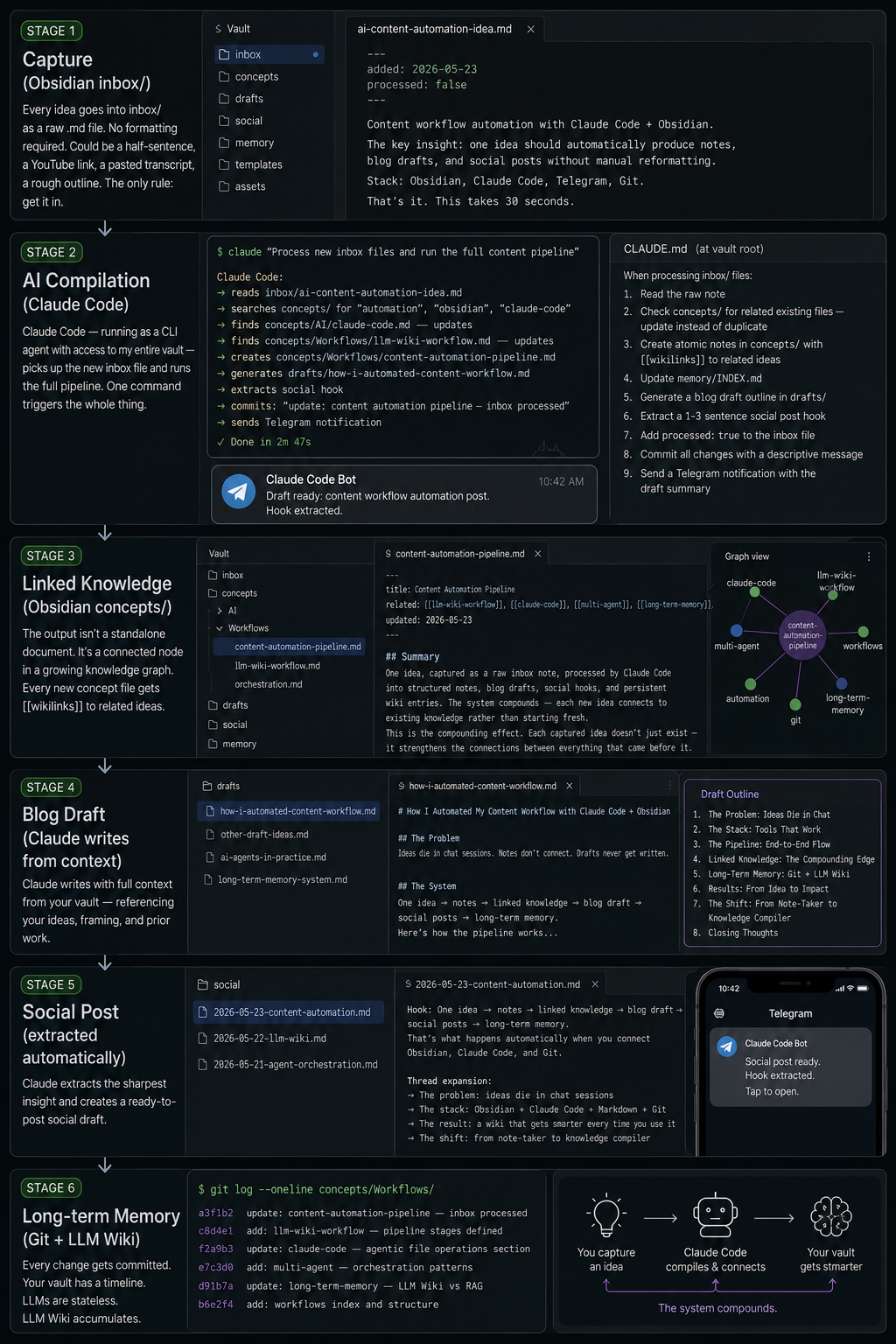
Stage 1: Capture (Obsidian inbox/)
Every idea goes into inbox/ as a raw .md file. No formatting required. Could be a half-sentence, a YouTube link, a pasted transcript, a rough outline. The only rule: get it in.
inbox/ai-content-automation-idea.md
---
added: 2026-05-23
processed: false
---

Content workflow automation with Claude Code + Obsidian.
The key insight: one idea should automatically produce notes,
blog drafts, and social posts without manual reformatting.
Stack: Obsidian, Claude Code, Telegram, Git.
That’s it. This takes 30 seconds.
Stage 2: AI Compilation (Claude Code)
This is where the automation lives. Claude Code — running as a CLI agent with access to my entire vault — picks up the new inbox file and runs the full pipeline.
The instructions live in a CLAUDE.md file at the vault root:
# CLAUDE.md

When processing inbox/ files:
1. Read the raw note
2. Check concepts/ for related existing files — update instead of duplicate
3. Create atomic notes in concepts/ with [[wikilinks]] to related ideas
4. Update memory/INDEX.md
5. Generate a blog draft outline in drafts/
6. Extract a 1-3 sentence social post hook
7. Add processed: true to the inbox file
8. Commit all changes with a descriptive message
9. Send a Telegram notification with the draft summary
One command triggers the whole thing:
claude "Process new inbox files and run the full content pipeline"
What happens next:
Claude Code:
  → reads inbox/ai-content-automation-idea.md
  → searches concepts/ for "automation", "obsidian", "claude-code"
  → finds concepts/AI/claude-code.md — updates with new automation angle
  → finds concepts/Workflows/llm-wiki-workflow.md — adds content pipeline section
  → creates concepts/Workflows/content-automation-pipeline.md (new)
  → generates drafts/how-i-automated-content-workflow.md
  → extracts social hook: "One idea → notes → linked knowledge → blog → social posts → memory. Here's the system."
  → commits: "update: content automation pipeline — inbox processed"
  → sends Telegram: "Draft ready: content workflow automation post. Hook extracted."
Total time from idea to draft: under 3 minutes of compute. Zero manual steps between capture and review.
Stage 3: Linked Knowledge (Obsidian concepts/)
The output isn’t a standalone document. It’s a connected node in a growing knowledge graph.
Every new concept file gets [[wikilinks]] to related ideas Claude found in the vault. After a few months, when I capture something new about AI agents, Claude doesn’t start from scratch — it reads everything I’ve already written about orchestration, multi-agent systems, context windows, and memory management, then integrates the new material into what’s already there.
# content-automation-pipeline.md
---
title: Content Automation Pipeline
related: [[llm-wiki-workflow]], [[claude-code]], [[multi-agent]], [[long-term-memory]]
updated: 2026-05-23
---

## Summary
One idea, captured as a raw inbox note, processed by Claude Code
into structured notes, blog drafts, social hooks, and persistent
wiki entries. The system compounds — each new idea connects to
existing knowledge rather than starting fresh.
This is the compounding effect. Each captured idea doesn’t just exist — it strengthens the connections between everything that came before it.
Stage 4: Blog Draft (Claude writes from context)
The draft Claude generates isn’t generic. It’s written with context from my vault — referencing ideas I’ve already explored, using framing that matches how I actually think about these problems, connecting to prior posts I’ve written.
The difference between a draft written from a blank prompt and a draft written from a 200-file knowledge base is substantial. The blank-prompt version reads like a generic explainer. The vault-context version reads like someone who has been thinking about this for a year — because the system has been.
I review, edit, add my voice, and publish. The structural work is done.
Stage 5: Social Post (extracted automatically)
As part of the pipeline, Claude extracts the sharpest insight from the new material — the one-liner that would make someone stop scrolling. This goes into a social/ folder as a ready-to-post draft.
# social/2026-05-23-content-automation.md

Hook: One idea → notes → linked knowledge → blog draft → social posts → long-term memory.
That's what happens automatically when you connect Obsidian, Claude Code, and Git.

Thread expansion:
→ The problem: ideas die in chat sessions
→ The stack: Obsidian + Claude Code + Markdown + Git
→ The result: a wiki that gets smarter every time you use it
→ The shift: from note-taker to knowledge compiler
Telegram delivers this to my phone. I paste it, add a visual, post. Total time: 2 minutes.
Stage 6: Long-term Memory (Git + LLM Wiki)
Every change Claude makes gets committed to Git. The vault has a timeline.
git log --oneline concepts/Workflows/
→ a3f1b2 update: content-automation-pipeline — inbox processed
→ c8d4e1 add: llm-wiki-workflow — pipeline stages defined
→ f2a9b3 update: claude-code — agentic file operations section
→ e7c3d0 add: multi-agent — orchestration patterns
Six months from now, when I capture something new about content automation, Claude will have access to everything I’ve written since the beginning. It won’t repeat ideas I’ve already covered. It will find the gap between what I’ve written and what’s new, and fill it precisely.
This is what Andrej Karpathy means when he talks about the long-term memory problem. LLMs are stateless — every session starts blank. The LLM Wiki pattern solves this not by extending the context window, but by externalizing memory into a structured, versioned, AI-readable knowledge base.
RAG retrieves. LLM Wiki accumulates.
What the Telegram Integration Actually Does
Telegram is the human-facing interface of this pipeline.
I use OpenClaw to route Claude Code’s output to my phone. When the pipeline runs:
- Draft summary → delivered immediately, so I know something is ready to review
- Social hook → delivered as a paste-ready post
- Error alerts → if Claude runs into something ambiguous, it pings me to decide
- Weekly digest → a summary of everything the wiki processed that week
This means I don’t have to check anything. The system tells me when something is ready. I review, approve, publish.
What This Actually Replaced
Before this system, my content workflow looked like:
| Task | Before | After |
|---|---|---|
| Capture idea | Open notes app, type, forget | 30 seconds → inbox/ |
| Develop idea | Manual research, blank drafts | Claude reads vault context, drafts from knowledge |
| Write post | 3-4 hours start to finish | 45 min review + editing |
| Social post | Separate task, often skipped | Auto-extracted, ready to paste |
| Knowledge retention | Lost in chat history | Committed to vault, linked, findable |
The total time I spend on any given idea went from 4+ hours to about an hour of focused review and editing. The quality went up because I’m editing from a draft that already has context, not writing from scratch.
Setting This Up
The minimum viable version:
1. Obsidian vault — create a folder with inbox/, concepts/, drafts/, social/, memory/. Write a CLAUDE.md explaining the structure.
2. Claude Code — install the CLI, point it at your vault directory. The CLAUDE.md file is your instruction set.
3. Git — git init in your vault. Commit after every pipeline run.
4. Telegram bot — optional, but recommended. OpenClaw or a simple bot script to receive Claude’s output on your phone.
5. A processing trigger — either manual (“process new inbox files”) or a cron job that runs the pipeline nightly.
The full system took me a weekend to set up. The leverage has been compounding since.
The Shift Worth Understanding
Most people use AI tools as a faster typewriter — you type a prompt, you get output, you copy it somewhere, you start over.
This stack is a different model. The AI isn’t a tool you use. It’s a process that runs on your knowledge base and makes it better every time it runs.
Static notes     → you search them manually, lose them over time
LLM Wiki system  → Claude reads, links, drafts, and the value compounds
The key insight from Karpathy: the bottleneck isn’t the AI’s capability. It’s the memory architecture around it. Build the right structure, and the AI gets more useful every week — not because the model changed, but because the knowledge base it has access to grew.
That’s what this stack does. One idea in, five outputs out, permanent memory stored.
Running a similar setup? Drop a comment — I’d be curious what your inbox → publish pipeline looks like.
Related Guides on Private Labs
- How I Built an AI Automation Workflow That Saves 3 Hours a Day
- Team Automation with Claude Code: A Practical Guide
- Obsidian + Claude Code + Git: The Living AI Brain Stack
More in Automation.