Obsidian + Claude Code + Markdown + Git: The Stack That Gives Your AI a Persistent Memory of Your Work
Obsidian + Claude Code + Markdown + Git: The Stack That Gives Your AI a Persistent Memory of Your Work
One-line verdict: This four-tool combination solves the biggest unsolved problem in personal AI productivity — the fact that LLMs forget everything the moment a session ends — by turning your private notes into a self-updating, AI-compiled knowledge base that gets smarter every time you use it.
This post is about the private half of the problem. Specifically: making AI remember your projects, decisions, and hard-won context across sessions. The knowledge stays on your machine, organized for your own productivity. If your goal is to take that accumulated knowledge and publish it publicly — turning your private vault into a website others can find and read — that’s a separate pipeline covered in the companion post on Obsidian + Quartz.
The Problem Nobody Talks About Enough
You’ve been using AI tools for a year. You’ve had brilliant conversations, generated great summaries, debugged complex systems, built mental models for new domains. And then — nothing. The next session starts blank. The AI doesn’t remember any of it.
This isn’t a bug. It’s the fundamental architecture of LLMs.
Every language model is stateless by design. When a session ends, the context window closes. There’s no persistent memory, no accumulated understanding, no growing familiarity with your projects. You’re meeting a brilliant stranger every single time — one who has read everything, but remembers nothing about you.
Andrej Karpathy, one of the architects of modern deep learning, has been vocal about this. His framing is sharp: the long-term memory problem is the key bottleneck between AI as a capable tool and AI as a genuine intellectual partner. The solution he keeps pointing to? Something like an LLM Wiki — a persistent, structured knowledge base that the AI can read, update, and reason over across sessions.
The Obsidian + Claude Code + Markdown + Git stack is the most practical implementation of that idea available right now. Here’s how it works and why it’s going to matter a lot more in the next two years.
The Flow: Four Stages, One Direction
The core insight is simple. Information has a natural processing pipeline:
Raw Docs → Markdown → AI Compilation → Persistent Wiki
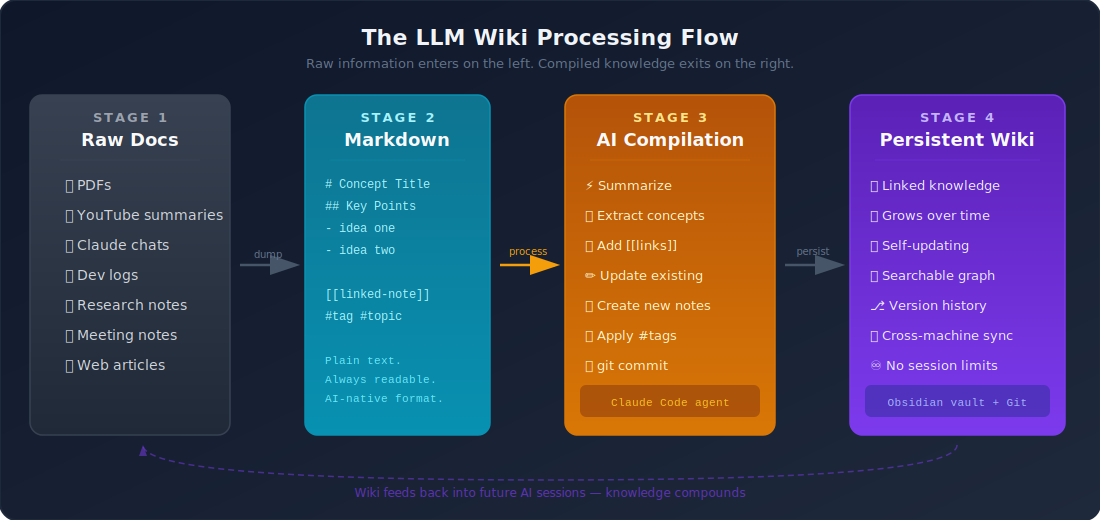
You feed in raw material. Claude processes it. Markdown stores it. Obsidian links it. Git preserves it. Over time, the system doesn’t just accumulate notes — it compiles knowledge.
Why Each Tool Is Non-Negotiable
Obsidian: The Knowledge Container
Obsidian is a local-first Markdown editor built around [[wikilinks]]. What makes it the right foundation here isn’t its features — it’s its philosophy.
Everything is plain text. No proprietary database, no cloud lock-in, no format drift. Your knowledge lives as .md files in a folder. That means Claude Code can read every single file directly. No export, no API, no middleware.
The [[link]] syntax creates a graph of connections. When Claude updates a document, it can add links to related concepts. Over time, your vault develops a topology — clusters of related ideas that mirror how you actually think.
What Obsidian provides: A navigable, human-readable, AI-accessible store of structured knowledge.
Claude Code: The AI Compiler
Claude Code is the critical piece most people miss. It’s not a chatbot you ask questions to. It’s an agent that operates on your file system — reading files, editing documents, running commands, maintaining state across a working session.
This matters for the wiki use case because Claude Code can:
- Read your entire vault in one pass
- Find the document most relevant to a new input
- Update an existing note rather than creating a duplicate
- Add
[[links]]to concepts it recognizes from your existing files - Summarize a 40-page PDF and insert the key points into the right place
- Cross-reference a new insight with three other documents it already knows about
The interaction pattern looks like this in practice:
You: "Here's a transcript from the Lex Fridman podcast with Yann LeCun.
      Update my AI research notes with anything new."

Claude Code:
  → reads /vault/AI/yann-lecun.md (existing)
  → reads /vault/AI/self-supervised-learning.md (existing)
  → identifies 3 new positions LeCun expressed
  → updates yann-lecun.md with the new material
  → adds [[world-models]] link (concept appeared in transcript)
  → creates /vault/AI/world-models.md if it doesn't exist
  → commits: "update: LeCun notes from Fridman EP 420"
This is not summarization. This is knowledge compilation — integrating new information into an existing structure, respecting what’s already there, building connections rather than just stacking documents.
What Claude Code provides: An autonomous AI agent that can read, reason, and write across your entire vault.
Markdown: The Universal Format
Markdown is boring on purpose. .md files are readable by humans without any software, indexable by search engines, parseable by every LLM, versionable by git, and convertible to any format you need.
More importantly: Markdown has no semantic loss. When Claude reads a .md file, it gets the full content with full context. No PDF parsing artifacts, no API rate limits, no format negotiation. Just text.
The [[link]] and #tag conventions in Obsidian-flavored Markdown give structure that Claude understands natively. You’re not working around format limitations — the format is designed for this.
What Markdown provides: A frictionless, durable, universally readable storage format that LLMs parse perfectly.
Git: The Memory Backbone
Git is the most underrated piece of this stack. Here’s what it actually does in this context:
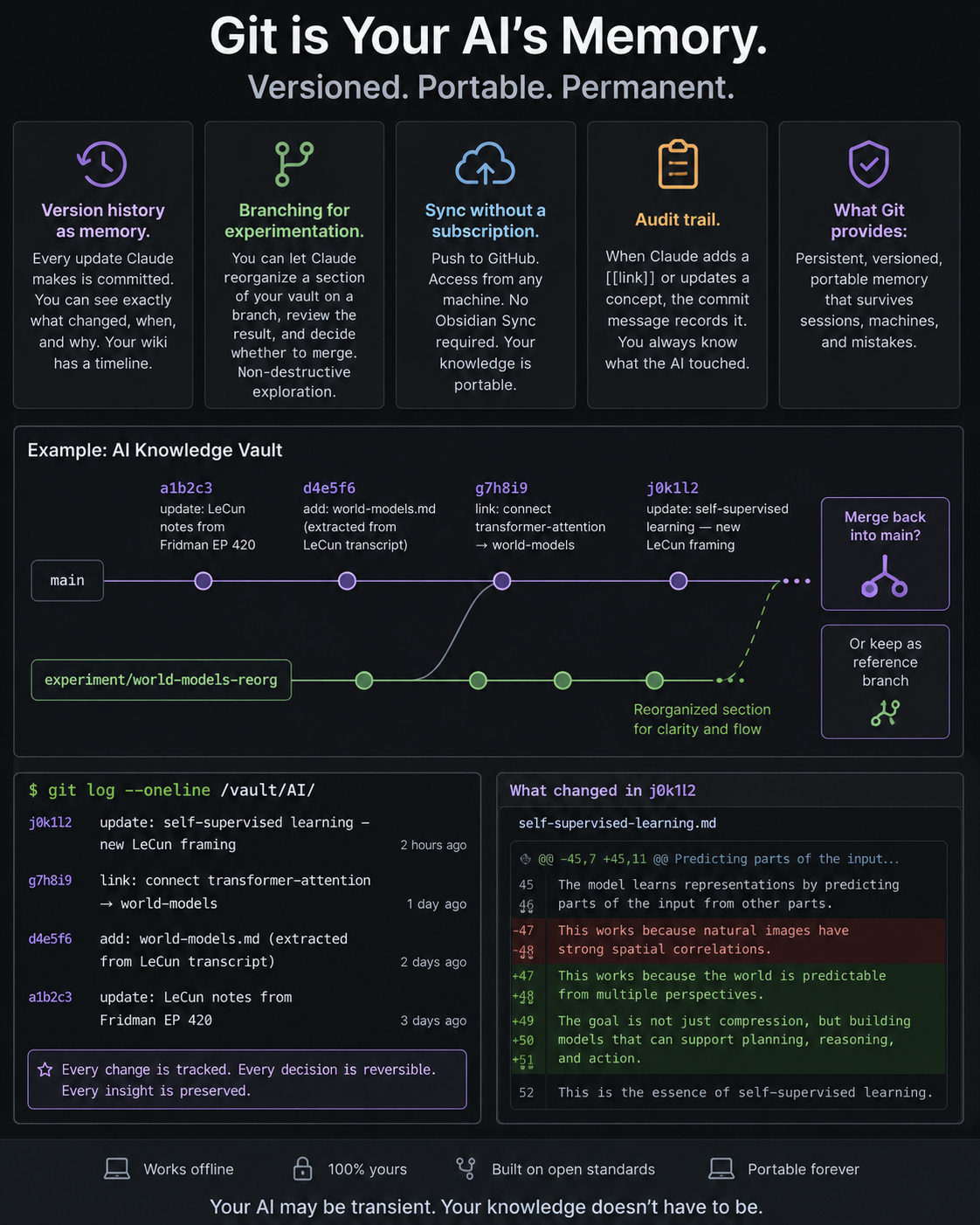
Version history as memory. Every update Claude makes is committed. You can see exactly what changed, when, and why. Your wiki has a timeline.
Branching for experimentation. You can let Claude reorganize a section of your vault on a branch, review the result, and decide whether to merge. Non-destructive exploration.
Sync without a subscription. Push to GitHub. Access from any machine. No Obsidian Sync required. Your knowledge is portable.
Audit trail. When Claude adds a [[link]] or updates a concept, the commit message records it. You always know what the AI touched.
git log --oneline /vault/AI/
→ a1b2c3 update: LeCun notes from Fridman EP 420
→ d4e5f6 add: world-models.md (extracted from LeCun transcript)
→ g7h8i9 link: connect transformer-attention → world-models
→ j0k1l2 update: self-supervised learning — new LeCun framing
What Git provides: Persistent, versioned, portable memory that survives sessions, machines, and mistakes.
LLM Wiki vs RAG: What’s the Actual Difference?
Both RAG (Retrieval-Augmented Generation) and LLM Wiki try to solve the memory problem. They solve different versions of it.
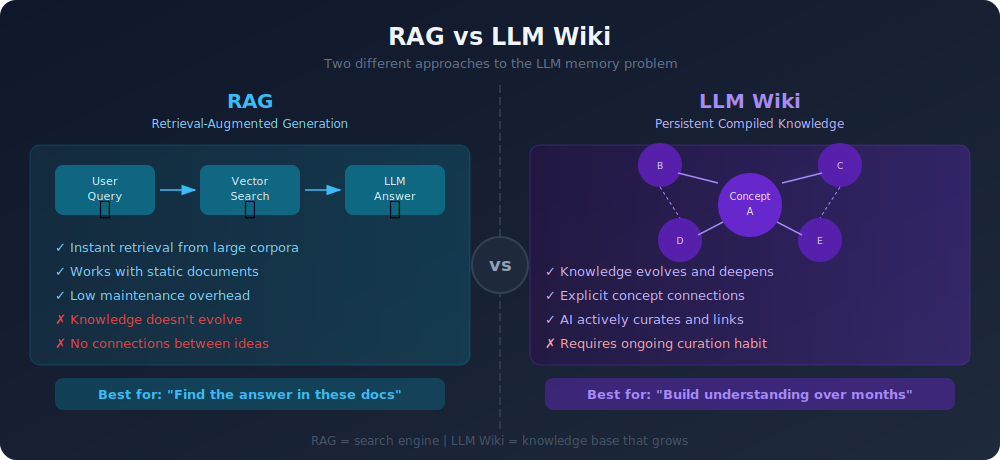
| Dimension | RAG | LLM Wiki |
|---|---|---|
| Core mechanism | Retrieve relevant chunks at query time | Maintain a curated, linked knowledge graph |
| Knowledge evolution | Static — docs don’t update themselves | Dynamic — AI actively updates and links |
| Structure | Flat embeddings, no explicit connections | [[linked]] graph with semantic topology |
| Best for | “Find me the answer in these documents” | “Build understanding across months of input” |
| Latency | Query-time retrieval cost | Near-zero (files are already structured) |
| Maintenance | Low — just index and retrieve | Higher — requires curation discipline |
| Long-term value | Scales with document count | Scales with connection density |
| AI role | Passive retriever | Active compiler and curator |
RAG is a search engine. LLM Wiki is a knowledge base.
RAG is excellent when you have a large, relatively static document corpus and need to answer specific questions from it. LLM Wiki is for the other problem: you’re building understanding over time, and you want that understanding to compound.
If you’ve been using AI tools seriously for a year, you’ve generated knowledge. The question is whether it’s trapped in dead chat logs or whether it lives somewhere that keeps getting better.
The Compounding Effect
Here’s what makes this stack different from a well-organized Dropbox folder.
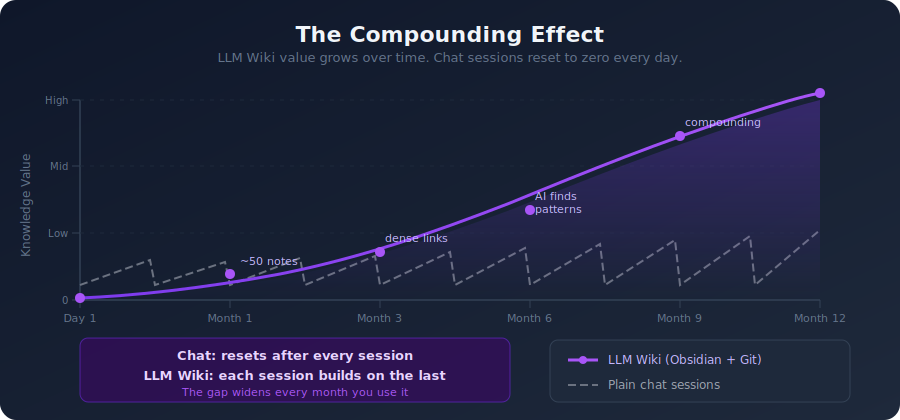
After three months of using this system:
- A new PDF you read automatically gets connected to five existing notes
- A question you ask Claude gets answered with context from your own research, not generic internet knowledge
- When you start a new project, Claude can read your entire knowledge base and bring relevant prior work forward
- Concepts you studied six months ago surface when they become relevant again — because the links are there
The wiki isn’t just growing. It’s densifying. The knowledge graph becomes richer, the connections multiply, and Claude’s ability to reason over your specific context improves with every addition.
This is what Karpathy means by long-term memory. Not a chat history. Not a vector database. A living document structure that reflects your actual intellectual work — and that an AI can actively maintain.
Practical Setup
You don’t need anything exotic to start:
1. Obsidian vault — one folder, local, plain .md files. Start with a few top-level folders: inbox/, concepts/, projects/, sources/.
2. Claude Code — installed as a CLI tool. Point it at your vault directory. Write a CLAUDE.md file that explains your vault’s structure and linking conventions.
3. Git — git init in your vault folder. Commit after every meaningful Claude session. Push to a private GitHub repo for backup and sync.
4. A processing habit — when you finish a PDF, a video, or an interesting conversation, drop the raw notes in inbox/ and ask Claude to process them into your vault. Ten minutes of input, structured knowledge forever.
# CLAUDE.md (example)

This is a knowledge vault. When adding new information:
- Check existing files before creating new ones
- Add [[links]] to related concepts you find in the vault
- Keep atomic notes: one concept per file
- Commit after each update with a descriptive message
- Use #tags for cross-cutting themes
Why This Trend Gets Stronger From Here
Three forces are accelerating this:
Context windows keep expanding. Claude can already read enormous vaults in a single pass. As context grows, the AI’s ability to reason across your entire knowledge base — not just relevant chunks — improves dramatically.
Agentic AI is maturing. Claude Code today can autonomously edit files, run searches, and maintain sessions. In 12 months, AI agents will handle the processing pipeline with even less friction.
Local AI is becoming viable. The same vault structure works with local models. Your knowledge base isn’t dependent on any particular model or provider — it’s just files.
The Obsidian + Claude Code + Markdown + Git stack works because it bets on fundamentals: plain text, open formats, version control, local-first storage. Those don’t go out of date.
The Bottom Line
The note-taking app you’re using right now is a static container. This stack is a dynamic knowledge compiler.
The difference matters because your AI tools are only as good as the context they have access to. A fresh ChatGPT session knows nothing about you. Claude Code pointed at a well-maintained Obsidian vault that covers two years of your thinking? That’s a different kind of tool entirely.
Static notes → you search them
LLM Wiki     → Claude reads, links, updates, and reasons over them
If you’re serious about working with AI over the long term — not just getting quick answers, but building something that compounds — this stack is worth setting up. The investment is low. The upside grows continuously.
That’s the point.
Want a step-by-step setup guide? Drop a comment below and I’ll write a follow-up with exact folder structure, CLAUDE.md templates, and a sample git workflow.
Related Guides on Private Labs
- Obsidian Web Clipper: Turn Any Webpage Into a Knowledge Asset
- How I Automated My Content Workflow with AI Agents
- Team Automation with Claude Code: A Practical Guide
More in Tools & Reviews.