Claude Code vs Cursor: AI Agent or AI Editor — Which Model of Assistance Actually Fits How You Work?
Claude Code vs Cursor: AI Agent or AI Editor — Which Model of Assistance Actually Fits How You Work?
One-line verdict: Claude Code is an AI agent that executes tasks autonomously — reading your entire codebase, running commands, editing files, iterating on failures without you. Cursor is an AI-enhanced editor that makes writing code faster while keeping you in control of every decision. The choice isn’t terminal versus GUI. It’s whether you want AI that assists or AI that acts.
This is a different question than Cursor vs. GitHub Copilot. That comparison is about integration depth — an AI-first IDE versus a portable extension. Here, Cursor is on one side again, but the other side is a categorically different thing: an autonomous coding agent. Cursor enhances the act of writing code. Claude Code replaces entire categories of manual work. If you found your way here from the Cursor vs. Copilot post, this is the question one level up.
Overview
I’ve been using both Claude Code and Cursor seriously since January 2025 — on real projects, not toy demos. Production debugging, refactoring legacy code, building features from scratch, writing tests. Here’s what I actually found when the honeymoon phase wore off.
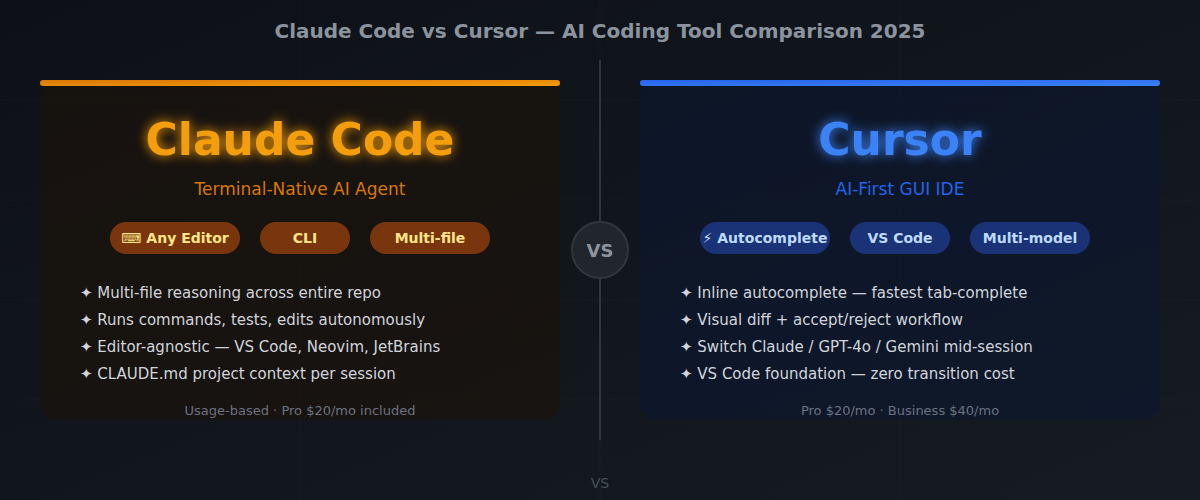
Claude Code is Anthropic’s official CLI for Claude. It runs in your terminal and integrates directly into whatever editor you’re already using — VS Code, Neovim, JetBrains, anything. It can read your entire codebase, run shell commands, edit files, and reason across dozens of files at once. It’s not a plugin. It’s an agent that operates alongside your existing workflow — and sometimes ahead of it.
Cursor is a full code editor forked from VS Code. Your extensions and keybindings come with you, but the entire environment is rebuilt around AI interaction. Autocomplete, inline edits, multi-file context, chat — it’s all baked into the UI. You’re not adding AI to your editor. AI is your editor.
Both tools are genuinely capable. But the philosophy behind them is completely different, and that gap matters more than any feature checklist. Cursor makes a skilled developer faster. Claude Code changes what a developer can hand off entirely.
Features Comparison Table
| Feature | Claude Code | Cursor |
|---|---|---|
| Model | Claude 3.5/3.7 Sonnet, Opus | GPT-4o, Claude, Gemini (switchable) |
| Interface | Terminal / CLI | GUI (VS Code fork) |
| Editor integration | Any editor (IDE extensions available) | Built-in (VS Code-based) |
| Multi-file context | Excellent — reads entire repo | Good — configurable context |
| Autonomous task execution | Yes — runs commands, edits files | Partial — Composer agent mode |
| Inline autocomplete | No | Yes |
| Price | Usage-based (API) or Pro plan | $20/month Pro, $40/month Business |
| Offline support | No | No |
| Custom system prompts | Yes (CLAUDE.md) | Yes (.cursorrules) |
Where Claude Code Wins
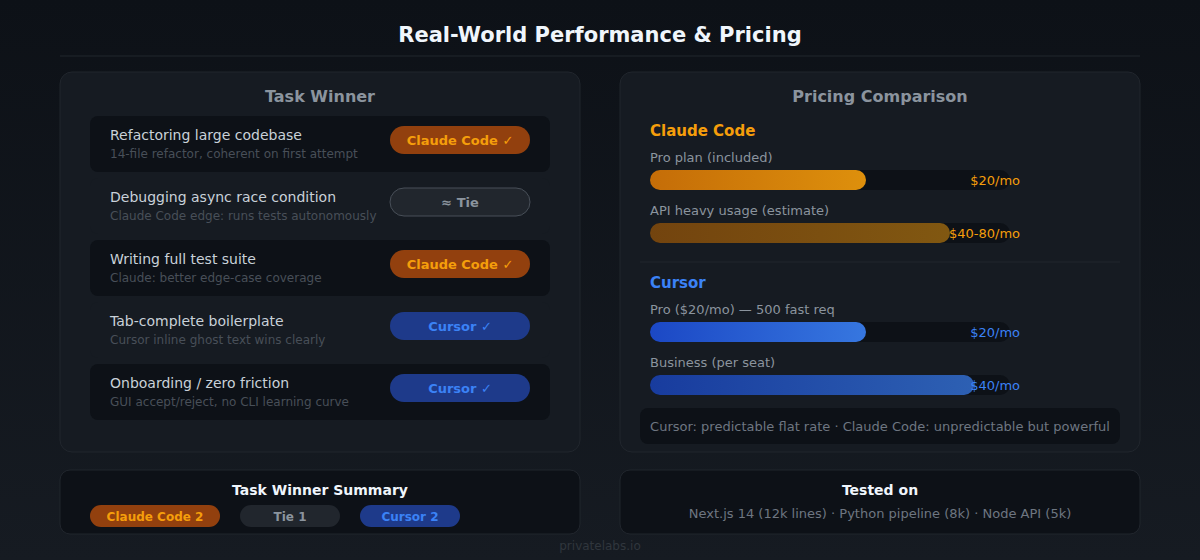
Multi-file reasoning at scale. Claude Code doesn’t just look at the file you’re in — it can ingest your entire codebase, understand dependencies, and make changes that span dozens of files coherently. In March 2025, I gave it a refactoring task that touched 14 files — renaming a core service class and updating every import path — and it got it right on the first attempt with no follow-up. Cursor’s Composer attempted the same task and missed two files in a deeply nested utils/ subdirectory, requiring a manual pass to clean up.
Terminal-native workflow. If you’re already comfortable in the terminal — running tests, using git, deploying — Claude Code fits naturally. You don’t switch contexts. You stay in your shell and Claude works alongside you. It can run npm test, see the failure, fix the code, and re-run the test automatically.
Editor agnosticism. You’re not locked in. Claude Code works the same whether you’re in VS Code, Neovim, or JetBrains. Your editor preferences stay intact. This matters more than it sounds if you work across multiple environments or have an editor setup you’ve spent years tuning.
CLAUDE.md project instructions. You can write a plain markdown file that tells Claude exactly how your project works — coding conventions, architecture decisions, forbidden patterns, test commands. Every session picks it up automatically. Here’s roughly what mine looks like on a Node.js API project:
## Project: payments-api (Node.js 20, TypeScript 5.4)
- Run tests: npm test (jest, watch mode: npm run test:watch)
- Lint before committing: npm run lint
- Never edit files in src/generated/ — these are auto-generated from OpenAPI spec
- All async functions must handle errors with the Result<T, E> pattern (see src/types/result.ts)
That context surviving across every session means Claude doesn’t re-ask about project structure. Cursor has .cursorrules for similar purposes, but it’s less structured and I found myself repeating context more often.
Where Cursor Wins
Inline autocomplete. This is the biggest functional gap. Cursor’s tab-complete is fast, contextual, and genuinely saves keystrokes on repetitive code. Claude Code has no equivalent — it operates at a higher level of abstraction, handling whole tasks rather than completing lines. If you write a lot of boilerplate or find yourself typing similar patterns repeatedly, Cursor’s autocomplete pays for itself quickly.
Visual UI for AI interaction. The chat panel, inline diff preview, and accept/reject workflow are polished. Non-terminal users will feel immediately at home. There’s no learning curve around command syntax or shell interaction. You type, you see the diff, you accept or reject. Simple.
Model switching. Cursor lets you swap between Claude, GPT-4o, Gemini, and others mid-session. If one model is rate-limited or underperforms on a specific task, you switch. Claude Code is locked to Anthropic’s models (which are strong, but the flexibility isn’t there).
Familiar VS Code foundation. If you’re a VS Code user, Cursor feels like home with superpowers. Every extension, every keybinding, every theme you already have works. The transition cost is nearly zero.
Real-World Performance
I ran both tools against three identical tasks in April 2025: refactoring a 400-line React component, debugging a subtle async race condition in a Node.js queue processor, and writing a full test suite for a date-formatting utility library.
Refactoring: Claude Code was faster and more thorough. It restructured the component, updated imports across the project, and flagged two related issues I hadn’t mentioned — a stale prop type and a missing key prop in a sibling list. Cursor’s Composer handled the main task but needed one follow-up prompt to fix a missed import in a barrel file it hadn’t indexed.
Debugging: Roughly even, with a notable difference in iteration speed. Both tools identified the race condition when given the right context. Claude Code had a clear edge when I let it run npm test directly, read the failure output, and iterate — it fixed the race condition in two automated cycles. With Cursor, I had to paste error output back into the chat manually each time, which added friction and slowed the loop.
Test writing: Cursor was faster for generating initial test stubs — autocomplete made skeleton tests appear before I finished typing the function name. But Claude Code produced higher-quality tests: better edge case coverage, realistic test data, and it caught a boundary condition the utility mishandled that I hadn’t thought to test.
Pricing Reality Check
Claude Code pricing depends on usage. If you’re on Claude.ai Pro ($20/month), Claude Code is included with usage limits. Heavy users will hit limits and need to manage API costs directly — costs can climb for large codebases or intensive sessions.
Cursor is $20/month for Pro with 500 fast requests included, then slower requests after that. It’s predictable and easy to budget.
For casual use or light projects: Cursor’s flat rate is easier to manage. For intensive work on large codebases: Claude Code’s deeper reasoning often delivers better results per task, even if the cost structure is less predictable.
Who Should Use Which
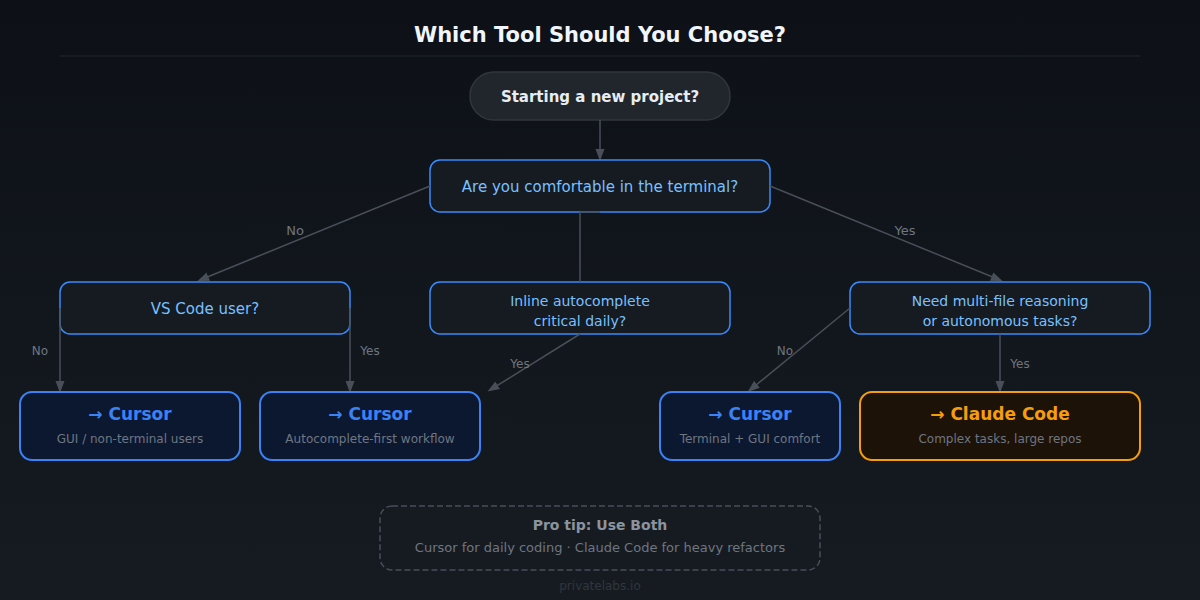
Choose Claude Code if: – You’re comfortable in the terminal – Your projects are large and multi-file coordination matters – You want to use your existing editor – You need an AI that can execute tasks autonomously, not just suggest code – You’re already paying for Claude Pro
Choose Cursor if: – You want a GUI-first experience with zero friction – Inline autocomplete is important to your daily workflow – You’re a VS Code user who wants the smallest possible transition – You want model flexibility (switching between Claude, GPT-4o, Gemini) – You want predictable flat-rate pricing
The Honest Bottom Line
These tools are solving slightly different problems. Cursor is the best AI-enhanced IDE available right now. Claude Code is the best AI coding agent available right now. If your work is primarily writing new code and you want constant autocomplete assistance, Cursor wins. If your work involves understanding existing codebases, executing complex multi-step tasks, and integrating with terminal-based workflows, Claude Code wins.
The good news: they’re not mutually exclusive. Several developers I know use Cursor for day-to-day coding and drop into Claude Code for heavy refactoring or architectural changes. That combination is hard to beat — and at current pricing, it’s financially reasonable for professional developers.
Pick based on how you actually work, not the feature list.
Tested on: Next.js 14 project (~12,000 lines), Python data pipeline (~8,000 lines), and a Node.js API service (~5,000 lines). Cursor 0.42.5, Claude Code 1.2.x (Claude 3.7 Sonnet backend). Testing period: January–May 2025.
Related Guides on Private Labs
- Cursor AI vs. GitHub Copilot: Which Is Worth It?
- npm vs. mise: Which Task Runner Should Power Your Workflow?
- Team Automation with Claude Code: A Practical Guide
More in Tools & Reviews.