Anchor-Based Doc Patching Across Many Files (Without Breaking Everything)
Anchor-Based Doc Patching Across Many Files (Without Breaking Everything)
I recently ran an 18-change documentation campaign across ten Markdown files. Each change was reviewed, approved, and sequenced before I touched a single file. By the end, every patch landed cleanly and nothing broke. Six months ago the same kind of campaign would have left me with shifted content, wrong insertions, and a diff I couldn’t trust.
The difference was switching from line-number-based patching to anchor-based patching. Here’s how the approach works and why it’s worth the upfront structure.
The Line-Number Trap
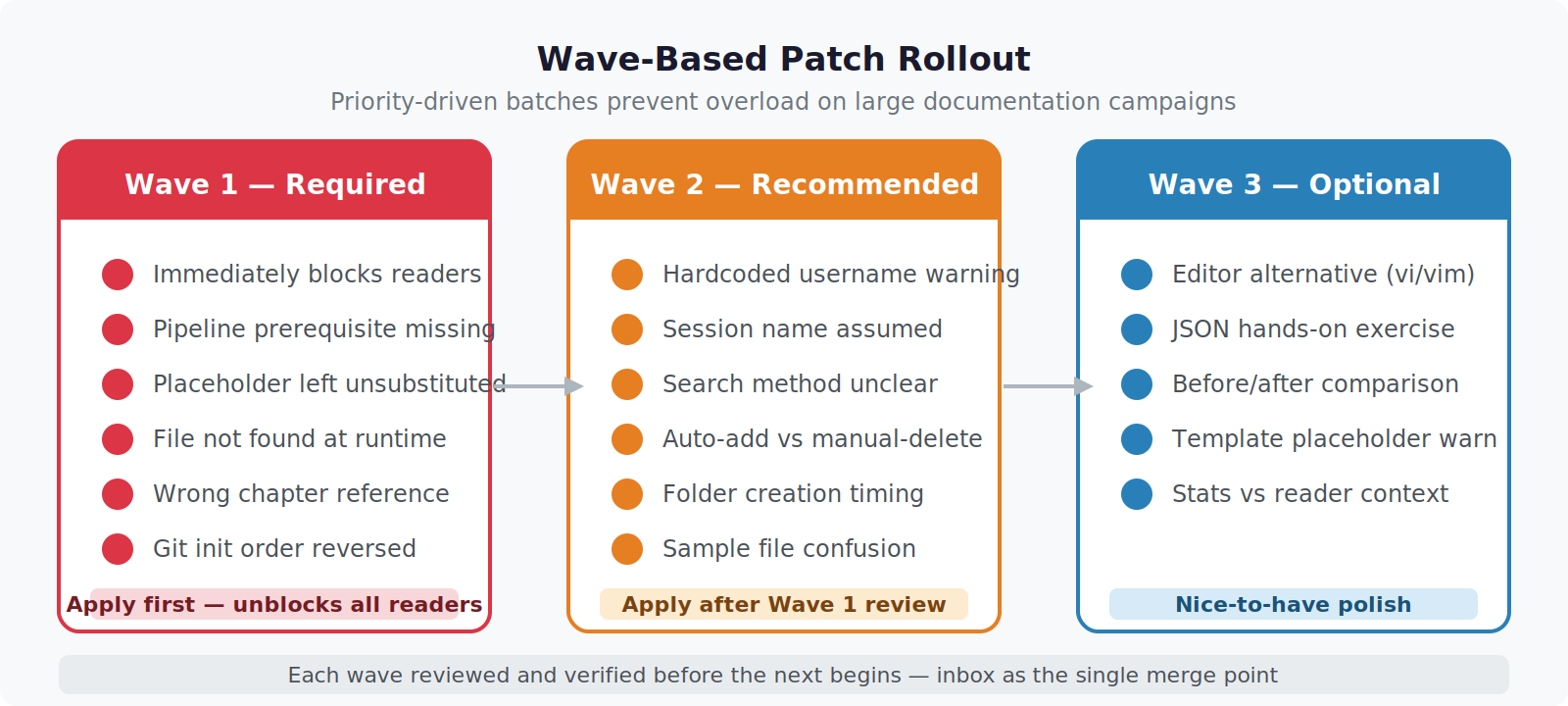
The natural first instinct when someone says “insert three lines after line 94” is to open the file, go to line 94, and insert. This works for one patch. It breaks the moment you have two patches in the same file.
Say you insert three lines after line 94. Now line 97 is what used to be line 95. Every subsequent patch targeting lines 95 and above now points to the wrong location. If you apply patches top-to-bottom, each insertion shifts the reference frame for every patch that follows.
You can work around this by applying patches bottom-up — largest line number first — so that earlier insertions don’t shift the targets of later ones. But this only helps when you know the exact current line numbers. In a living document that gets edited between patch rounds, last week’s line 94 might be this week’s line 108. You have to re-read the whole file every time to re-anchor your patch positions.
Line numbers are coordinates that expire.
Anchors That Don’t Move
An anchor is a short, unique string that already exists in the target file — a heading, a comment, a distinctive code line. Instead of “insert after line 94,” you specify “insert after the line that reads ### Follow-Along: See It Live.”
That string doesn’t care about line numbers. It stays valid as long as the surrounding content doesn’t change. Insertions above it, deletions above it, reformatting above it — none of that invalidates the anchor. You look for the string, find it, insert relative to it.
For my documentation campaign I wrote each patch spec like this:
File: 05-1-inbox-watch.md
Anchor: # Script save (write the code above to a file)
Position: immediately after anchor line, before the nano command
Insert:
  # Feel free to use vi, vim, or gedit instead of nano
  # If nano is not available: cat > /path/to/file.sh << 'EOF' ... EOF
When I went to apply it, I searched for the anchor string, confirmed it was unique in the file, and inserted. No line number required.
The uniqueness requirement is real. If your anchor string appears in three places in the file, you have to qualify it — include the surrounding context, or choose a more specific anchor. “Insert after # Install” in a file with four # Install headings is not an anchor, it’s ambiguity.
# Check anchor uniqueness before applying
grep -n "# Script save (write the code above" 05-1-inbox-watch.md
# Should return exactly one line
Structuring a Multi-File Campaign
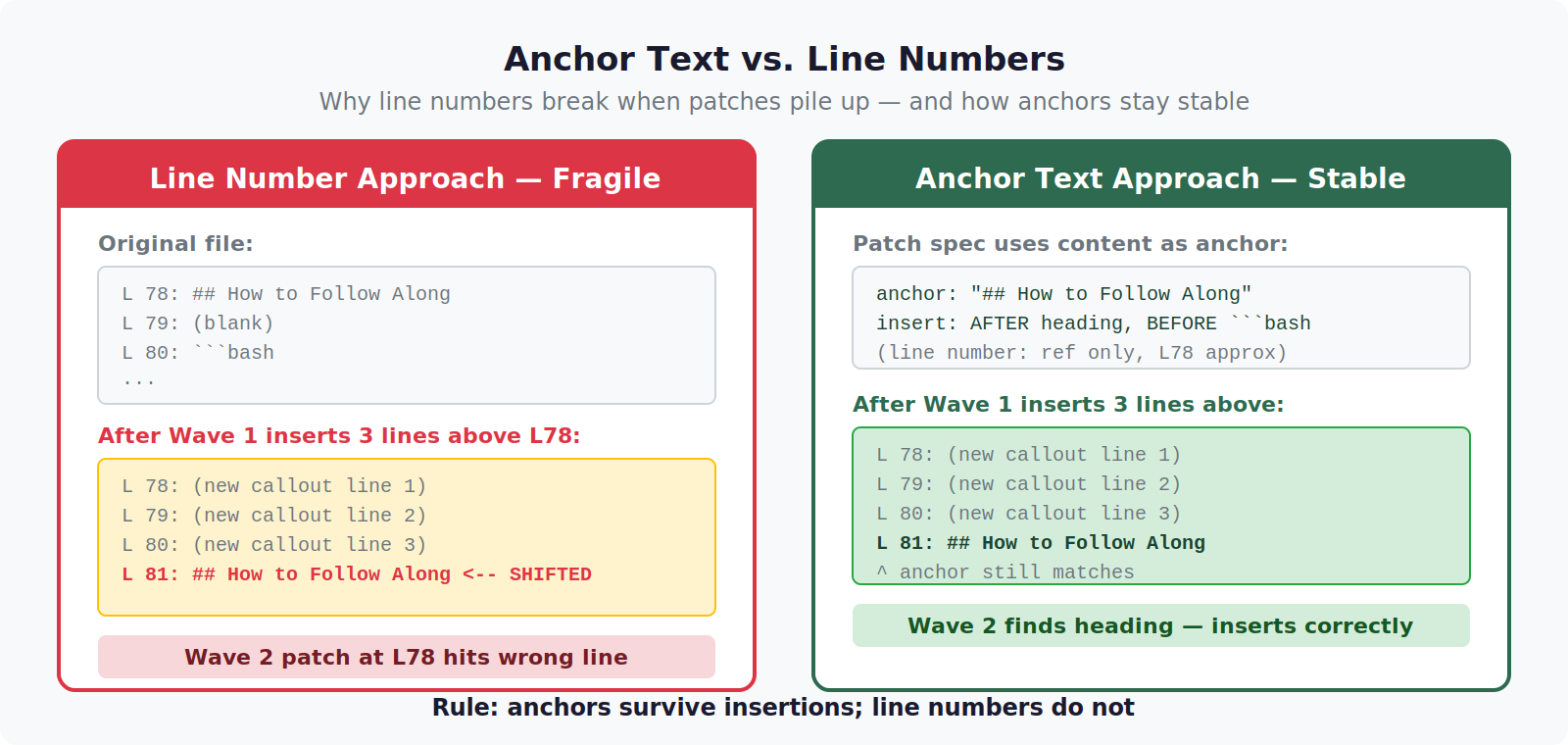
For 18 changes across 10 files I used a wave structure. Each wave was a batch of logically related patches reviewed together before any were applied.
| Wave | Files | Changes | Theme |
|---|---|---|---|
| Wave 1 | 4 files | 7 patches | Required fixes — broken behavior |
| Wave 2 | 5 files | 6 patches | Recommended — improved clarity |
| Wave 2b | 5 files | 5 patches | Selected additions — follow-along UX |
The separation matters. Required fixes and improvements to broken behavior go first. Once those are confirmed correct, clarity improvements get layered on top. Optional additions come last. If you mix them, you can’t tell which changes are load-bearing and which are cosmetic.
Each patch in the spec included:
– File path — exact relative path
– Anchor — unique string to locate in the file
– Position — before anchor / after anchor / replace anchor
– Content to insert — exact lines, verbatim
– Verification — what to grep for after applying to confirm success
Applying Multiple Patches to One File
When one file receives multiple patches in the same wave, order still matters — but differently than with line numbers.
With line numbers you apply bottom-up to avoid shifting. With anchors you can apply in any order as long as the anchor strings don’t overlap, but bottom-up is still safer. An insertion at anchor A that physically sits above anchor B does shift B’s line number, but not B’s anchor string. If you’re using a tool that works purely by text replacement, order is irrelevant. If you’re applying manually and reading the file between patches, apply from the bottom section upward so you’re always looking at content that hasn’t moved yet.
For 05-4-conflict-detection.md, which received two patches in Wave 2b, I applied the lower patch first:
Patch S-05 (around line 165): Insert before/after comparison blocks
Patch S-02 (around line 245): Insert one-line editor alternative comment
Applied S-05 first (upper in file) — this added ~18 lines, pushing S-02’s anchor down. Since S-02’s anchor was a distinctive comment line (# Note repair — 200 confirmed correct), it didn’t matter that its line number shifted. I searched for the string, found it, inserted the one line. Done.
The Intake Funnel: Collecting Patches From Multiple Sources
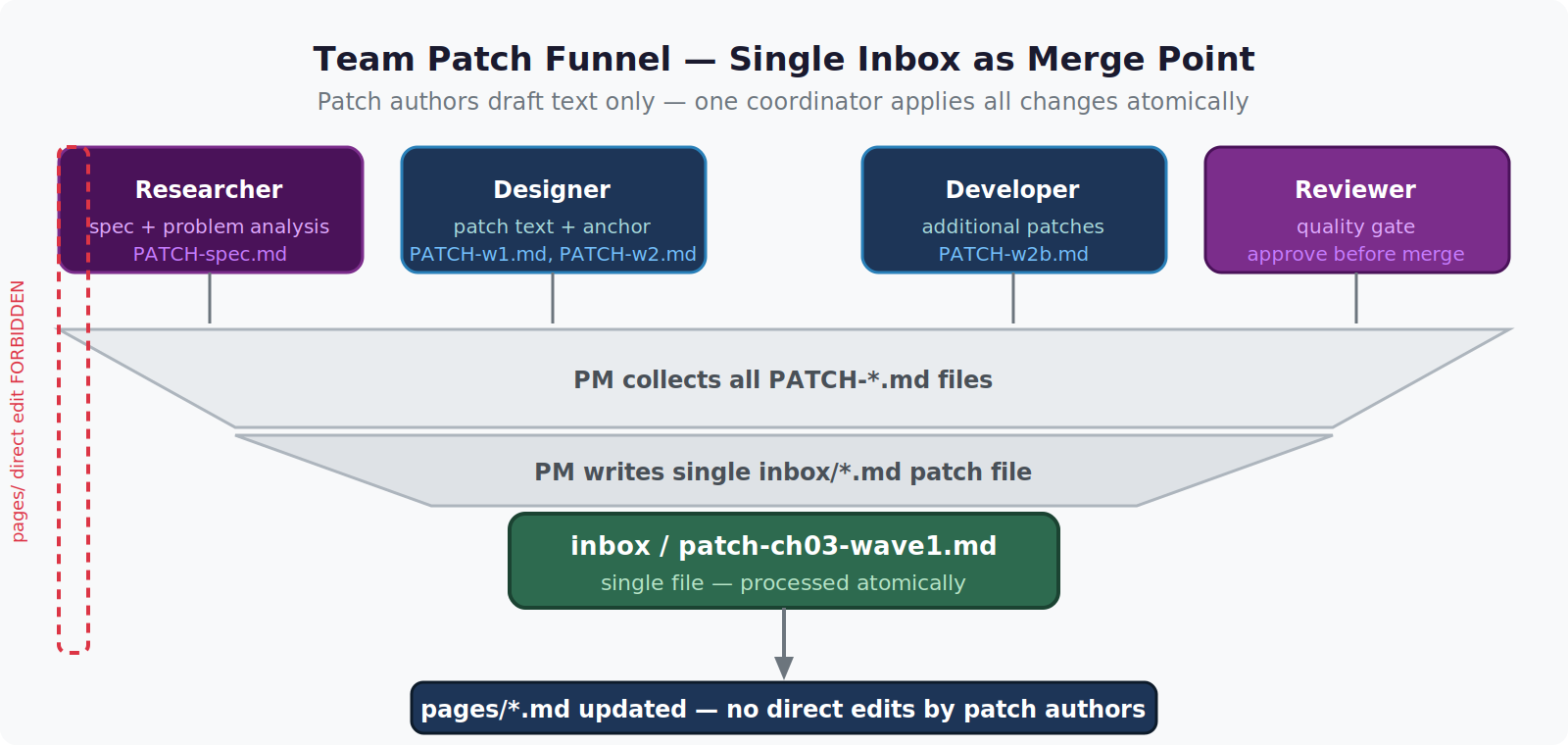
For this campaign, patches came from multiple reviewers — a researcher who read all ten files and flagged 16 issues, a design review that flagged 5 more, an editorial pass that added 3 more. If each reviewer directly edited files, changes would collide.
Instead, every proposed change went into an inbox file first. The inbox file is a structured spec: what file, what anchor, what to insert, why. Nothing touches the actual document files until the inbox item is reviewed and approved.
# Example inbox entry (YAML-ish spec)
- id: R-03
  file: 04-3-memory-index.md
  anchor: "# LLMWiKi INDEX.md — open it directly"
  position: move-to-before "# If installing for the first time"
  rationale: "Intro comment must precede the caveat, not follow it"
  approved: true
This funnel means: 1. Reviewers can propose without touching files 2. Every change has a paper trail with rationale 3. Approval is explicit before application 4. Conflicts between proposed changes surface in the inbox, not in the files
Verifying Each Patch After Application
Verification needs to be specific. “It looks right” is not verification. For insertions, I grep for a distinctive phrase from the inserted content and confirm the count is exactly 1:
# After inserting the editor-alternative comment
grep -c "vi, vim, gedit" 05-1-inbox-watch.md
# Expected: 1
# If 0: insertion didn't happen
# If 2+: duplicate insertion (applied twice)
For order-correction patches (moving content rather than adding), I verify both the new position and the absence from the old position:
# Confirm intro comment now appears before caveat comment
grep -n "open it directly\|If installing for the first time" 04-3-memory-index.md
# Line numbers should show intro BEFORE caveat
For patches that must not accidentally duplicate content, I also check that the original anchor still exists unchanged:
# Confirm anchor wasn't accidentally modified or duplicated
grep -c "# Script save" 05-1-inbox-watch.md
# Expected: exactly 1
What the Campaign Looked Like at the End
After all three waves completed:
- 18 changes applied across 10 files
- 0 incorrect insertions
- 0 duplicate applications
- 0 anchor mismatches (every patch found its target)
- Total lines added: approximately +110
The verification greps made the “0 incorrect insertions” claim checkable, not just an assertion. Each patch had a corresponding grep -c command in the spec that I ran immediately after applying.
When This Approach Is Worth It
Anchor-based patching pays off when:
- You have more than 3 patches in a single campaign
- Multiple people are proposing changes to the same set of files
- Files are actively edited between patch rounds (line numbers would expire)
- You need an audit trail of what changed, why, and who approved it
It adds overhead for a single quick fix. For anything involving multiple reviewers or multiple rounds of changes, the structure saves more time than it costs — in avoided collisions, in not having to re-read entire files to re-derive line numbers, and in having verification built into the process rather than bolted on at the end.
The inbox-funnel approach described here is part of a broader knowledge management pipeline — covered in the Build & Projects section under the auto-committing knowledge vault post.