Debugging Silent Message Drops in a Redis Queue (Four Bugs, One System)
Debugging Silent Message Drops in a Redis Queue (Four Bugs, One System)
I run a six-agent tmux setup where every inter-agent message goes through a Redis-backed queue. One agent writes a task, another BLPOP-s it off and executes. For weeks the system worked perfectly. Then, quietly, messages started disappearing — not crashing, not throwing errors. Just vanishing. The receiving agent would sit idle while the sender believed the task had been delivered.
Four separate bugs were responsible. None of them announced themselves. Here is how I found each one.
How the Queue Is Supposed to Work
Each agent gets its own queue key. The sender calls RPUSH team:queue:1 "<payload>" and moves on. The receiver runs a blocking BLPOP team:queue:1 0 — blocking indefinitely until something arrives. When a message lands, BLPOP returns it and the agent processes it.
Simple in theory. The failure modes were anything but.
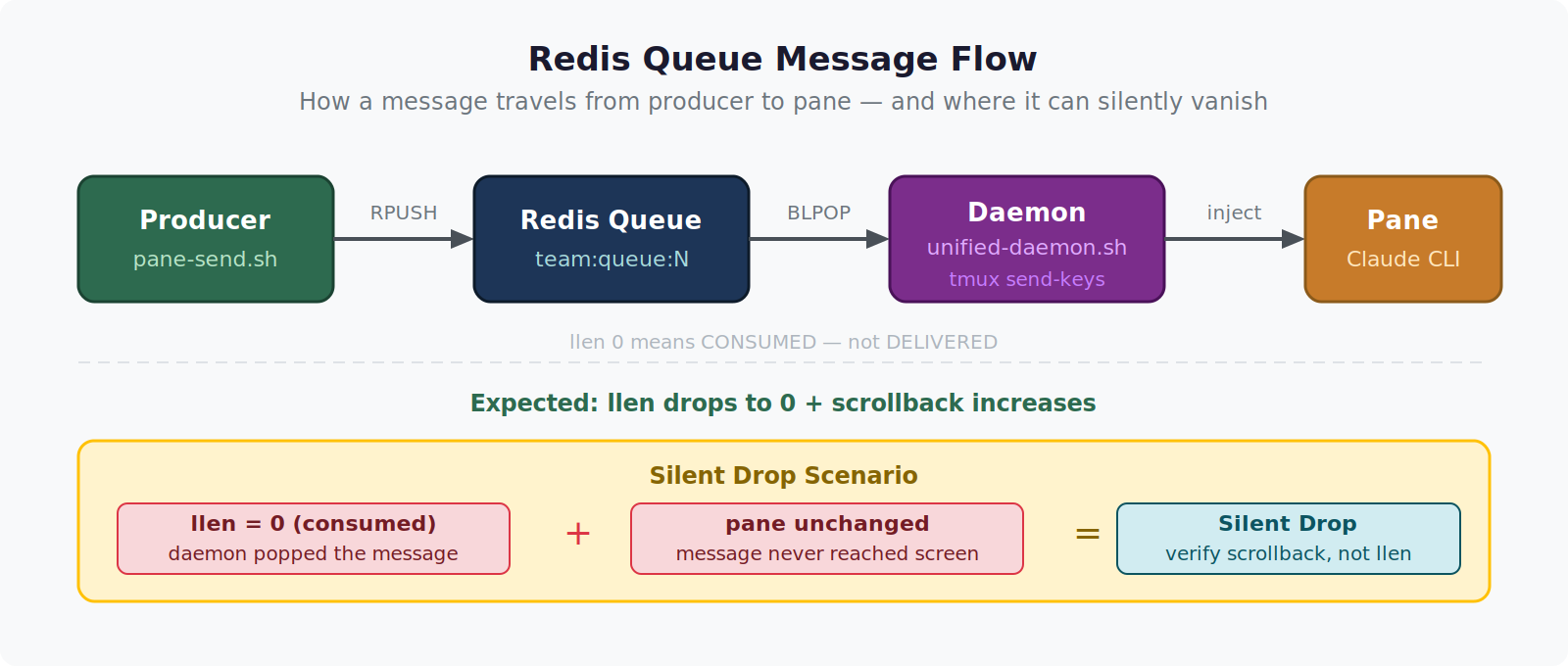
Bug 1: Wrong Key Name (The Colon Problem)
The first bug took me an embarrassingly long time to find because the diagnostic tool I was using was itself broken.
To check whether messages were queuing up I would run:
redis-cli llen team:queue:1
This always returned , which I read as “the queue is empty.” But messages I sent were definitely not being consumed — the receiving agent showed no activity. I concluded the messages were never reaching Redis.
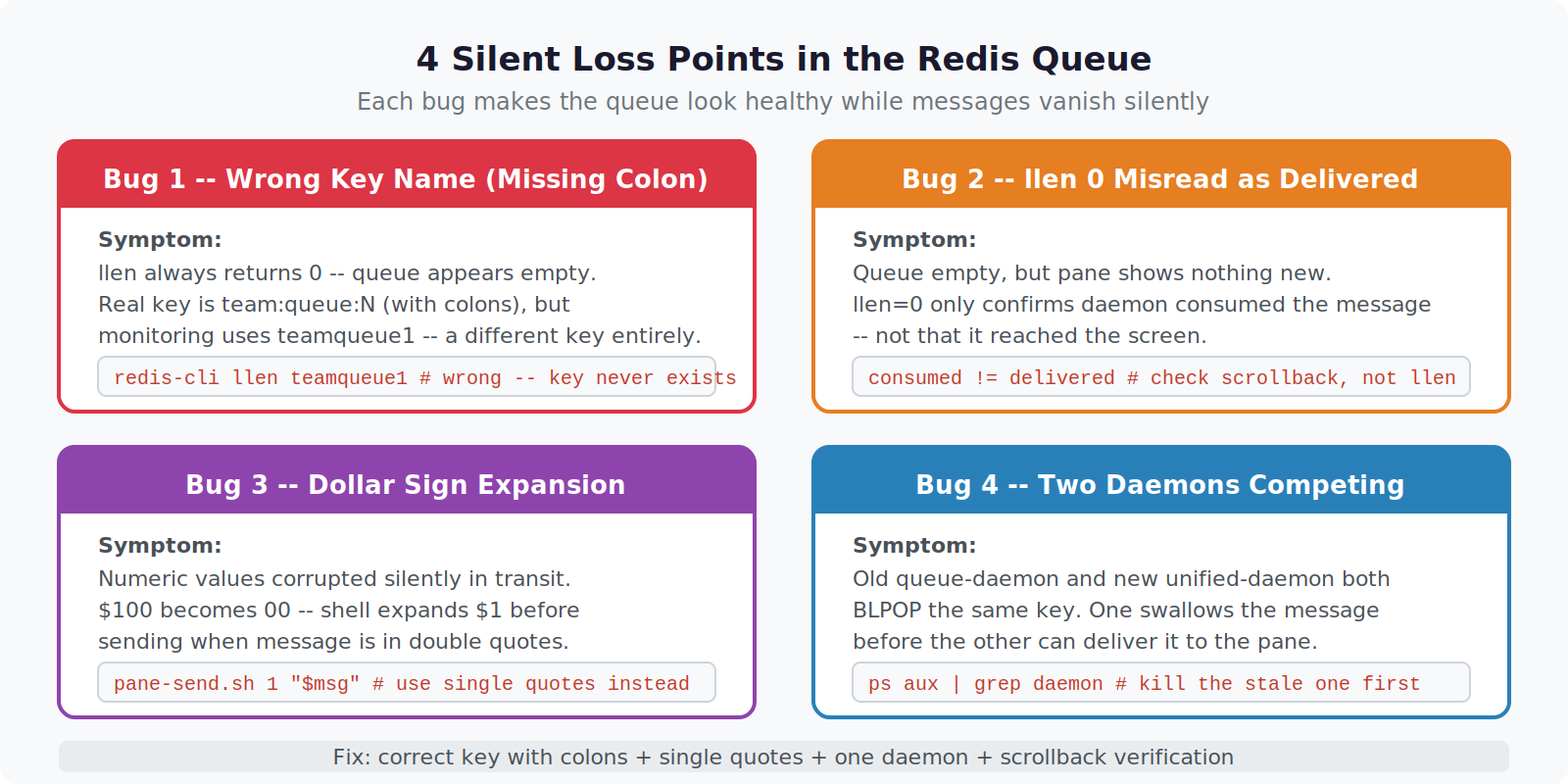
They were reaching Redis. The key was team:queue:1. I was checking teamqueue1.
My queue daemon script had been started with an environment variable that stripped colons from key names. The sender was writing to team:queue:1. The receiver was reading from team:queue:1. But my llen check was hitting teamqueue1 — a key that had never existed — and returning .
Three things were happening that all pointed to “empty queue”:
– llen returned 0 (wrong key)
– No consumer activity (it was reading the right key, fine)
– No error output (Redis happily returns 0 for nonexistent keys)
Fix: Always verify key names by listing all queue-shaped keys first.
redis-cli keys "team:queue:*"
# Showed both team:queue:1 AND an unexpected teamqueue1 with 47 items
Bug 2: Treating llen 0 as Delivery Confirmation
After fixing the key name I fell into a related trap. I started using llen to confirm delivery: push a message, immediately check llen, see 0, conclude “delivered and consumed.”
This was backwards. llen 0 means the queue is empty — either the message was consumed, or it was never pushed. It tells you nothing about whether the receiver actually received and acted on the message. If the receiver’s BLPOP popped the message but then crashed before processing it, llen reads and I would mark the delivery as successful.
The correct confirmation is watching the receiver’s side: does its terminal scroll, does its log file get a new line, does its output file update?
Fix: Delivery confirmation must come from the receiver, not the sender.
# Before sending
BEFORE=$(wc -l < /mnt/c/LLMWiKi/logs/agent-1.log)

# Send the message
redis-cli rpush team:queue:1 "$payload"

# Confirm on receiver side — wait for log line count to increase
sleep 2
AFTER=$(wc -l < /mnt/c/LLMWiKi/logs/agent-1.log)
if [ "$AFTER" -gt "$BEFORE" ]; then echo "Delivered"; else echo "No activity"; fi
Bug 3: Dollar Sign Expansion in the Payload
This one was subtle and cost me an afternoon. Messages were arriving at the receiver but contained corrupted data. A task that read "Process the $100 invoice" arrived as "Process the invoice" — the dollar sign and the number silently gone.
The sender script was using double quotes when calling the queue send function:
bash /path/to/pane-send.sh 1 "Task: review the $100 invoice"
The shell expanded $100 before it ever reached the Redis push command. Since $100 is not a defined variable, it expanded to an empty string. The message entered Redis as "Task: review the invoice" — no error, no warning.
Fix: Single quotes for payloads containing dollar signs, or escape them explicitly.
# Wrong — shell expands $100
bash pane-send.sh 1 "Process $100 payment"

# Correct — single quotes prevent expansion
bash pane-send.sh 1 'Process $100 payment'

# Also correct — explicit escape
bash pane-send.sh 1 "Process \$100 payment"
When in doubt, write the payload to a file first and pass the file path through the queue instead of the raw string. The file content is never shell-expanded.
Bug 4: Two Daemons Competing on the Same Key
The most damaging bug was also the hardest to reproduce consistently. Messages would occasionally disappear completely — not corrupted, not delayed, just gone. The receiver showed no activity and the queue was empty.
What was actually happening: two queue-reading processes were both running BLPOP on the same key simultaneously. One was the original queue daemon I had written early in the project. The other was a newer unified daemon that was supposed to replace it. I had added the new one but never stopped the old one.
When a message arrived, BLPOP is atomic — exactly one consumer gets it. With two daemons racing, either one could pop the message. The old daemon, which had no handler for the new message format, would pop it, fail silently to parse it, log nothing, and move on. From my perspective the message simply disappeared.
# Revealed the duplicate
ps aux | grep "queue-daemon"
# queue-daemon.sh   PID 1823  (old — should have been killed)
# unified-daemon.sh PID 3041  (new — the intended one)
Both were BLPOPing team:queue:*. Any message had roughly a 50% chance of going to the wrong process.
Fix: Kill the old daemon, add a startup check.
# Kill all queue consumers before starting a new one
pkill -f "queue-daemon"
sleep 1

# Verify only one remains
CONSUMERS=$(ps aux | grep -c "[B]LPOP\|queue-daemon")
if [ "$CONSUMERS" -gt 1 ]; then
  echo "ERROR: duplicate consumers detected"
  exit 1
fi

# Start the intended daemon
bash unified-daemon.sh &
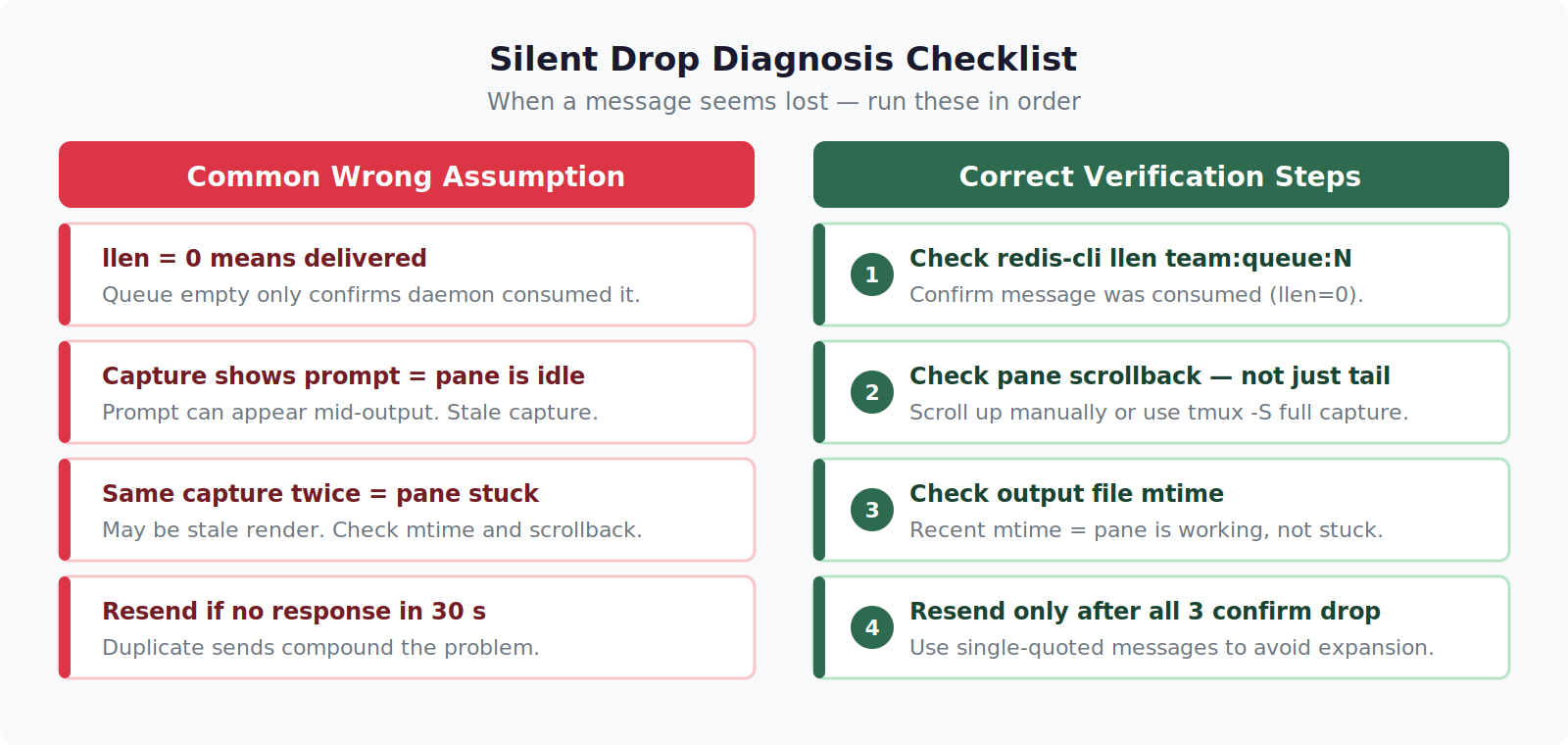
The Unified Diagnostic Sequence
After finding all four bugs I now run this sequence whenever messages seem to go missing — before touching any code.
1. Verify the key name exactly.
redis-cli keys "team:queue:*"
# Confirm the key your sender writes matches the key your receiver reads
2. Check queue depth with the correct key.
redis-cli llen team:queue:1
# If nonzero: messages are queuing but not being consumed
# If zero: messages either never arrived or were popped
3. Check consumer count.
ps aux | grep -E "blpop|queue-daemon|unified-daemon" | grep -v grep
# Should be exactly one process per queue key
4. Confirm receiver activity directly.
tail -f /mnt/c/LLMWiKi/logs/agent-1.log
# Send a test message and watch for a new line here
5. Inspect the payload for expansion artifacts.
# Push a test payload with a known dollar sign
redis-cli rpush team:queue:1 'test: $100 marker'
# Read it back
redis-cli lpop team:queue:1
# If you see "test:  marker" instead of "test: $100 marker", you have a quoting bug upstream
What I Learned
All four bugs share a pattern: the system appeared to work, confirmed by metrics that were measuring the wrong thing. llen 0 is not delivery confirmation. No error output is not correctness confirmation. A process running is not a correct process running.
With Redis queues specifically, “silent” failures are the default failure mode. The protocol is fire-and-forget at the RPUSH side and greedy-consume at the BLPOP side. Nothing in between checks that the right consumer got the right message, that the payload survived the shell, or that only one consumer is listening.
Build your confirmation on the receiver side. Validate key names before assuming they match. And always check for zombie processes before blaming the queue itself.
Part of an ongoing series on building reliable multi-agent systems on a single machine. The six-agent tmux setup is described in the Build & Projects section.