Obsidian Web Clipper: Turn Any Webpage Into a Searchable Knowledge Asset
Obsidian Web Clipper: Turn Any Webpage Into a Searchable Knowledge Asset
You’re browsing the web and you find something worth keeping — a GitHub doc, a research paper, a tutorial, a YouTube breakdown. So you bookmark it.
And then you never look at it again.
Most bookmarks die in a folder. You forget what you saved, why you saved it, and where. The information was useful — but it never became yours.
That’s exactly the problem Obsidian Web Clipper solves.
Obsidian Web Clipper isn’t just a save button. It converts web content into Markdown and stores it directly in your Obsidian vault — turning scattered links into a structured, searchable personal knowledge base (PKM) you can actually build on.
If you’re serious about personal knowledge management in the AI era, this is one of the first tools to learn.
What Is Obsidian Web Clipper?
Obsidian Web Clipper is the official browser extension for Obsidian that lets you clip any webpage directly into your vault.
Regular bookmarks store a URL. Web Clipper stores the content — converted to a Markdown document, with metadata like title, author, tags, source URL, and a summary automatically extracted and organized.
The practical upside: even if the website goes down or the URL changes, your copy is safe. The content lives in your vault, not in a browser tab.
With templates, you can customize exactly what gets saved and how — so every clipped note arrives pre-structured and ready to use.
How to Install and Use Obsidian Web Clipper
Getting started takes about two minutes.
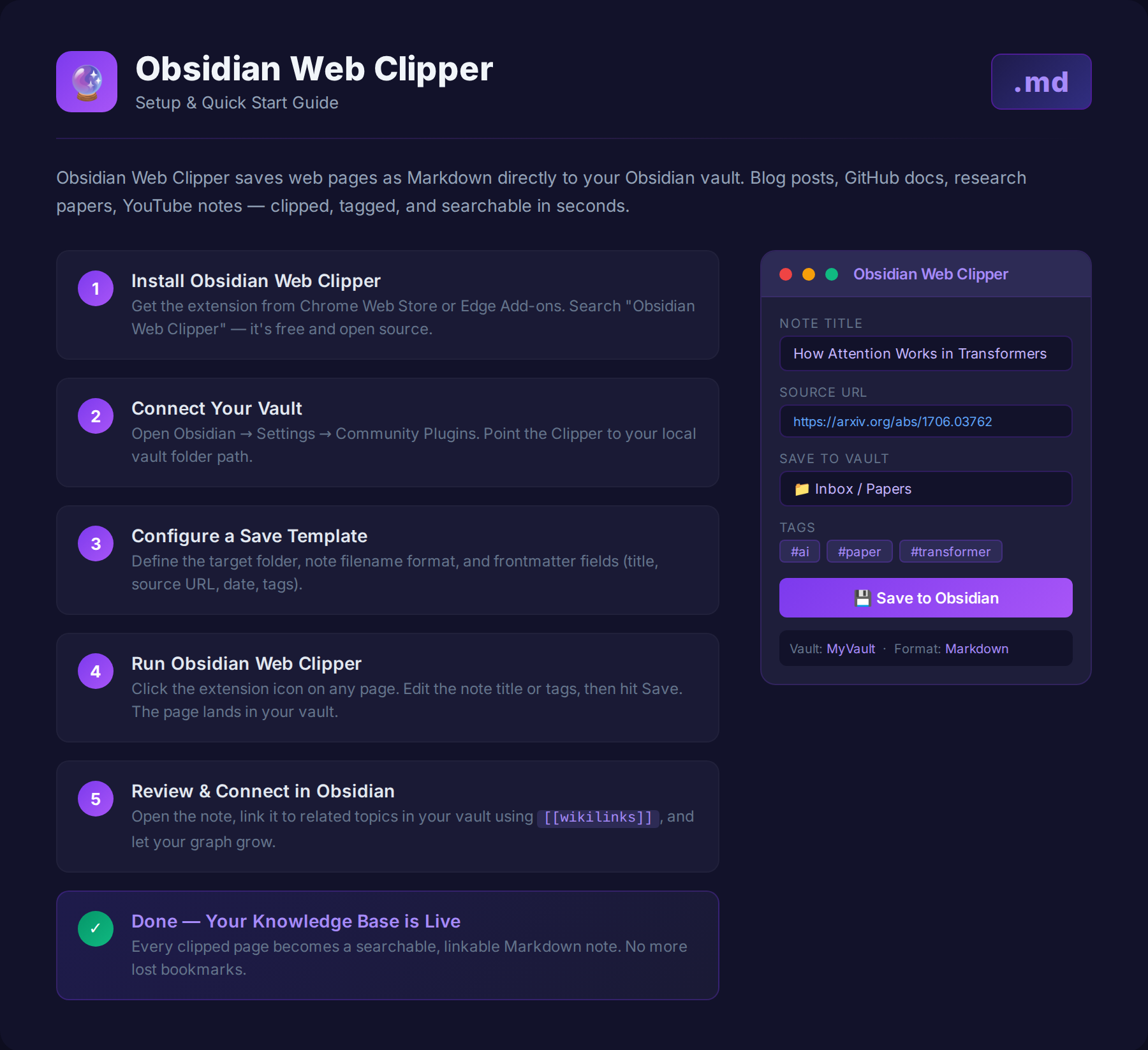
| Step | Action | Details |
|---|---|---|
| 1 | Install the extension | Add Obsidian Web Clipper to Chrome or Edge from the browser extension store |
| 2 | Open your Obsidian vault | Launch Obsidian and make sure your vault is running and accessible |
| 3 | Open a page you want to save | Any blog post, GitHub doc, news article, or research paper works |
| 4 | Click the Web Clipper icon | Find the Obsidian icon in the top-right of your browser toolbar |
| 5 | Choose a template and clip | Select your template and hit Clip — the Markdown file lands in your vault instantly |
In a few seconds, a webpage becomes a searchable, reusable knowledge asset.
What You Can Clip
Obsidian Web Clipper handles almost any web content.
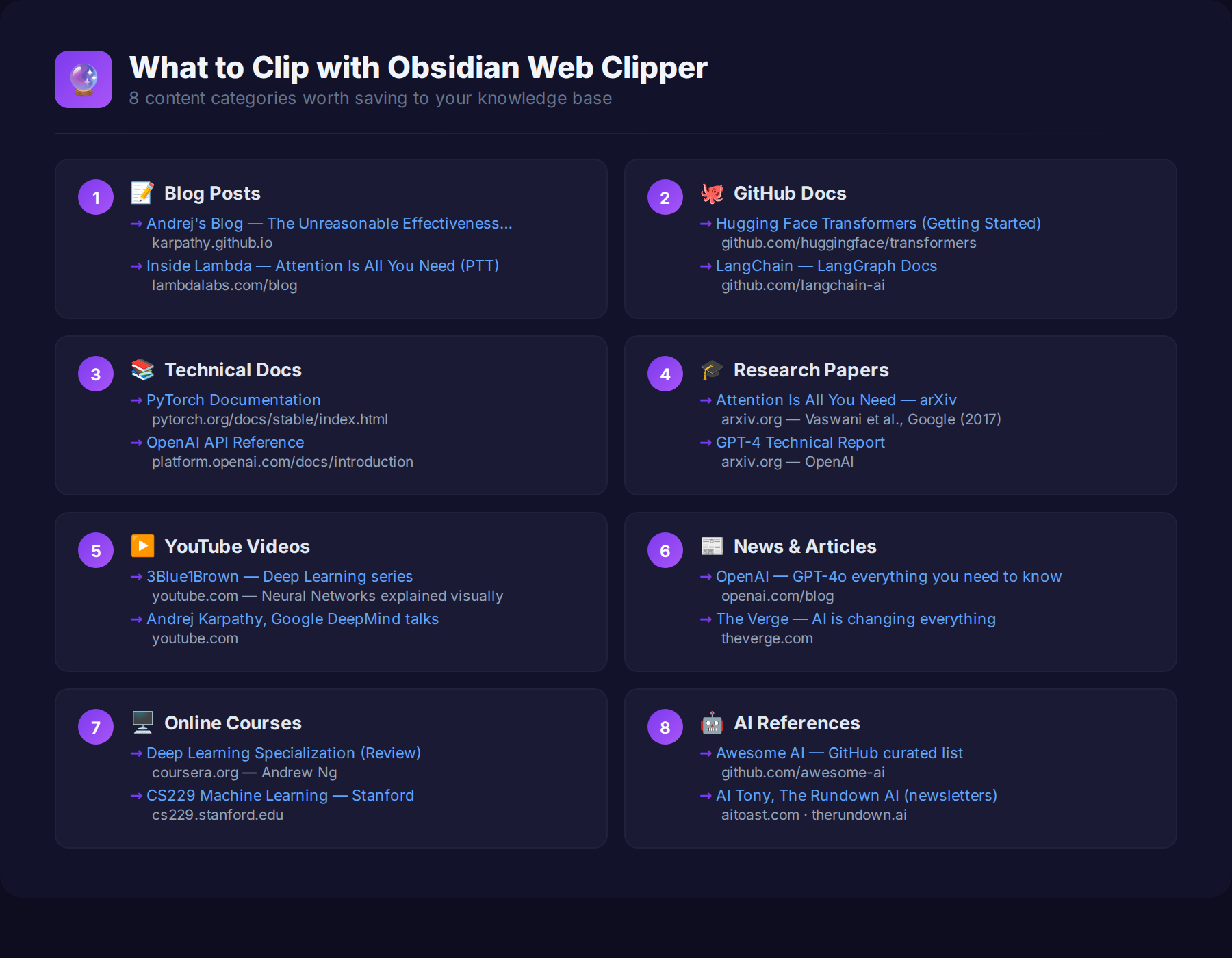
The real advantage is automatic metadata extraction — title, tags, URL, author info, and a summary get pulled and organized for you. No manual copy-pasting, no reformatting. The note arrives ready to file.
Bookmarks vs. Obsidian Web Clipper
Here’s why this beats a bookmarks folder:
| Regular Bookmarks | Obsidian Web Clipper | |
|---|---|---|
| What gets saved | URL only | Full Markdown document |
| Search | Title only | Full-text search across all content |
| Reusability | Low — hard to reuse | High — notes connect and compound |
| Long-term value | Context fades over time | Builds into a permanent knowledge base |
| Structure | None | Auto-tags, templates, frontmatter |
| AI integration | None | Works with AI agents and LLM workflows |
| Purpose | Save a link | Build knowledge |
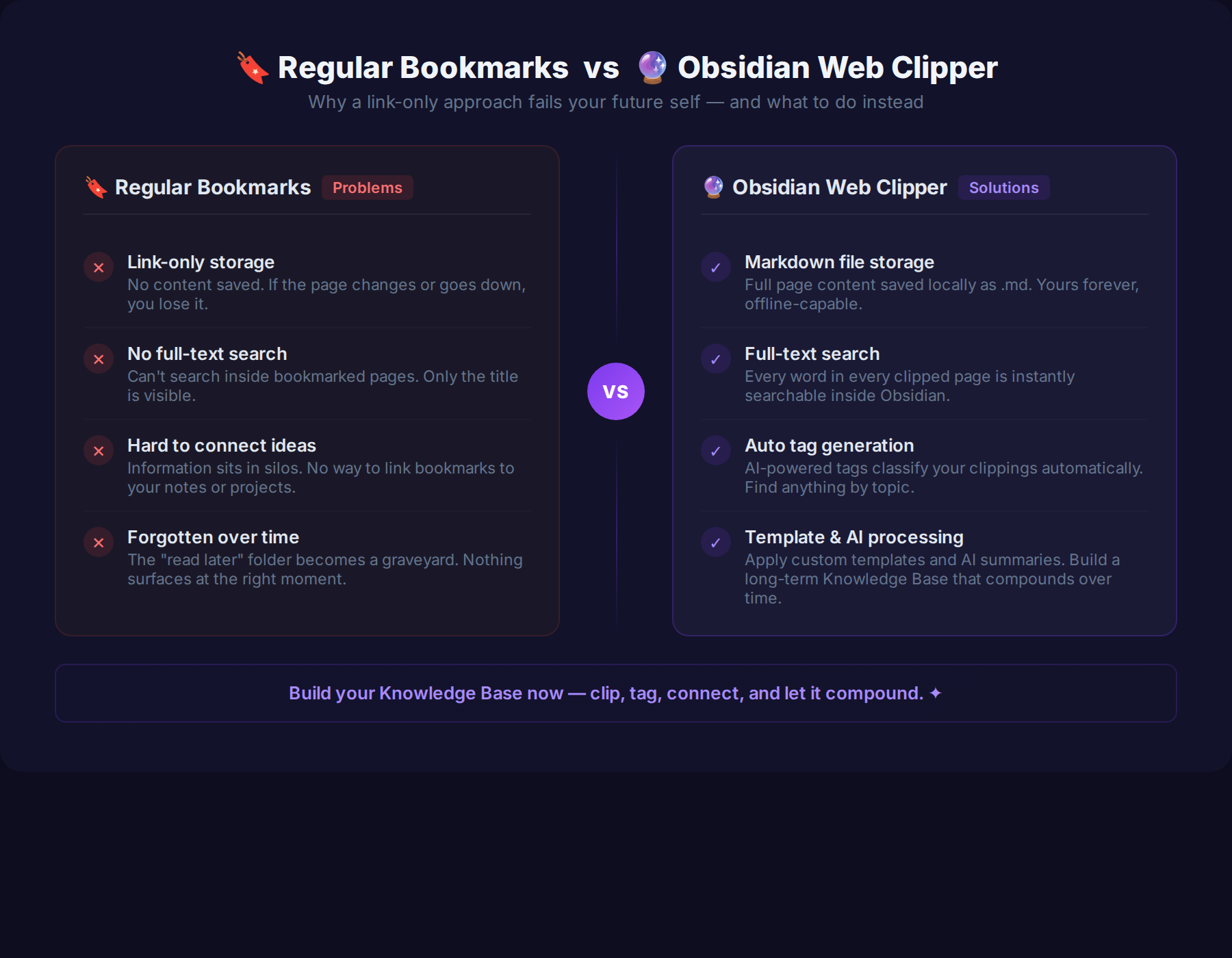
The difference isn’t just convenience. It’s whether you’re consuming the web or owning it.
Using Obsidian Web Clipper in an LLM Wiki Workflow
One of the most powerful use cases right now is pairing Obsidian Web Clipper with an LLM Wiki workflow.
The idea: Web Clipper becomes the collection layer of a larger system.
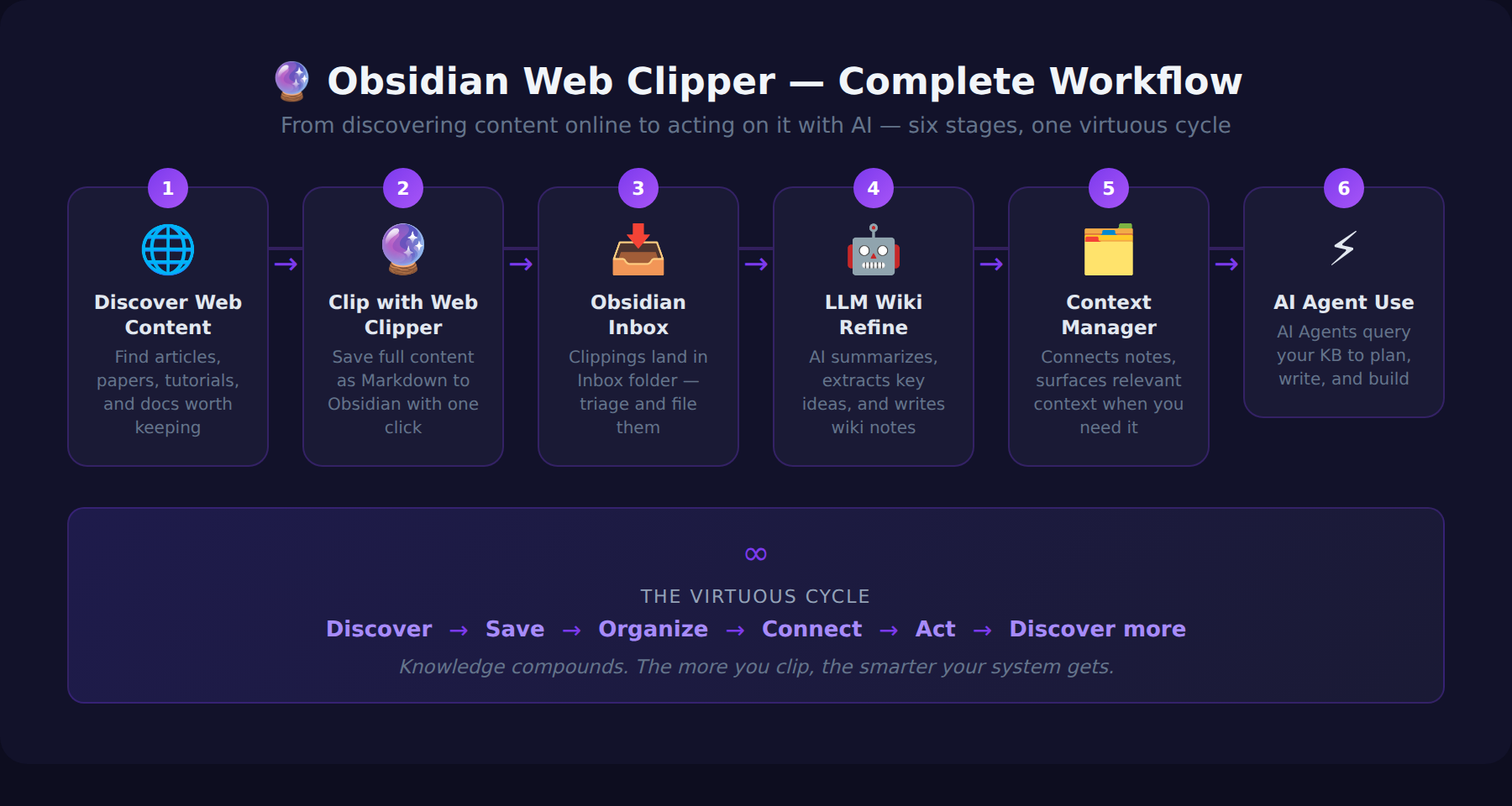
In this structure, internet content doesn’t stay as a passive reference. It becomes a personal database that AI can search, query, and reason over. Information you clipped months ago can surface as context the next time you’re working on a related problem.
Why Obsidian Web Clipper Matters in the AI Era
AI performance depends almost entirely on context quality. The better the input, the better the output.
Every time you clip something useful with Obsidian Web Clipper and file it in your LLM Wiki, you’re expanding the context available to your AI tools. Over time, your vault grows into a personal knowledge graph — one that reflects exactly what you’ve read, researched, and thought about.
That knowledge graph can serve as long-term memory for AI agents. Instead of starting every session from scratch, your AI has a structured, searchable base of your own accumulated knowledge to draw from.
This is the shift: from browsing the internet to building an asset from it.
Conclusion
The real value of Obsidian Web Clipper isn’t the save button. It’s the compounding effect.
Every clipped note is a brick. Over weeks and months, you’re building something: a searchable, AI-ready knowledge base made from everything you’ve found worth keeping.
Obsidian Web Clipper isn’t a tool for reading the web.It’s a tool for making the web part of your knowledge system.
If you’re building a PKM system, an LLM Wiki, or an AI agent setup — this is where the knowledge pipeline starts.
Frequently Asked Questions
Is Obsidian Web Clipper free?
Yes. Obsidian Web Clipper is the official, free browser extension from the Obsidian team. You only need an Obsidian vault (also free) to save your clips into.
Which browsers does Obsidian Web Clipper support?
It works on Chromium-based browsers like Chrome and Edge, as well as Firefox and Safari. Install it from your browser’s extension store, then point it at your vault.
What’s the difference between a bookmark and Obsidian Web Clipper?
A bookmark saves only a URL — if the page changes or disappears, you lose the content. Obsidian Web Clipper converts the page itself into a Markdown note stored in your vault, so the content stays yours and stays fully searchable.
Can I customize what gets saved?
Yes. Templates let you control exactly which fields are captured — title, author, tags, source URL, summary, and more — so every clipped note arrives pre-structured and ready to file.
How does Obsidian Web Clipper fit into an AI workflow?
Clipped notes become a personal database that AI agents can search and reason over. Paired with an LLM Wiki, your vault grows into long-term memory for your AI tools — turning everything you’ve read into reusable context.
Related Guides on Private Labs
- Obsidian + Claude Code + Git: The Living AI Brain Stack
- How I Automated My Content Workflow with AI Agents
- How I Built an AI Automation Workflow That Saves 3 Hours a Day
More in Tools & Reviews.