Obsidian + LLM + Git + Quartz: The Pipeline That Turns Your Private Notes Into Public Knowledge
Obsidian + LLM + Git + Quartz: The Pipeline That Turns Your Private Notes Into Public Knowledge
One-line verdict: This four-stage pipeline — capture in Obsidian, compile with an LLM, preserve in Git, publish with Quartz — solves a different problem than personal AI memory: it gets your accumulated knowledge out of a private folder and in front of the people who need it. The longer you run it, the more it compounds in both directions.
This post is about the public half of the problem. The companion post covers the memory layer — making AI retain context about your private work across sessions, entirely on your own machine. This post picks up where that ends: once you’ve built a structured, AI-compiled knowledge base, how do you publish it without the usual copy-paste friction? That’s the Quartz question, and it’s a meaningfully different problem with meaningfully different tooling.
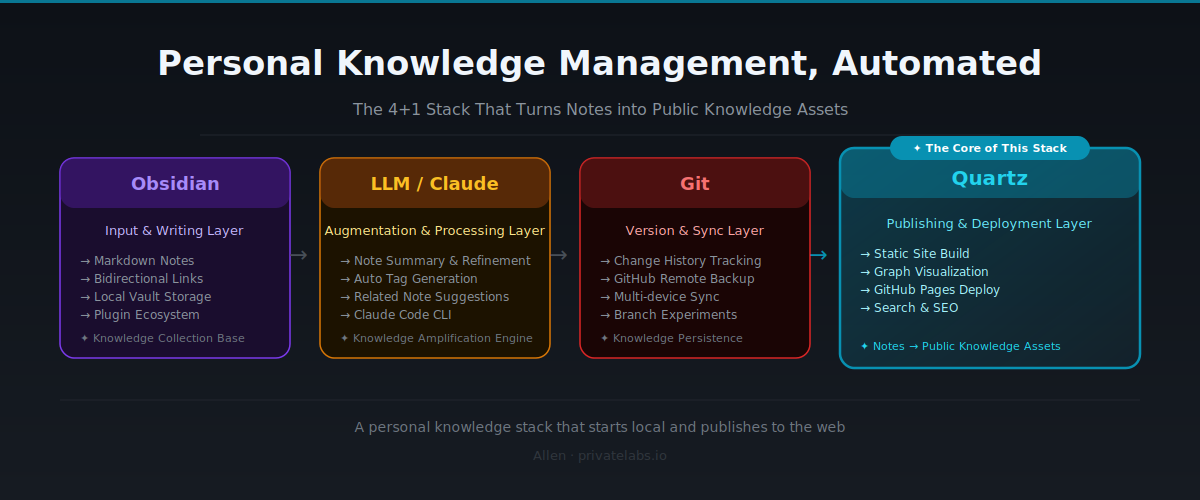
The Second Problem Nobody Talks About
The memory problem is solved. LLMs are stateless, but your Obsidian vault isn’t — the companion post covers that stack in detail.
But solving memory creates a second problem.
All the knowledge you’ve carefully organized stays locked inside your computer.
I’ve been managing an Obsidian vault for three years. AI research notes, project architecture decisions, paper summaries, records of hard-won lessons. A structured, genuinely compounding knowledge base that an LLM can actually navigate. There’s material in there that would be useful to other people.
But to publish any of it? Copy-paste, format conversion, image uploading, platform migration. The friction was high enough that everything stayed in a drafts folder.
Quartz eliminates that friction.
Quartz converts an Obsidian vault — [[wikilinks]], tags, folder structure and all — directly into a static website. No additional platform, no format conversion. A note is a webpage. And with is_public: true, you control exactly which notes go public.
Add this fourth layer and the pipeline is complete.
The Processing Flow: Five Stages, One Direction
Write → LLM Compile → Git Version Control → Quartz Build → Publish
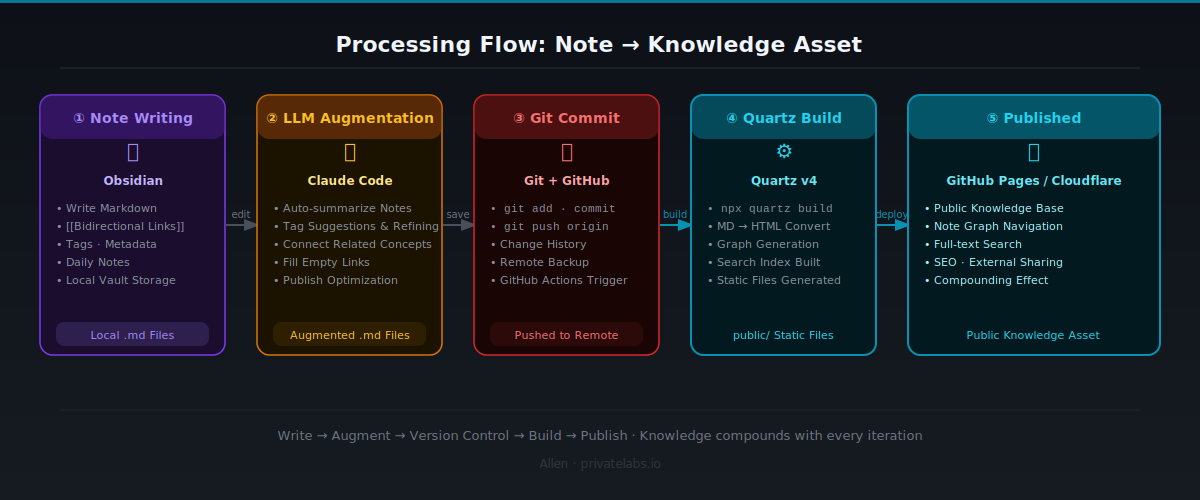
Raw input goes in, Claude structures it, Markdown stores it, Obsidian links it, Git preserves it, and Quartz deploys it. Each stage is a prerequisite for the next. None is optional.
The original three-tool stack (Obsidian + LLM + Git) was knowledge management for yourself. Add Quartz and it becomes knowledge management with the world.
Why Each of the Four Tools Is Non-Negotiable
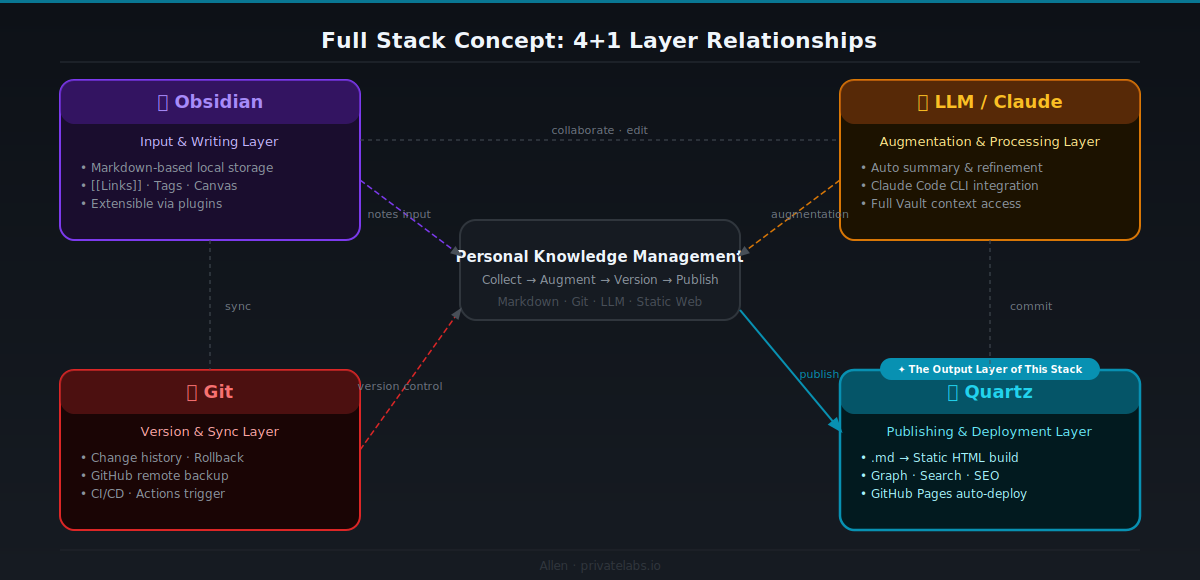
Obsidian: The Knowledge Container
Everything is plain text. No proprietary database, no cloud lock-in. Just .md files sitting in a folder. That’s exactly why Claude Code can read the entire vault directly, and why Quartz can convert it into a static site without any transformation step.
[[Wikilinks]] build a node graph inside Obsidian and become hyperlinks inside Quartz. The connections you build in your vault become the connections on your website — automatically, with no extra work.
I run my vault with four top-level folders: inbox/ (unprocessed input), concepts/ (concept notes), projects/ (active work), and public/ (cleared for publication). This structure maps naturally to Quartz’s visibility controls.
What Obsidian provides: A single source of truth that an LLM can read and Quartz can build from.
Claude Code: The AI Compiler
Its job is to take new material and integrate it into the vault’s existing structure. After reading an article or wrapping up a meeting, I drop the raw notes in inbox/ and ask Claude to process them.
What Claude does:
- Checks for overlap with existing
concepts/notes - Creates a new file if the concept is new, updates the existing one if it isn’t
- Adds
[[links]]to related notes - Proposes
is_public: truefor content worth sharing - Writes the commit message
The actual prompt pattern I use:
User: "Here's my summary of Andrej Karpathy's LLM OS essay.
       Please integrate it into the vault. Flag with is_public if it's worth sharing."

Claude Code:
  → /vault/concepts/llm-os.md doesn't exist → creates new file
  → reads /vault/concepts/agentic-ai.md → finds related content
  → adds [[agentic-ai]] link to llm-os.md
  → sets is_public: true (worth publishing)
  → commits: "add: LLM OS concept note (based on Karpathy essay)"
What Claude Code provides: An autonomous curator that maintains the vault without manual classification.
Markdown + Frontmatter: Readable by Two Machines
Markdown itself was covered in the previous post. Here, frontmatter pulls extra weight.
---
is_public: true
tags: [AI, productivity, LLM]
date: 2026-06-14
---
These three lines control Quartz’s behavior. Notes with is_public: false are excluded from the build. Tags become Quartz tag pages automatically. The date drives latest-posts ordering.
You can instruct Claude in CLAUDE.md to generate appropriate frontmatter whenever it creates a new note, so you never have to set it manually.
What Markdown provides: A universal format that an LLM parses and Quartz renders.
Git: The Memory Backbone and Deployment Trigger
Git serves two roles in this stack. The first — version history, experimental branching, cross-device sync — was covered in the previous post.
The second role appears when Quartz enters the picture: deployment trigger.
Push to GitHub, and GitHub Actions runs the Quartz build and deploys automatically to GitHub Pages or Vercel. One commit is both a note save and a deployment.
# Wrapping up a typical working session
cd ~/vault
git add .
git commit -m "update: LLM OS concept note added, agentic-AI linked"
git push origin main
# → GitHub Actions runs → Quartz builds → web deployment complete
One push syncs the vault and updates the website at the same time.
What Git provides: Version control and a zero-downtime deployment pipeline in one.
Quartz: The Public Layer for Your Knowledge
This is the new addition.
Quartz is a Hugo-based static site generator built specifically for Obsidian vaults. Install it, point it at your vault folder, and it works. It converts [[wikilinks]] to hyperlinks, renders the graph view as a webpage, and auto-generates tag pages.
The key parts of the config:
// quartz.config.ts
const config: QuartzConfig = {
  configuration: {
    pageTitle: "Allen's Notes",
    baseUrl: "notes.allenminded.com",
    ignorePatterns: ["private", "templates", ".obsidian", "inbox"],
    defaultDateType: "modified",
  },
  plugins: {
    filters: [Plugin.RemoveDrafts()],  // excludes is_public: false
    emitters: [
      Plugin.AliasRedirects(),
      Plugin.ComponentResources(),
      Plugin.ContentPage(),
      Plugin.TagPage(),
      Plugin.ContentIndex({ enableSiteMap: true, enableRSS: true }),
    ],
  },
}
Plugin.RemoveDrafts() is the critical piece. It automatically excludes any note with is_public: false or draft: true in its frontmatter. Your private notes stay in the vault; they just never appear on the web.
How you control visibility per note:
---
# This file will be published
is_public: true
tags: [AI, productivity]
---

# This file stays local only
draft: true
What Quartz provides: A frictionless publishing layer that converts your vault into a website.
The Quartz Publishing Pipeline, In Detail

After the initial setup, the repeating workflow is straightforward.
Initial setup (one time only)
# 1. Install Quartz
git clone https://github.com/jackyzha0/quartz.git
cd quartz
npm install

# 2. Connect your vault (set contentFolderPath in quartz.config.ts)
# or symlink your vault folder to quartz/content/

# 3. Local preview
npx quartz build --serve
# → check at http://localhost:8080

# 4. Push to GitHub → GitHub Actions deploys automatically
Repeating workflow (each session)
# After Claude updates the vault and commits
git add .
git commit -m "update: 3 new concept notes, 2 existing linked"
git push origin main
# → auto build and deploy complete (usually under 2 minutes)
The GitHub Actions setup is handled by the official Quartz template — no CI configuration overhead.
One habit worth building: run npx quartz build --serve locally before pushing. Check the rendered output in a browser. It prevents unintended notes from going public.
The Compounding Effect: When Knowledge Becomes an Asset
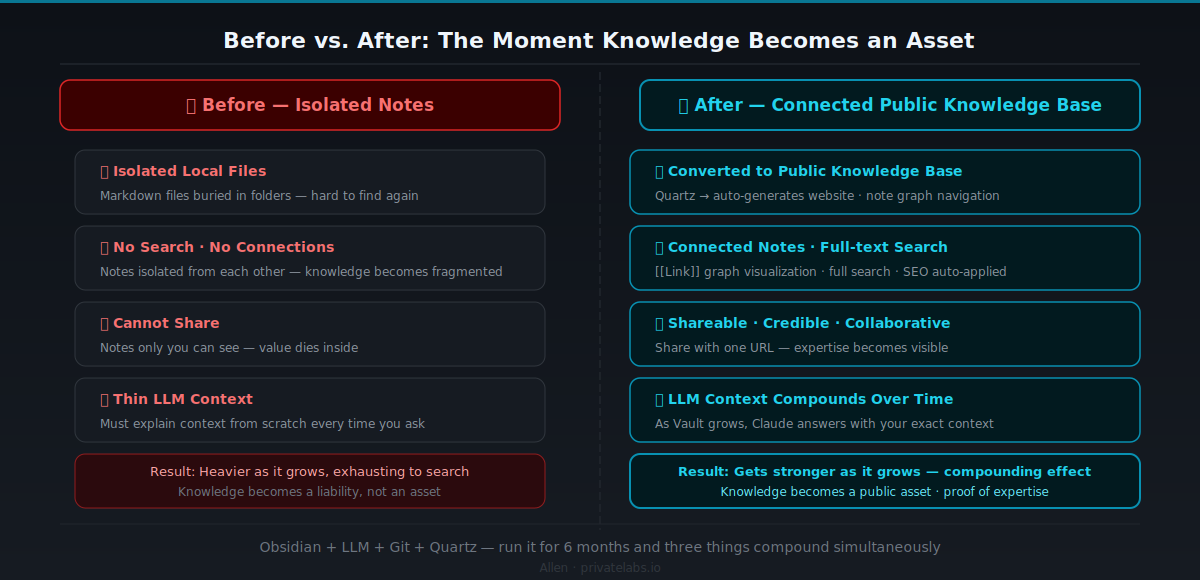
Run this stack for six months and three things compound simultaneously.
First, the quality of context the LLM works with. As the vault grows, Claude answers questions through your lens, not a generic one. “Explain AI agent architecture” becomes “Connect the architecture decision I made last month with the paper I read last week and organize it.”
Second, published knowledge creates new connections. People who read your Quartz site give you feedback, you find researchers working on the same problems, you get perspectives you’d missed. None of that happens inside a closed vault.
Third, a writing habit forms. Knowing a note might go public makes you write more clearly from the start. Clearer writing gives Claude more to connect. More connections produce better public content. Once this loop is running, it’s hard to stop.
Before I adopted this stack, I published zero to one posts a month. Three months in, fifteen vault notes were live on the web — and I couldn’t remember ever sitting down to “write a post.” The note-taking habit had quietly become the publishing habit.
Practical Setup
The only addition to the existing Obsidian + Claude Code + Git stack is Quartz configuration.
1. Obsidian vault — recommended folder structure:
vault/
├── inbox/          # Unprocessed input (excluded from Quartz build)
├── concepts/       # Concept notes (selective publication)
├── projects/       # Active work (private)
├── public/         # Cleared for publication
└── CLAUDE.md       # AI instruction file
2. CLAUDE.md — add Quartz awareness:
# CLAUDE.md

This is a knowledge vault. When processing new information:
- Check existing files first — no duplicate creation
- Add [[links]] to related concepts
- Atomic notes: one concept per file
- Include frontmatter:
  - If worth publishing: is_public: true
  - If incomplete: draft: true
  - tags: 2–4 relevant concepts
- Commit after each update (include reason in the message)
3. Quartz config — start with the minimum:
// quartz.config.ts essentials
configuration: {
  pageTitle: "My Knowledge Notes",
  baseUrl: "your-username.github.io/quartz",  // or custom domain
  ignorePatterns: ["private", "templates", ".obsidian", "inbox", "projects"],
},
plugins: {
  filters: [Plugin.RemoveDrafts()],
}
4. GitHub Actions — use the official Quartz template as-is:
# .github/workflows/deploy.yml (Quartz-provided template)
name: Deploy Quartz site to Pages
on:
  push:
    branches: ["main"]
jobs:
  build:
    runs-on: ubuntu-22.04
    steps:
      - uses: actions/checkout@v4
      - uses: actions/setup-node@v4
        with:
          node-version: 22
      - run: npm ci && npx quartz build
      - uses: actions/upload-pages-artifact@v3
        with:
          path: public
  deploy:
    needs: build
    runs-on: ubuntu-latest
    permissions:
      pages: write
      id-token: write
    environment:
      name: github-pages
    steps:
      - uses: actions/deploy-pages@v4
5. Daily workflow:
# End of a working session (after Claude updates the vault)
git add .
git commit -m "update: [brief description of changes]"
git push origin main
# Deployment complete in ~2 minutes
Nothing complex. The existing stack gains one quartz.config.ts and one GitHub Actions file.
Why This Stack Gets More Valuable Over Time
Three forces are pushing in the same direction.
Agentic AI will automate the deployment step. Right now, Claude updates the vault and I commit and push manually. In the near future, “update complete — shall I commit and deploy?” will be the standard prompt. The human workload in vault management keeps shrinking.
Static sites are optimal for AI crawling. Dynamic web apps, login-required platforms, client-side rendering — these are all hard for AI agents to access. A Quartz static site built from plain HTML is the opposite. Your knowledge becomes discoverable not just to human readers, but to other people’s AI agents too.
Local LLMs will complete the privacy model. Right now, when Claude processes your vault, it passes through Anthropic’s servers. When local LLMs (Ollama, LM Studio) get good enough, your entire vault can be processed without anything leaving your machine. Same stack, same workflow, complete privacy.
Obsidian + LLM + Git + Quartz works because it bets on fundamentals: plain text, open formats, version control, static files. Those don’t go out of date.
The Bottom Line
The previous stack (Obsidian + LLM + Git) was an AI memory system for yourself. Add Quartz and it becomes an AI knowledge base for the world.
The core shift:
Before: Write → LLM processes → Git saves  →  lives on your machine
After:  Write → LLM processes → Git saves → Quartz deploys → lives on the web
The added friction is nearly zero. After initial setup, it’s one git push. What you get in return: your knowledge can reach the people who actually need it — not just you.
If you want to work seriously with AI tools over the long term, your knowledge base can’t live only in your head or inside a locked app. It needs to be readable, connected, and publishable. That’s how knowledge becomes an asset.
This stack makes that possible.
Curious about the initial Quartz setup, or want a concrete example of vault folder structure? Drop a comment. I’m planning a follow-up post sharing my actual vault layout and full CLAUDE.md.